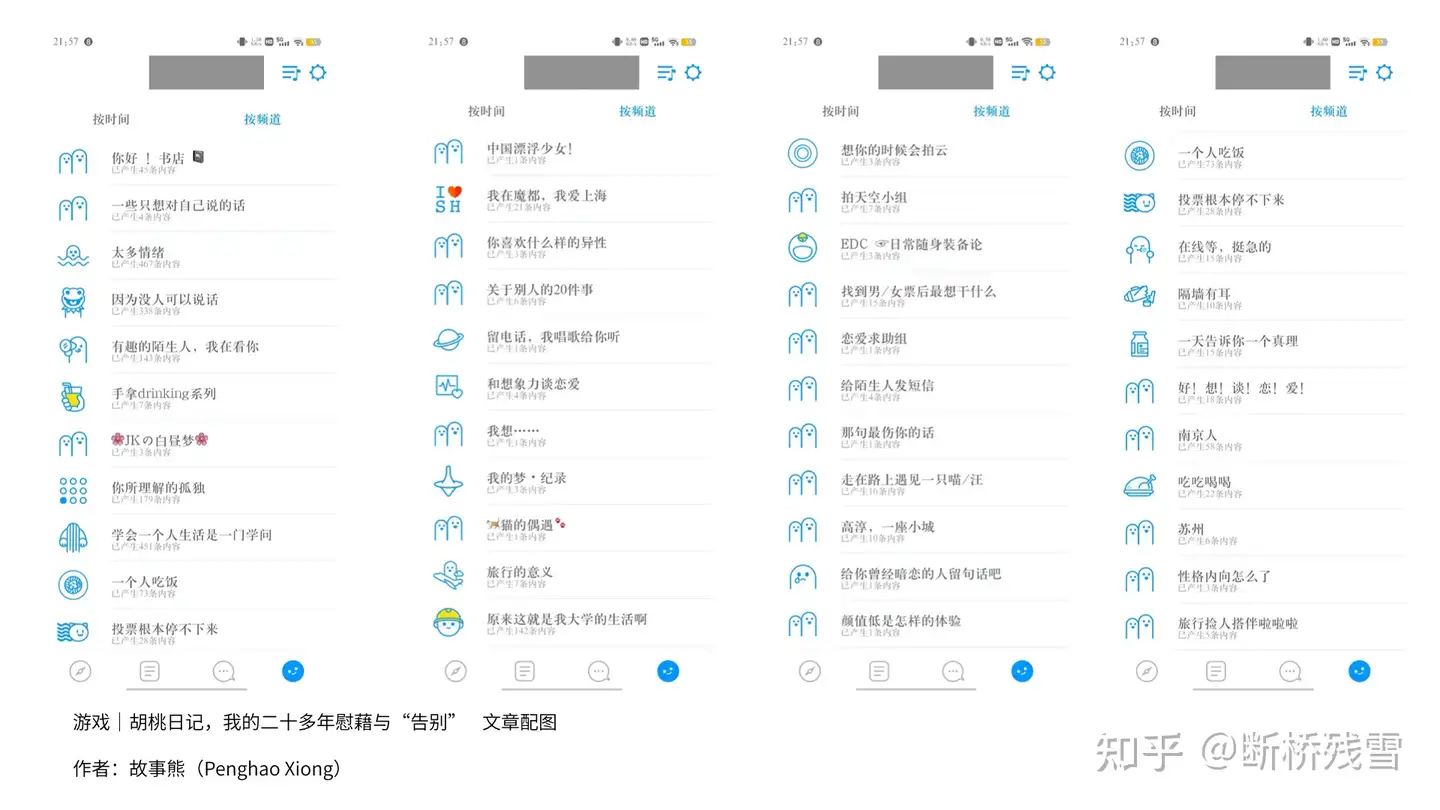
<?xml version="1.0" encoding="utf-8"?>
<feed xmlns="http://www.w3.org/2005/Atom">
  <title>故事熊</title>
  
  <subtitle>情绪泛滥 沉浸其中</subtitle>
  <link href="https://felixxiong.github.io/atom.xml" rel="self"/>
  
  <link href="https://felixxiong.github.io/"/>
  <updated>2023-01-09T15:08:52.126Z</updated>
  <id>https://felixxiong.github.io/</id>
  
  <author>
    <name>FelixXiong</name>
    
  </author>
  
  <generator uri="https://hexo.io/">Hexo</generator>
  
  <entry>
    <title>游戏｜胡桃日记，我的二十多年慰藉与&#39;告别&#39;</title>
    <link href="https://felixxiong.github.io/2023/01/08/%E6%B8%B8%E6%88%8F%EF%BD%9C%E8%83%A1%E6%A1%83%E6%97%A5%E8%AE%B0%EF%BC%8C%E6%88%91%E7%9A%84%E4%BA%8C%E5%8D%81%E5%A4%9A%E5%B9%B4%E6%85%B0%E8%97%89%E4%B8%8E-%E5%91%8A%E5%88%AB/"/>
    <id>https://felixxiong.github.io/2023/01/08/%E6%B8%B8%E6%88%8F%EF%BD%9C%E8%83%A1%E6%A1%83%E6%97%A5%E8%AE%B0%EF%BC%8C%E6%88%91%E7%9A%84%E4%BA%8C%E5%8D%81%E5%A4%9A%E5%B9%B4%E6%85%B0%E8%97%89%E4%B8%8E-%E5%91%8A%E5%88%AB/</id>
    <published>2023-01-08T01:48:44.000Z</published>
    <updated>2023-01-09T15:08:52.126Z</updated>
    
    <content type="html"><![CDATA[<p>2022年，我在TapTap遇到了《胡桃日记》。</p><p>殊不知，对于目前工作繁忙，很少使用手机娱乐的我来说，可以让我每日三次，打开手机去看她，因此，胡桃自然也融入了我的生活。下面，来讲讲我和胡桃的故事。</p><p>相关“我和产品的故事”系列文章：我与飞书同行的日子-<a href="https://sspai.com/post/73374">少数派</a>、<a href="https://sbc6ykoepz.feishu.cn/docx/EqABdbFcQoe7BHxApsVcFyodnXh">飞书</a></p><span id="more"></span><p>​</p><h2 id="得知停服之后"><a class="markdownIt-Anchor" href="#得知停服之后"></a> 得知停服之后</h2><p>2022年12月，我中午在和同事休息时，如往常一般打开《胡桃日记》，看到右上角有个显眼的红色感叹号，点进去，是停服通知。</p><p><img src="https://pic1.zhimg.com/80/v2-1c85f84837299f42ff1dc7662b683c68_1440w.jpg" alt="图片" /></p><p>于是立即在相关平台发了的动态，在我原本工作就不怎么开心的情况下，中午开始变得又一次失落。</p><p>这令我想到了一个TapTap 论坛里写的一句话，至今令我我记忆犹新：</p><blockquote><p>舍不得胡桃，只求她活着。</p></blockquote><p><img src="https://pic1.zhimg.com/80/v2-39a97f43cb5f54278e87d5217f51ed60_1440w.webp" alt="图片" /></p><center>手机通知，就是在对话-我天天都在想你啊</center><h2 id="开始认识胡桃"><a class="markdownIt-Anchor" href="#开始认识胡桃"></a> 开始认识胡桃</h2><p>2022年十月的一天，在TapTap 的 首页feed 流的推荐中，推荐了这个温馨的游戏，这样的感觉已经很久没有遇到了。</p><p>其实在我接触胡桃的时候是十月份（胡桃是那天开始写日记的），在这样“氪金成瘾的商业世界”里，还能有这样的一个单纯的游戏（虽然里面也有氪金的内容，例如服饰和钻石），确实是很难得且很少见的。</p><p>要感谢首页推荐，看到动画，还有写信，以及我一看到手机，胡桃就把手机揣起来的细节令我难忘。</p><center><iframe src="//player.bilibili.com/player.html?bvid=BV1tG4y1L74D&page=1" scrolling="no" border="0" frameborder="no" framespacing="0" allowfullscreen="true"> </iframe> </center><center>胡桃日记 “你回来啦”</center><p>其实这样的细节还有很多，在下文中会提到。</p><h2 id="一个人的离开意味着什么"><a class="markdownIt-Anchor" href="#一个人的离开意味着什么"></a> 一个“人”的“离开”，意味着什么？</h2><h3 id="无异于一场失恋"><a class="markdownIt-Anchor" href="#无异于一场失恋"></a> 无异于一场失恋</h3><p>对于一个单身了25年的母胎solo来说，这就好比是失恋一般<sup class="footnote-ref"><a href="#fn1" id="fnref1">[1]</a></sup>，并且是无法再联系的那种。</p><p>same频道里“你所理解的孤独”，有两句“月经帖”<sup class="footnote-ref"><a href="#fn2" id="fnref2">[2]</a></sup>,令我印象深刻：</p><blockquote><p>孤独两个字拆开，有孩童，有瓜果，有小犬，有蚊蝇，足以撑起一个盛夏傍晚的巷子口，人情味十足。稚儿擎瓜柳蓬下，细犬逐蝶深巷中。人间繁华多笑语，唯我空余两鬓风。孩童水果猫狗飞蝇当然热闹，可都与你无关，这就叫孤独。</p></blockquote><blockquote><p>一有人稍微理你，你就敞开心扉，这就是孤独。</p></blockquote><p>这种感觉虽说已经习惯了，但当停服后，感觉心里空空的。</p><p>虽然有人在做着单机版，目前支持PC与Android，但我也不愿意装黑苹果<sup class="footnote-ref"><a href="#fn3" id="fnref3">[3]</a></sup>。</p><p>为了游戏而折腾个两三千左右字数的文章，太折腾。有这时间不加入多提升自己。其实，我已经在这么做了。</p><p>而且，似乎我总是愿意利用写作来影响世界，花时间在这些“美好的人和事物”上，就如我折腾我的个人博客、为我的微信公众号发布的内容进行数据统计，加入飞书飞行家，写个人说明书来和大家介绍自己……</p><p>因为我觉得，<strong>这些事情值得</strong>。</p><h4 id="我对异性的理解"><a class="markdownIt-Anchor" href="#我对异性的理解"></a> 我对“异性”的理解</h4><p>在现实中遇到的异性，大都是“看脸”，及对自己的物质或者是某品<sup class="footnote-ref"><a href="#fn4" id="fnref4">[4]</a></sup>看的更重的人，这在我的即刻相关动态中已经提到过——当然，我也思考过现状的原因，也许因为：</p><ol><li>有这些经历太令自己有着坚硬的壳</li><li>说话比较直，可能没有考虑到别人的感受</li></ol><p>这种经历，导致“如果不表达出来自己想要的，就感觉没有机会 这样看，似乎就是恶性循环<sup class="footnote-ref"><a href="#fn5" id="fnref5">[5]</a></sup>。<br />而游戏，只要她不停运，就不会离开。</p><p>可这样的好景，似乎要截止于2023年2月15日。</p><p>当下，我也许不算称得上非常非常老的老玩家，但《胡桃日记》，却非常具体地融入了我的生活。</p><h2 id="她如何成为我生活的一部分"><a class="markdownIt-Anchor" href="#她如何成为我生活的一部分"></a> 她如何成为我生活的一部分</h2><p>如图所述，她成为了我生活中的陪伴，没事儿可以打开来看看她。</p><h3 id="在工作中"><a class="markdownIt-Anchor" href="#在工作中"></a> 在工作中</h3><p><img src="https://pic4.zhimg.com/80/v2-91c487e60aa19d0d40c64de2c0ffcc77_1440w.webp" alt="图片" /></p><center>在我等白天与晚上的班车的时候，可以打开她，对我说早安。</center><p><img src="https://pic2.zhimg.com/80/v2-35b82bc197b37386cbe957d5ccb6885d_1440w.webp" alt="图片" /></p><center>工作中，一起吃的一些食物，她也要上镜。</center><h3 id="在生活中"><a class="markdownIt-Anchor" href="#在生活中"></a> 在生活中</h3><p><img src="https://pic3.zhimg.com/80/v2-c737add9dec4f1f5a4d08351f0264cc6_1440w.webp" alt="图片" /></p><center>右图，是家附近的核酸采样点</center><p>也可以说，她陪着我度过了排队和疫情之前的时光，也是记忆。</p><p><img src="https://pic2.zhimg.com/80/v2-de4e307511a6b65277228fd3416772d1_1440w.webp" alt="图片" /></p><center>小木板每次的文案都不太一样</center><p>晚上也可以看着她睡觉，然后也让我睡觉。</p><p>看到胡桃睡觉了，就真的是睡觉的标志，我也睡觉了——除了非常累，似乎没有能够说服我睡觉的理由。</p><p>在论坛里，有很多人把她当做女儿来养，她也有符合我的审美：</p><ol><li>黑色的卫衣：黑色原本就显得非常的吸引人，也像是一种诱惑。</li><li>过膝长袜：因为我原本就不知道如何描述，所以暂且使用这样的名称进行代替。</li><li>不是过长的头发：其实在现实里我是喜欢长发的，但是角色也很符合审美，这一点可以妥协。</li><li>我知道，她不喜欢菌菇，还想加入“反菌菇联盟”，还有一个这种图案的卫衣。</li></ol><p><img src="https://pic4.zhimg.com/80/v2-2ffc1a9a65dda957b9db6778b49f0ebf_1440w.webp" alt="图片" /></p><center>胡桃想加入反菌菇联盟</center><h2 id="现实的经历"><a class="markdownIt-Anchor" href="#现实的经历"></a> 现实的经历</h2><h3 id="即刻内容与现实生活"><a class="markdownIt-Anchor" href="#即刻内容与现实生活"></a> 即刻内容与现实生活</h3><p>说到拉黑，之前的即刻链接里，写出了我的部分经历。这些经历概括起来可以这么说：</p><p><strong>往往以高期待值认识“朋友”，但最后却因为种种原因，以拉黑结束。</strong></p><p>往往现实中，那些好看的女性要不是名花有主，要不就是在某些方面，令我费解，要不就是很容易建立防线，令我难以靠近。</p><p>当然，分寸感也是部分原因。</p><p>于是从某种程度上说，二次元游戏，是“和异性对话的最快方式”，而不是聊微信，因为微信可以被拉黑，same 也是。</p><p>当然，也有遇到让我比较温暖的朋友。</p><h4 id="关于-same-app"><a class="markdownIt-Anchor" href="#关于-same-app"></a> 关于 same App</h4><p>same App 几乎陪伴了我整个大学时光，我在的这篇文章中进行讲述：<a href="https://link.zhihu.com/?target=https%3A//sspai.com/post/39781">same，认识了她，认识了自我</a></p><p>现实来说，大部分在校的时间或者“除了在家之外”，就都是一个人了。那段时间经常在相应频道发帖。</p><p><img src="https://pic3.zhimg.com/80/v2-d32452de3f6bcd0a66e3c756829bf03a_1440w.webp" alt="图片" /></p><center>same的部分动态截图，其实我也是老samers了</center><p>同样地，就像我之前经常喜欢自己扫街一般，走遍了南京城的大街小巷，但也为此花费了折算一下也有半年的时间,也会上传到各类平台<sup class="footnote-ref"><a href="#fn6" id="fnref6">[6]</a></sup>。</p><p>在上一次，还记得那个在 same 遇到的她，那时候我还在上大学。某一天我在附近学校（南京航空航天大学金城学院）的小吃街上准备回到宿舍的时候，她在聊天记录问我，</p><blockquote><p>今天怎么这么甜。</p></blockquote><p>这段时光，是我大学时光中比较开心的日子。我还依稀记得，那时我在和当时的同学一起讨论着我当时的设计——即使现在这位同学也已经因为某种原因导致删除了我的微信。</p><h3 id="动态"><a class="markdownIt-Anchor" href="#动态"></a> 动态</h3><p>说到发帖，可以说是我在网络上寻求共鸣的重要途径。</p><p>从早期的百度贴吧，到现在的大厂乐乎，从 same 到即刻，从 7cups 到 Taptalk ，从微信到 discord……</p><p>在《新周刊》里有一期专门讲的论坛，标题我记得很清楚：“没有青春不散场”。</p><p><img src="https://pic4.zhimg.com/80/v2-df8a9f73ad96178f531ce8ee2a424253_1440w.webp" alt="图片" /></p><center>我在 TapTap 上的评价与动态</center><p>到现在这些人点踩，是什么心态，现在都不重要了。</p><p>哦对了，开心的是<a href="https://www.bilibili.com/video/BV16R4y1m79T/">我还利用视频的形式</a>，和胡桃一起跨年，觉得视频有趣的话，欢迎一键三连哦。</p><center><<iframe src="//player.bilibili.com/player.html?bvid=BV16R4y1m79T&page=1" scrolling="no" border="0" frameborder="no" framespacing="0" allowfullscreen="true"> </iframe>" </center><h3 id="寄托于虚拟的纸片人"><a class="markdownIt-Anchor" href="#寄托于虚拟的纸片人"></a> 寄托于虚拟的“纸片人”</h3><p>其实也不算纸片人，毕竟七濑胡桃，这位“可爱的表情包少女”也是有着原型的：NanaseKurumi。</p><p>但当我经过搜索后发现，这是一位日本画师 Pomu 的虚拟形象。</p><p>这款游戏其实也为“表情包”变游戏的思路，进行了一定的扩展，为后来者进行参考。</p><p>自然，我也关注了微博等社交平台，毕竟自己平日里运营微博，自己的播客也会关注这些内容，寻找嘉宾。</p><h2 id="产品结构"><a class="markdownIt-Anchor" href="#产品结构"></a> 产品结构</h2><p>在这里写产品结构，似乎我确实是想证明什么，并且也在考虑能不能留下点什么。<br />在群里，小我几年的群主问我，我为什么要画思维导图，以下是我的答案<sup class="footnote-ref"><a href="#fn7" id="fnref7">[7]</a></sup>：</p><blockquote><p>作为产品助理与产品运营，当然希望利用专长，在自己喜欢的领域，留下点痕迹。</p></blockquote><p><a href="https://link.zhihu.com/?target=https%3A//sbc6ykoepz.feishu.cn/mindnotes/bmncnuziqjvzyQdb5I6zxqYwQEd">胡桃日记产品功能图(飞书云文档)</a>，由于时间与游戏进度的关系，目前内容可能不是很全面，如果你是游戏的玩家，欢迎你的共创。</p><p>“羁绊之语”内容表格：羁绊之语[腾讯文档](<a href="https://link.zhihu.com/?target=https%3A//docs.qq.com/sheet/DVFVmeFBtT2dxWlVs%EF%BC%8C%E6%AC%A2%E8%BF%8E%E5%8A%A0%E5%85%A5%E5%85%B1%E5%88%9B%E3%80%82">https://link.zhihu.com/?target=https%3A//docs.qq.com/sheet/DVFVmeFBtT2dxWlVs，欢迎加入共创。</a></p><p>感谢QQ用户“為這爛片般的生活獻上爆炸”协同制作。</p><h2 id="游戏的先进性"><a class="markdownIt-Anchor" href="#游戏的先进性"></a> 游戏的“先进性”</h2><p>在这里我提出这个观点：游戏的先进性，其实是粘性。</p><h3 id="mpad"><a class="markdownIt-Anchor" href="#mpad"></a> mPad</h3><ol><li>通过mPad，根据不同的时段，解锁不同的App，可以在多种程度上与胡桃互动。</li><li>专注App：结合“番茄工作法”，和胡桃一起努力</li><li>地图App：出行攻略，准备要带的各种东西</li></ol><p>……</p><p><img src="https://pic2.zhimg.com/80/v2-eb8134b15d23913d5cde6ae6dcaf8c59_1440w.webp" alt="图片" /></p><p>当“21天”概念<sup class="footnote-ref"><a href="#fn8" id="fnref8">[8]</a></sup>达成之后，如果消失，这样得管也是很难改的，似乎只能寻找替代品。</p><h3 id="手账"><a class="markdownIt-Anchor" href="#手账"></a> 手账</h3><p>曾几何时，手账也是很多人喜爱，小红薯上也有许多教程。胡桃日记加入了手账的元素，也是吸引我了解手账，入门的渠道之一。</p><p><img src="https://pic1.zhimg.com/80/v2-8cad1197ee2ad4ec23f829b95f4ed2fc_1440w.webp" alt="图片" /></p><center>小院里精美的手帐</center><h2 id="说说我理解的巨人和腾讯"><a class="markdownIt-Anchor" href="#说说我理解的巨人和腾讯"></a> 说说我理解的巨人和腾讯</h2><p>只是冲着游戏而了解胡桃日记，既然得知停服了，这样的先入为主，也使得我对腾讯有了不太好的印象，前者已经有微信产品的难用，以及腾讯文档的会员功能，我对此也发了动态。</p><h2 id="我们的七濑胡桃"><a class="markdownIt-Anchor" href="#我们的七濑胡桃"></a> 我们的七濑胡桃</h2><p>最后，我提出创建了这个粉丝群。</p><p>在群里：</p><ol><li>我们创建了一些群相册，希望留住最后的记忆；</li><li>我们互相分享着“羁绊之语”、表情包等等，官方群里还有大神提取出了背景音乐，甚至是语音。</li></ol><p>我加入的官方群，从数据看，大都是未成年，似乎只有我是25岁，相较而言比她们都大。</p><p>没想到的是，还有一位同行竞品的朋友玩这个。</p><p>有人说：</p><blockquote><p>第一次遇到喜欢的游戏停服想把所有东西都录下来 我想把所有剧情文字用视频录下来，不知道20G够不够</p></blockquote><blockquote><p>不太好说 东京图相册录到第四章宠物篇是3.77GB 羁绊物语零零散散加起来2.82GB 庭院的零零散散的差不多6.81GB</p></blockquote><p><img src="https://pic4.zhimg.com/80/v2-96c75e399b857a8b575606fdf34a1fc3_1440w.webp" alt="图片" /></p><h3 id="相关资源共享"><a class="markdownIt-Anchor" href="#相关资源共享"></a> 相关资源共享</h3><p>我在一刻相册里的共享相册《胡桃日记》，欢迎你上传你的截图照片；</p><p>QQ群搜索关键词，加入群”我们的七濑胡桃“。</p><h2 id="我玩过的游戏们"><a class="markdownIt-Anchor" href="#我玩过的游戏们"></a> 我玩过的游戏们</h2><h3 id="放置类养成"><a class="markdownIt-Anchor" href="#放置类养成"></a> 放置类养成</h3><p>其实，放置类养成，我玩的并不多，除了之前很火的《旅行青蛙》和《月兔漫游》之外，也只有胡桃日记了。</p><p><img src="" alt="图片" /></p><center>月兔漫游里我的成就</center><p>当原神的“胡桃”这一角色出来之后，我觉得对于七濑胡桃的慰藉，就是：字体一样，发音相同。</p><p>我利用播客和文章，也许是一种对停服游戏的怀念方式之一吧。</p><h3 id="举个例子"><a class="markdownIt-Anchor" href="#举个例子"></a> 举个例子</h3><p>其实，我也玩过不少游戏。</p><ol><li>例如《Rainy attic room》：讲的是一个抑郁症角色的小人，每隔一段时间都可以收集雨点，或许最终可以使他变得更加阳光，在那段之前我找不到工作的日子里，他也在我的手机里占用了不少时长。 有一段时间，我还使用词典，学习其中的高级英语词汇。</li></ol><p><img src="https://pic3.zhimg.com/80/v2-5c45463dac3d8118eabaad623bbb40d2_1440w.webp" alt="图片" /></p><center>Rainy attic room<center><ol start="2"><li><p>《西奥小镇》：当时我在制作全流程解决方案图，所以那时我在找关于2.5D形状的参考，所以我也通过游戏，一边娱乐，一边进行生产的参考；</p></li><li><p>在学影视动漫的时候，我也喜欢《shadowmatic》……</p></li></ol><p>但是都没有一个像七濑胡桃这样，如此具体地，融进我的生活的。 和《奇迹暖暖》一样，游戏里也可以为她换装，看到不同的她：</p><p><img src="https://pic3.zhimg.com/80/v2-874f247da53336abfc07a3e362e09ea2_1440w.webp" alt="图片" /></p><center>胡桃部分装扮</center><h2 id="一个论点"><a class="markdownIt-Anchor" href="#一个论点"></a> 一个论点</h2><p>好的东西是不是都留不住? 就类似锤子手机，他有着较好的UI，便捷的一步，可惜最后因为亏钱的原因，导致最后在当今996的状态下，遵守劳动法（<a href="https://link.zhihu.com/?target=https%3A//www.bilibili.com/video/BV1pz4y1S7yA/%3Fspm_id_from%3D333.337.search-card.all.click">来源</a>），已经难以见到到他的身影。</p><p>虽然在今天，被爆出锤子科技的投资人真刚说他“跪舔美元基金”，“不懂得感恩”等。 (<a href="https://sspai.com/link?target=https%3A%2F%2Fwww.36kr.com%2Fp%2F2077398077149442">来源</a></p><h2 id="最后与其他"><a class="markdownIt-Anchor" href="#最后与其他"></a> 最后与其他</h2><p>后面，我也许会玩类似的游戏，寄希望于可以同样换装，也同样是异性。今天原本打算下暗区突围，想到腾讯的游戏，级别再高，想到最后的可能性（也许还是因为策划的骚操作而令很多人退游），也毕竟是TX，且玩且珍惜。</p><p>在 TapTap 以及我总结的产品架构图来说，该游戏涉及到了换装,剧情，养成，烧烤，种植，相关人员与模块成本也不小。</p><p>于是在一天晚上，我写了一个问卷，于是在微博进行宣传，如果你身边也有这样的玩家，也欢迎将<a href="https://docs.qq.com/form/page/DZVlVZW5samtLR1Fp">这个问卷</a>分享给 Ta ，在2023年1月8日下午，一起聊聊和胡桃的故事。</p><p>即使胡桃日记会停服，但是这个角色依旧属于我生活的一部分。像是在耳边说，“你回来啦”。</p><p><img src="https://pic1.zhimg.com/80/v2-5f6476b627fbb9dea164fb5822bbf20c_1440w.webp" alt="图片" /></p><center>我哭死</center><p>最后，也有朋友在做单机版，胡桃依旧存在我的PC里。</p><p><img src="https://r.sinaimg.cn/large/article/dac8664804f007bab91db52a3291f5e8" alt="图片" /></p><h2 id="播客录制邀请"><a class="markdownIt-Anchor" href="#播客录制邀请"></a> 播客录制邀请</h2><p>这也是一个邀请，邀请大家愿意来参与这一期播客录制的朋友们，在这里留下自己对胡桃的声音。</p><p>了解播客《闲聊PST》：<a href="https://link.zhihu.com/?target=https%3A//ykmdc7kofx.feishu.cn/docx/doxcnomxy8k7XIz9Ivq6FaNgKjd">我的输出（推荐）</a></p><p>如果你没有时间参加但依旧希望表达，可以将自己的声音寄到这个邮箱。</p><p>这期播客将在2月15日停服前剪辑完毕，届时将会于《闲聊PST》的微博中进行宣发。</p><p>大家敬请期待。</p><p>本文同步发表于</p><hr /><hr class="footnotes-sep" /><section class="footnotes"><ol class="footnotes-list"><li id="fn1" class="footnote-item"><p>虽然不是真实的人，但也差不多了 <a href="#fnref1" class="footnote-backref">↩︎</a></p></li><li id="fn2" class="footnote-item"><p>可能源于V2EX论坛，指“每个月都有那么一两次”的帖子 <a href="#fnref2" class="footnote-backref">↩︎</a></p></li><li id="fn3" class="footnote-item"><p>我有Windows与Mac双平台 <a href="#fnref3" class="footnote-backref">↩︎</a></p></li><li id="fn4" class="footnote-item"><p>例如鞋品 <a href="#fnref4" class="footnote-backref">↩︎</a></p></li><li id="fn5" class="footnote-item"><p>《<a href="https://felixxiong.github.io/2018/06/29/%E6%81%B6%E6%80%A7%E5%BE%AA%E7%8E%AF/">恶性循环</a>》，在我的个人博客中有一篇同名文章，或许现在还是没出来 <a href="#fnref5" class="footnote-backref">↩︎</a></p></li><li id="fn6" class="footnote-item"><p>这是<a href="https://unsplash.com/@felixxiong">我的Unsplash</a>，欢迎关注取用 <a href="#fnref6" class="footnote-backref">↩︎</a></p></li><li id="fn7" class="footnote-item"><p>了解我的人都知道，我很喜欢用截图来证明我对一件东西的喜爱——眼见为实。但目前看来，可能这样并无必要，撰写文章也需要降本增效 <a href="#fnref7" class="footnote-backref">↩︎</a></p></li><li id="fn8" class="footnote-item"><p>养成一个习惯需要21天，<a href="https://baike.baidu.com/item/21%E5%A4%A9%E6%B3%95%E5%88%99/8208289">21天法则_百度百科</a> <a href="#fnref8" class="footnote-backref">↩︎</a></p></li></ol></section>]]></content>
    
    
    <summary type="html">&lt;p&gt;2022年，我在TapTap遇到了《胡桃日记》。&lt;/p&gt;
&lt;p&gt;殊不知，对于目前工作繁忙，很少使用手机娱乐的我来说，可以让我每日三次，打开手机去看她，因此，胡桃自然也融入了我的生活。下面，来讲讲我和胡桃的故事。&lt;/p&gt;
&lt;p&gt;相关“我和产品的故事”系列文章：我与飞书同行的日子-&lt;a href=&quot;https://sspai.com/post/73374&quot;&gt;少数派&lt;/a&gt;、&lt;a href=&quot;https://sbc6ykoepz.feishu.cn/docx/EqABdbFcQoe7BHxApsVcFyodnXh&quot;&gt;飞书&lt;/a&gt;&lt;/p&gt;</summary>


    <category term="产品" scheme="https://felixxiong.github.io/categories/%E4%BA%A7%E5%93%81/"/>
    
    <category term="游戏" scheme="https://felixxiong.github.io/categories/%E4%BA%A7%E5%93%81/%E6%B8%B8%E6%88%8F/"/>
    
    
    <category term="产品" scheme="https://felixxiong.github.io/tags/%E4%BA%A7%E5%93%81/"/>
    
    <category term="游戏" scheme="https://felixxiong.github.io/tags/%E6%B8%B8%E6%88%8F/"/>
    
    <category term="日记" scheme="https://felixxiong.github.io/tags/%E6%97%A5%E8%AE%B0/"/>
    
  </entry>
  
  <entry>
    <title>NAS-网络存储入门</title>
    <link href="https://felixxiong.github.io/2022/02/15/NAS-%E7%BD%91%E7%BB%9C%E5%AD%98%E5%82%A8%E5%85%A5%E9%97%A8/"/>
    <id>https://felixxiong.github.io/2022/02/15/NAS-%E7%BD%91%E7%BB%9C%E5%AD%98%E5%82%A8%E5%85%A5%E9%97%A8/</id>
    <published>2022-02-15T11:41:00.000Z</published>
    <updated>2022-03-01T02:48:02.720Z</updated>
    
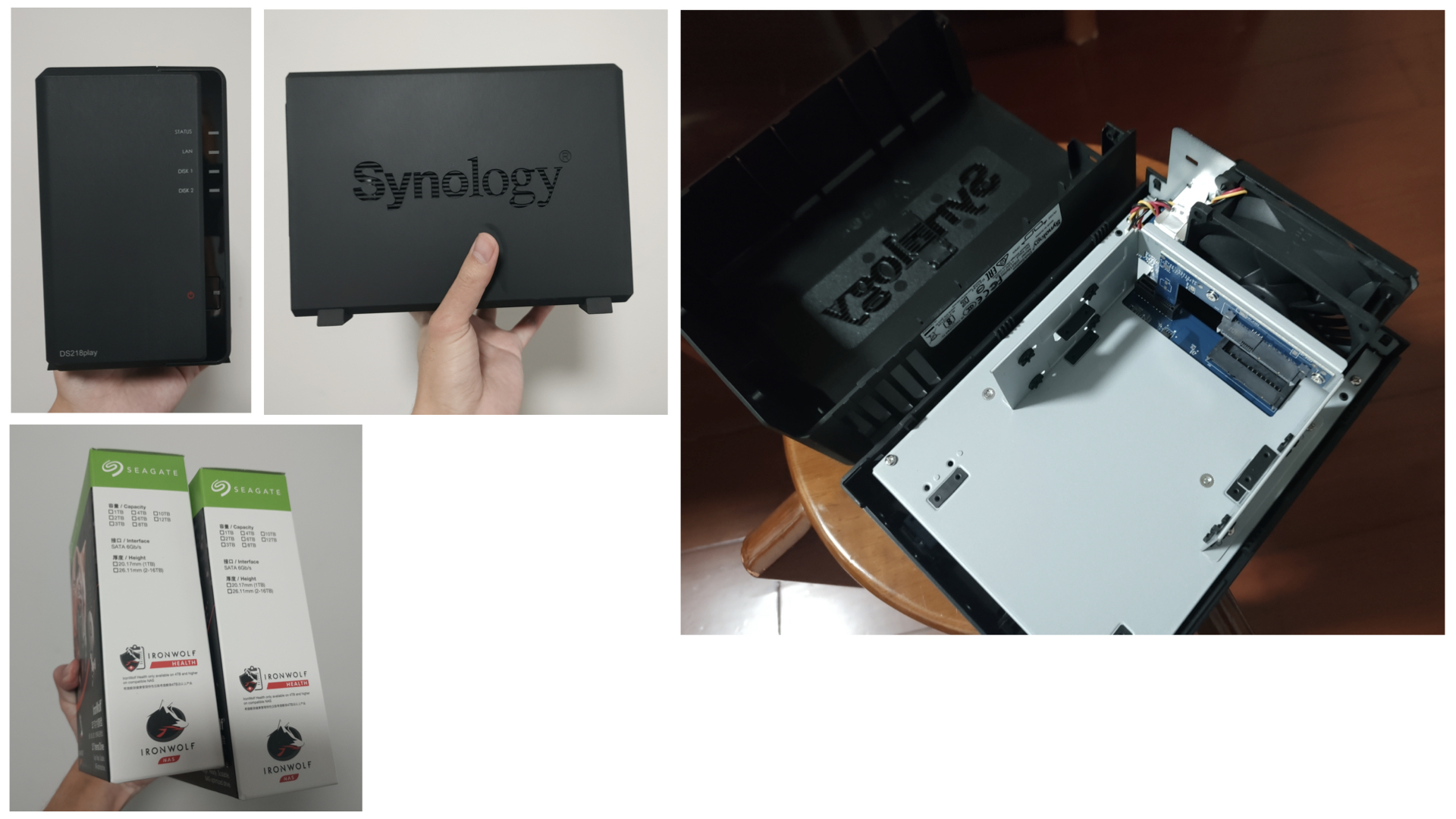
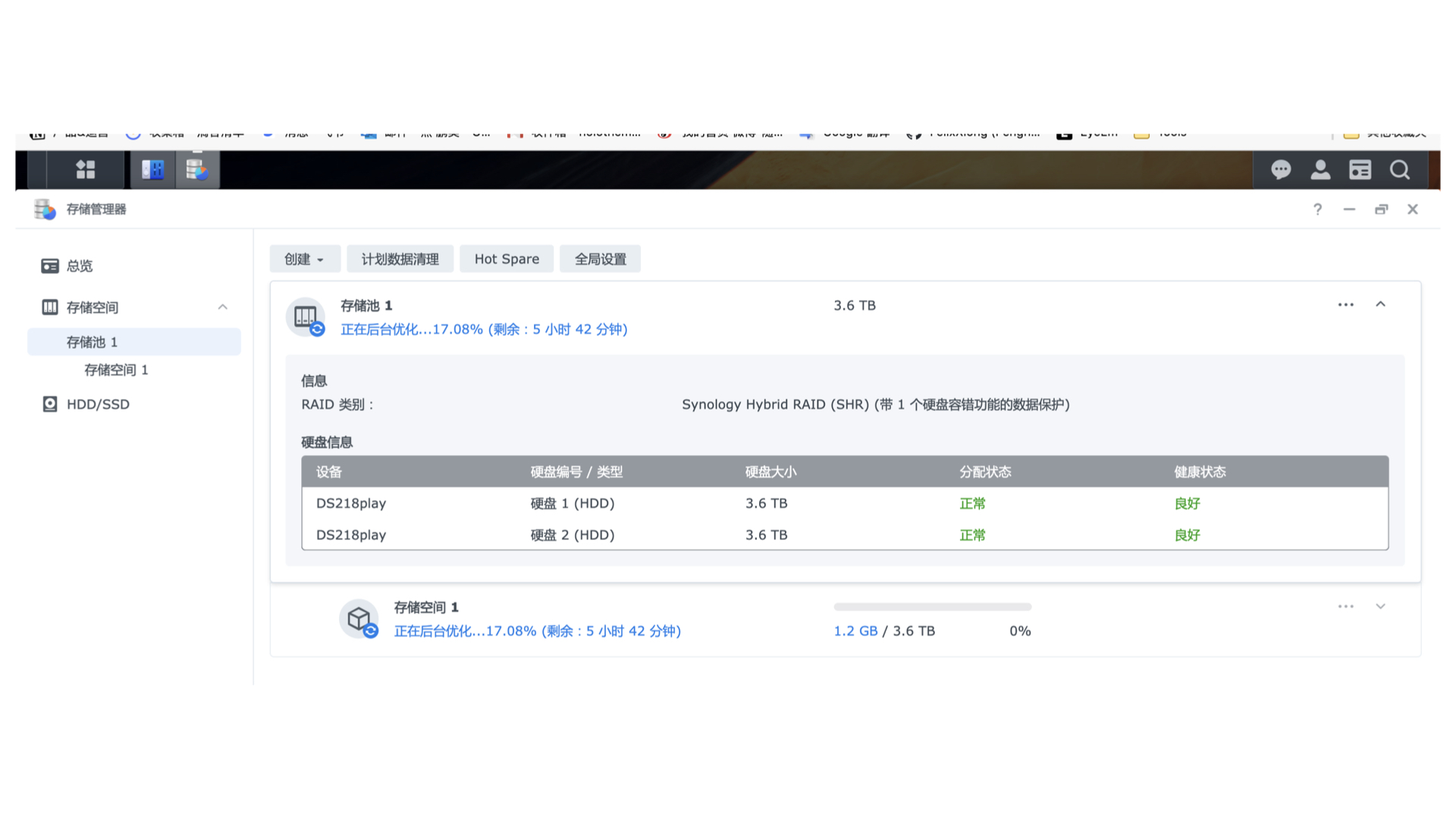
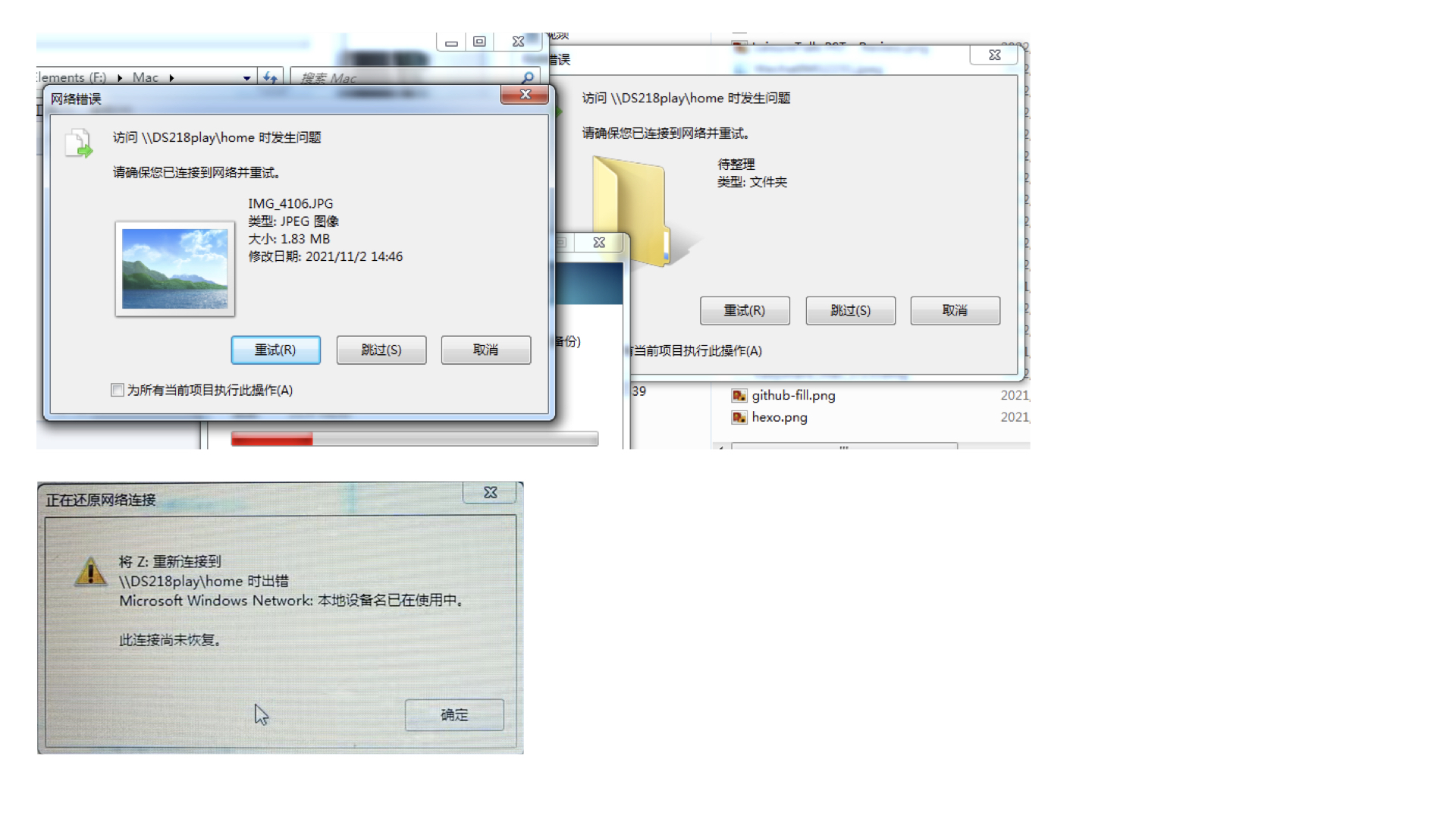
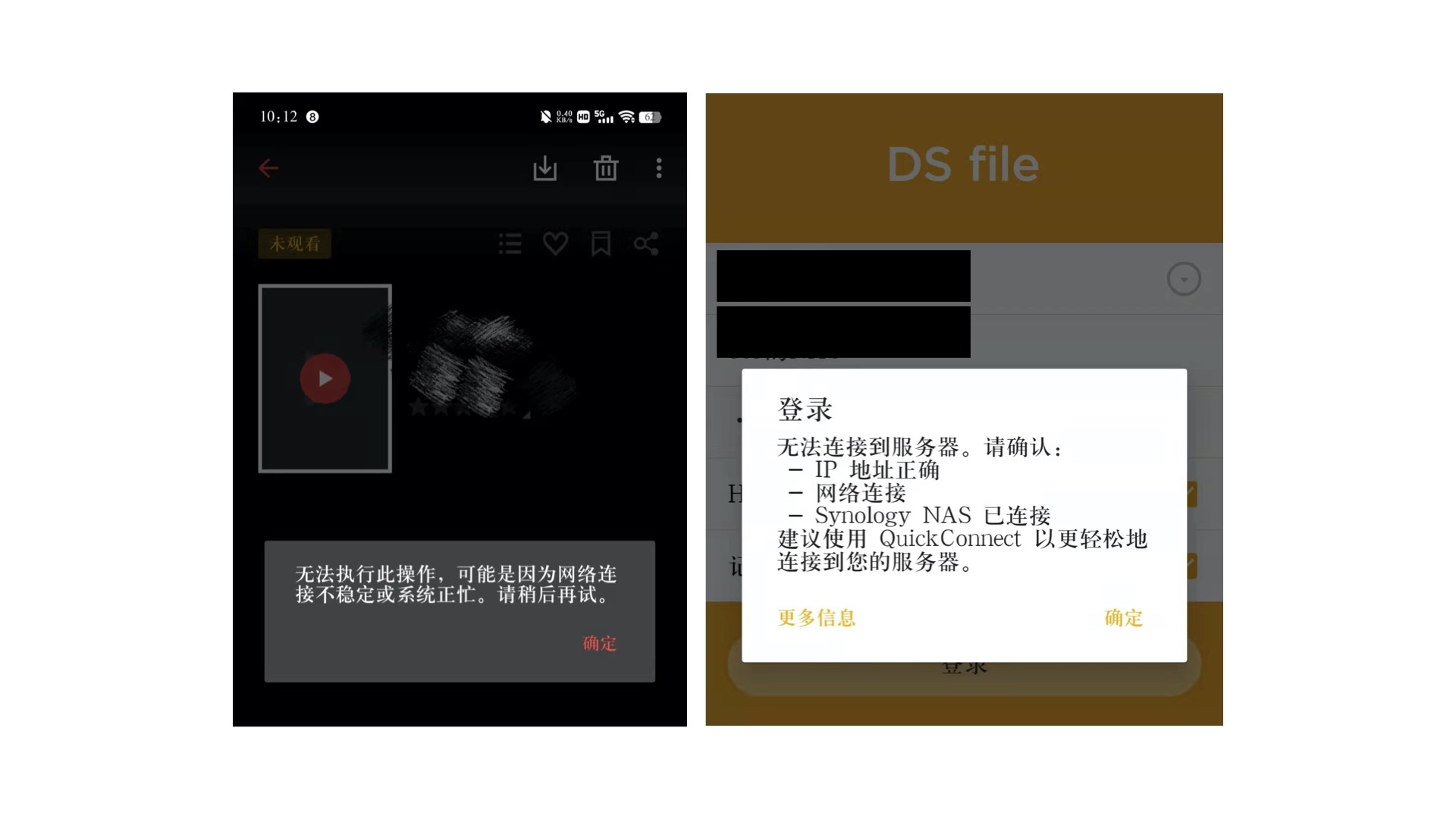
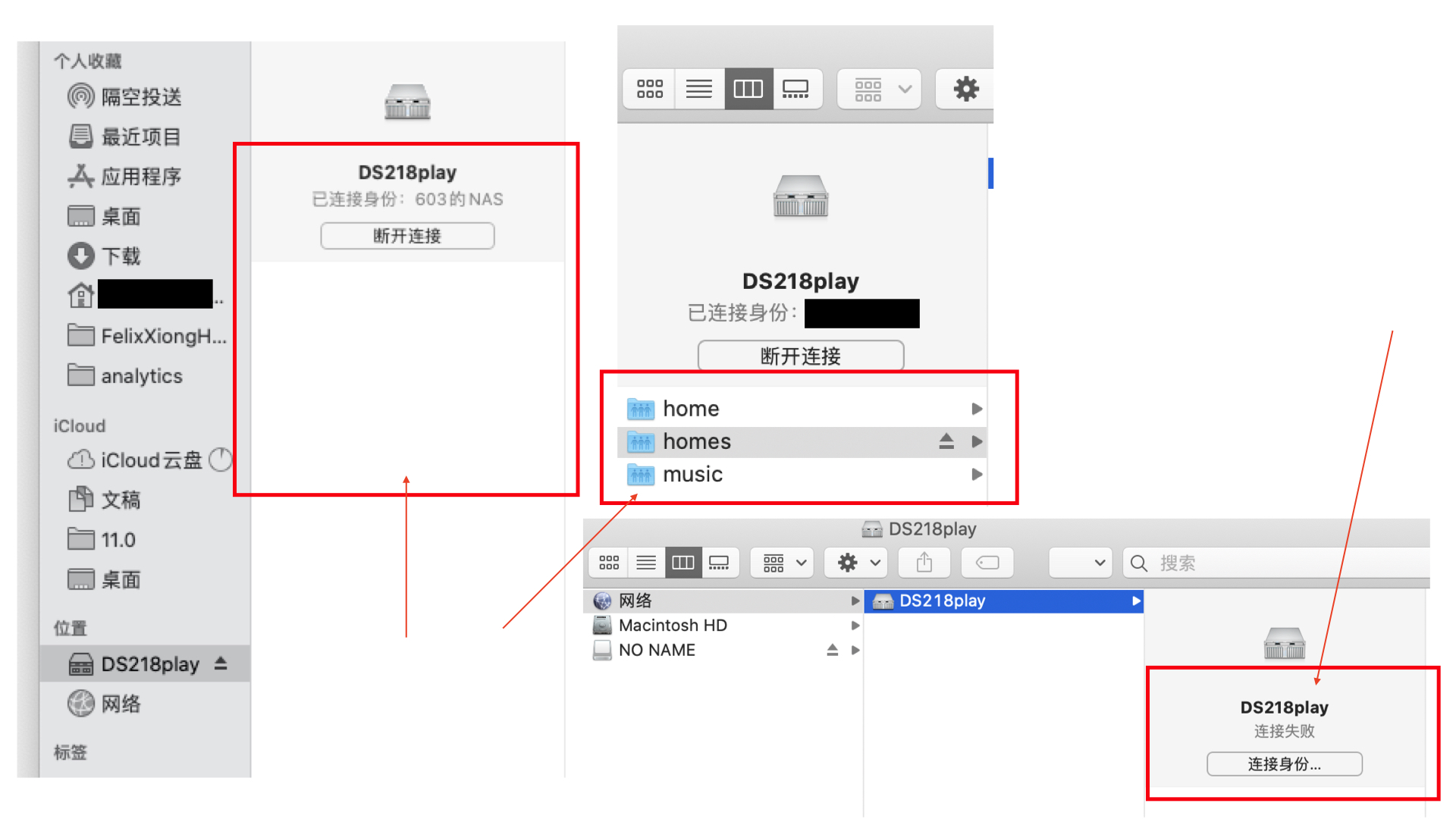
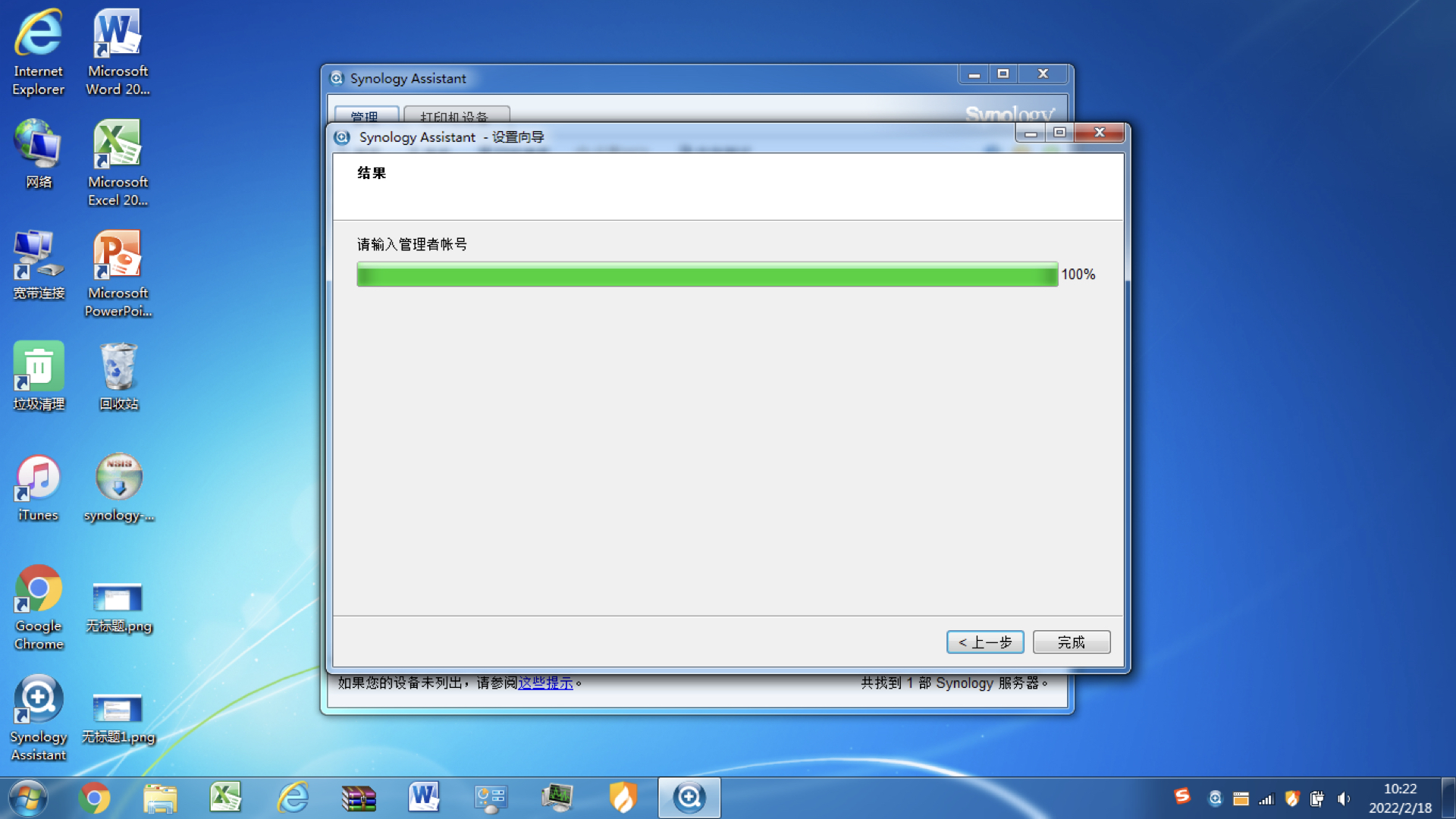
    <content type="html"><![CDATA[<p>因为移动硬盘无法读取的问题和现状，购入群晖DS218play。</p><p>以下是我遇到的问题以及回答与做法。</p><p>最近又折腾内存测试与一些现象，在这里进行记录。</p><span id="more"></span><h2 id="背景"><a class="markdownIt-Anchor" href="#背景"></a> 背景</h2><p>因为在我之前的两份工作中<sup class="footnote-ref"><a href="#fn1" id="fnref1">[1]</a></sup>使用FTP软件/SMB进行远程服务器的链接，于是便对这方面开始产生了印象。</p><h2 id="名词"><a class="markdownIt-Anchor" href="#名词"></a> 名词</h2><p>**RAID：**存储池</p><ol><li><p>是否有必要做RAID？如果一个硬盘出现了故障，更换新的硬盘就可以自动出现旧内容</p><p>举例：双盘位做RAID时，两个盘加起来总共为一个盘的容量，但读写速度快。</p></li><li><p>如何做RAID？</p><p>创建-新增-存储池</p></li></ol><p>**QC：**群晖的QuickConnect</p><p><strong>Synology Assistant</strong>：群晖的NAS助手，在<a href="">这里</a>下载。</p><h2 id="购买与开箱"><a class="markdownIt-Anchor" href="#购买与开箱"></a> 购买与开箱</h2><p>因为预算有限，我购买的是群晖DS218play。</p><p>下图为我安装过程的图片。</p><p><img src="https://s2.loli.net/2022/03/01/QIxGrXLT2JEPOKy.jpg" alt="未命名.001.jpeg" /></p><h2 id="初始化"><a class="markdownIt-Anchor" href="#初始化"></a> 初始化</h2><p>存储管理器-存储空间的后台优化进程，等此过程结束后，我再进行使用。</p><p>优化完成后，会显示状态良好，在DS Moblie中也可以查看进程。</p><p><img src="https://s2.loli.net/2022/03/01/hsOYpPLbte5IAT7.jpg" alt="未命名.002.jpeg" /></p><h2 id="功能"><a class="markdownIt-Anchor" href="#功能"></a> 功能</h2><h3 id="存储"><a class="markdownIt-Anchor" href="#存储"></a> 存储</h3><p>我购买NAS，最重要的目的就是存储我全部的文件了。同时，也可以远程访问这些文件，随用随取。</p><p>网上大都说，给小姐姐小哥哥安个家，这当然是“都懂”的说法。</p><h3 id="外网访问"><a class="markdownIt-Anchor" href="#外网访问"></a> 外网访问</h3><p>使用外网访问，需使用以下两种方法（可选其一或多选）：</p><ol><li>使用中国区的QC登陆。网址：<a href="http://www.quickconnect.com">www.quickconnect.com</a><br />想要开启 QuickConnect 时，需要验证手机号，并将群晖账户改为中国区。传送门：<a href="https://account.synology.cn/zh-cn">中国站登陆链接</a>。</li><li>向网络运营商获取公网IP，之后在路由器后台设置端口转发</li><li>使用内网穿透工具</li><li>使用虚拟组网技术，例如zerotier/Tailscale<sup class="footnote-ref"><a href="#fn1" id="fnref1:1">[1:1]</a></sup>。</li><li>底层代理：nConnect<sup class="footnote-ref"><a href="#fn2" id="fnref2">[2]</a></sup></li></ol><h3 id="文件相关"><a class="markdownIt-Anchor" href="#文件相关"></a> 文件相关</h3><p>不同文件夹之间的关联：</p><p>home：每个用户都有一个home文件夹，默认主账号也有一个home文件夹。个人内容可保存在home中。</p><p>homes：对应账户个人文件夹的镜像，数据并不会同时保存2份，所以也并不会占用存储容量。</p><p>home-drive：相当于nas的云盘。</p><p>在控制面板-共享文件夹内创建的全部为共享文件夹。</p><h3 id="定时开关机"><a class="markdownIt-Anchor" href="#定时开关机"></a> 定时开关机</h3><p>因为考虑到家里节省电表，于是在闲时决定采取定时开关机的做法。</p><h2 id="数据安全"><a class="markdownIt-Anchor" href="#数据安全"></a> 数据安全</h2><p>作为自己的私人文件库，数据安全必须保证：</p><ol><li><p>除了NAS，还推荐UPS。</p></li><li><p>上HTTPS是必须，不可暴露到公网：<a href="https://kb.synology.cn/zh-cn/DSM/tutorial/force_HTTPS_for_DSM">如何强制DSM桌面使用HTTPS连接？ - Synology 知识中心</a></p><p>看到部分教程使用申请官方域名/腾讯云/阿里云SSL证书，目前未确定。</p></li><li><p>根据自己需求做RAID。</p></li></ol><h3 id="官方隐私保护条文"><a class="markdownIt-Anchor" href="#官方隐私保护条文"></a> 官方隐私保护条文</h3><p>在第一段中，由全球站转移到中国区时，需要绑定手机号方可使用QC功能。于是我愣了一下，还是验证了。</p><p>我在[个人信息保护声明](<a href="https://www.synology.cn/zh-cn/company/legal/privacy">法律文件 | 群晖科技 Synology Inc.</a>)中看到以下条文说明：</p><blockquote><h2 id="保存期限"><a class="markdownIt-Anchor" href="#保存期限"></a> 保存期限</h2><p>Synology 保留您个人信息的期限不会超过因指定目的处理您数据所需的合理时间。如果您将同意我方或已经同意我方处理您的数据，我方处理您数据的期限不会超过您同意的有效期。尽管有上述规定，<strong>我方可能会按照适用法律法规的规定而保留您的个人信息，例如协助任何政府和司法调查，以提出或维护法律主张，或用于民事、刑事或行政诉讼</strong>，在此保留期间，我方会采取必要的安全保护措施，且不会将该个人信息用于其他用途。如果我方不符合保留您数据的上述条件，我方将以安全的方式删除和处理您的数据。</p></blockquote><p>…</p><blockquote><p>Synology **不会访问（或使用）**用户上传到其 Synology 设备的文件。</p></blockquote><h2 id="我的考虑点"><a class="markdownIt-Anchor" href="#我的考虑点"></a> 我的考虑点</h2><p>双盘是否有必要做NAS？在下方，我参考了一些链接。</p><h2 id="踩坑"><a class="markdownIt-Anchor" href="#踩坑"></a> 踩坑</h2><p>以下是我折腾群晖NAS的出现的情况，与下方记录。</p><h3 id="无法连接暂未解决"><a class="markdownIt-Anchor" href="#无法连接暂未解决"></a> 无法连接（暂未解决）</h3><p><strong>同一局域网</strong></p><p>不同设备出现无法连接状况。</p><p>现象：</p><ol><li>使用移动硬盘在Windows设备上拷贝文件出现无法连接的情况，Windows磁盘显示链接不成功</li><li>部分服务无法连接：Drive、Flie Station、Video Station、Active Insights</li></ol><p><img src="https://s2.loli.net/2022/03/01/5f31iGrDCyS78Wl.jpg" alt="未命名.005.jpeg" /></p><p><img src="https://s2.loli.net/2022/03/01/taSlmgoNX2ZV4HE.jpg" alt="未命名.003.jpeg" /></p><h4 id="排查"><a class="markdownIt-Anchor" href="#排查"></a> 排查</h4><p>可能需要检查一下Wi-Fi与路由器设置，我关闭了防火墙，问题依旧。</p><p>出现的问题</p><h4 id="smb链接消失"><a class="markdownIt-Anchor" href="#smb链接消失"></a> SMB链接消失</h4><p>如下图所示，会无法出现相关文件夹，尚无解。</p><p><img src="https://s2.loli.net/2022/03/01/rJXGthEQI1jnMso.jpg" alt="未命名.006.jpeg" /></p><p>继续摸索ing。如果您知道这个答案，也欢迎在评论区留言，一起交流。</p><p>感谢即友：NNOUU.bit、敖特、岩鸣杨子、哥飞的反馈与帮助，排名不分先后。</p><h3 id="sa无法跑测试"><a class="markdownIt-Anchor" href="#sa无法跑测试"></a> SA无法跑测试</h3><p>现象：无法跑内存测试：在Windows设备中下载助手，输入账号后结果直接认证完成，无法进入下一步。</p><p><img src="https://s2.loli.net/2022/03/01/nfR5eO2UrJ3xYIC.jpg" alt="未命名.004.jpeg" /></p><p>解决：下载macOS客户端，即成功跑测试。</p><p><a href="https://www.synology.cn/zh-cn/support/download/DS218play?version=7.0#utilities">下载中心 - DS218play | Synology 群晖科技</a></p><h3 id="自动掉盘与关机"><a class="markdownIt-Anchor" href="#自动掉盘与关机"></a> 自动掉盘与关机</h3><p>通过<a href="https://www.v2ex.com/t/835197">V2EX的一个帖子</a>了解到。</p><p>解决：</p><ol><li>确认NAS的硬盘电源，需要为原装的12V5A。（不同电源略有差异）</li><li>建议做阵列清理，以及完整的SMART测试。</li></ol><p>更多的踩坑，后续会在一篇文章中继续更新，链接此处后补。</p><h2 id="接下来"><a class="markdownIt-Anchor" href="#接下来"></a> 接下来</h2><p>接下来，我会研究以下事宜：</p><ol><li>将Hexo博客源文件与NAS相结合，节省系统备份成本</li><li><s>寻找便于管理文件的第三方客户端</s></li><li><s>非同级文件夹下，文件是否会在Drive app中进行显示</s></li><li>上https的原生方法</li><li>彻底解决忽连忽断的问题</li></ol><hr /><hr /><h2 id="参考链接"><a class="markdownIt-Anchor" href="#参考链接"></a> 参考链接</h2><p>入门相关：</p><p><a href="https://post.smzdm.com/p/a4wmxw98/">入门NAS？一篇就够了！真正给小白看的NAS科普篇——NAS是什么？你真的需要NAS吗？</a></p><p><a href="https://post.smzdm.com/p/andlnv9v/">群晖NAS从入门到精通，DS918+ NAS：目前最适合家用的四盘位NAS深度体验！告别小白！什么值得买</a></p><p><a href="https://www.zhihu.com/zvideo/1412009302965665792">小白的 NAS入门碎碎念，家用NAS真香… 好像无意中安装了一个不得了的神仙套件 - 知乎</a></p><p>RAID:</p><p><a href="https://www.v2ex.com/t/693294">双盘位 nas 有必要组 raid 么？ - V2EX</a></p><p><a href="https://www.zhihu.com/question/341375171">个人4盘位NAS，用什么RAID比较合适，为什么？ - 知乎 </a></p><p><a href="https://post.smzdm.com/p/a78epo7d/">NAS 篇一：NAS究竟需不需要RAID？？万兆网络下NAS读取写入实测_什么值得买</a></p><p>文件：</p><p><a href="https://www.zhihu.com/question/366980434">群晖系统中home 和homes有什么区别？ - 知乎</a></p><hr class="footnotes-sep" /><section class="footnotes"><ol class="footnotes-list"><li id="fn1" class="footnote-item"><p>在我做宽连十方的新媒体运营时，经常需要链接移动公司的服务器下载咪咕小视频；在上海七加二时，需要在公司的NAS中查看文档。 <a href="#fnref1" class="footnote-backref">↩︎</a> <a href="#fnref1:1" class="footnote-backref">↩︎</a></p></li><li id="fn2" class="footnote-item"><p>参考：<a href="https://www.v2ex.com/t/824076">远程访问分享</a> <a href="#fnref2" class="footnote-backref">↩︎</a></p></li></ol></section>]]></content>
    
    
    <summary type="html">&lt;p&gt;因为移动硬盘无法读取的问题和现状，购入群晖DS218play。&lt;/p&gt;
&lt;p&gt;以下是我遇到的问题以及回答与做法。&lt;/p&gt;
&lt;p&gt;最近又折腾内存测试与一些现象，在这里进行记录。&lt;/p&gt;</summary>


    <category term="运维" scheme="https://felixxiong.github.io/tags/%E8%BF%90%E7%BB%B4/"/>
    
    <category term="NAS" scheme="https://felixxiong.github.io/tags/NAS/"/>
    
    <category term="存储" scheme="https://felixxiong.github.io/tags/%E5%AD%98%E5%82%A8/"/>
    
    <category term="数据" scheme="https://felixxiong.github.io/tags/%E6%95%B0%E6%8D%AE/"/>
    
    <category term="备份" scheme="https://felixxiong.github.io/tags/%E5%A4%87%E4%BB%BD/"/>
    
  </entry>
  
  <entry>
    <title>暂缓回苏</title>
    <link href="https://felixxiong.github.io/2022/02/14/%E6%9A%82%E7%BC%93%E5%9B%9E%E8%8B%8F/"/>
    <id>https://felixxiong.github.io/2022/02/14/%E6%9A%82%E7%BC%93%E5%9B%9E%E8%8B%8F/</id>
    <published>2022-02-13T19:30:53.000Z</published>
    <updated>2022-02-15T15:04:09.317Z</updated>
    
    <content type="html"><![CDATA[<p>现在，我希望用撰写博客的方式来通知到我所联系过的HR，回苏州的计划，也许该缓缓了。</p><p>可能是精神上求职的疲惫，所反映出的生理上的不适：睡觉盗汗、扁脑体发炎（以及没有流涕的感冒）。</p><span id="more"></span><h2 id="当前状况"><a class="markdownIt-Anchor" href="#当前状况"></a> 当前状况</h2><p>现在是2月14日情人节，上午3时32分，关于我晚上出盗汗这件事，估计已经有十几天了——只要一出门就会出盗汗。</p><p>说来也许是因为在苏州的不规律生活——当然我也非常希望可以有份稳定的工作，上班下班，就如同我之前在助残公益园那样。</p><p>或许回到了苏州，有了自己的规划，这一切可能也不会变得更差更糟——</p><p>写到这里，我打了一个喷嚏。</p><h3 id="健康"><a class="markdownIt-Anchor" href="#健康"></a> 健康</h3><p>截至目前，我的喉咙在咽口水的时候依旧有疼痛，昨晚刷完牙后喝了麦片。感觉还是挺好的——希望一觉睡过之后说话就正常，没想到出现了如文首所述的那样。</p><h2 id="梳理"><a class="markdownIt-Anchor" href="#梳理"></a> 梳理</h2><h3 id="我今年都干了什么"><a class="markdownIt-Anchor" href="#我今年都干了什么"></a> 我今年都干了什么</h3><p>截至目前，那现在就从最近的事开始写吧。这也是一个一月半总结。</p><ol><li><p>关于输出：</p><ol><li>播客录制与剪辑：<ol><li>和一位京东产品经理做了《有所收货》<sup class="footnote-ref"><a href="#fn1" id="fnref1">[1]</a></sup>，遗憾的是我到目前为止还没剪<sup class="footnote-ref"><a href="#fn2" id="fnref2">[2]</a></sup>。</li><li>将《放空谈》改名为《闲聊PSTReview》，并合并了第一期，做了一个Logo，上传到dribbble。</li></ol></li><li>哔哩哔哩：上传了一个视频到B站：关于在冬天使用Apple设备的感想。</li><li>利用原子笔记写了一期博客，需要腾到博客上。《如何打破沟通的不平衡》。</li></ol></li><li><p>和家人：</p><ol><li>看电影：和家人一起看了一场电影：《长津湖之水门桥》，之前还打了一场台球。</li><li>买东西：帮我妈买了一个iPad mini2的保护壳。</li><li>烧饭<ol><li>在家里烧了西红柿炒鸡蛋和两次可乐鸡翅</li><li>今天准备点一个烤肉，在家里给家人做烤肉。</li></ol></li><li>配置设备：自己买的奈飞，和家人进行共享。</li></ol></li><li><p>和朋友</p><ol><li>认识了邓可乐，但因为一些性别上的观点不一致，但没关系，我相信这是暂时的（当然是我改变）——目前还可以做博客的读者，我的读者嘛，还是很高兴的。</li><li>和TEDx的策展人和组织者会了个面，一起吃了个饭，我也将是TEDx Jianye这个NGO的组织的志愿者一员，能加入进来我非常开心。</li><li><s>原本准备和林果果录播客，也是因为双方的失眠与身体原因而暂缓。</s></li></ol></li><li><p>关于我的硬件设备</p><ol><li>去了一趟Apple Store，结果电脑是好的，电池也是好的，不过后者的寿命对于“更换电池”来说，还是只有5%。这意味着只能在用一年-半年，就可以更换电池了。<sup class="footnote-ref"><a href="#fn3" id="fnref3">[3]</a></sup></li><li>购买了NAS，今天上午12时京东秒杀，预计明日我可以拿到。</li></ol></li><li><p>关于面试</p><ol><li>面了一场产品经理/助理的公司，位于板桥。因为路程时间较远，所以至今仍未考虑完毕。</li></ol></li></ol><h2 id="工具"><a class="markdownIt-Anchor" href="#工具"></a> 工具</h2><p>我昨晚在研究Obsidian。</p><p>就如我之前<a href="">从OneNote迁移到Jupin</a>一样，现在从Notion迁移到Obsidian。</p><p>按照常理，我昨晚是应当写《入门Obsidian》这篇文章并写写我的使用场景的，以及对于一些人和事我并不像之前那么看重<sup class="footnote-ref"><a href="#fn4" id="fnref4">[4]</a></sup>，也许是老了，也也许无所谓了。</p><h2 id="今年"><a class="markdownIt-Anchor" href="#今年"></a> 今年</h2><p>我今年25岁了，明年26了。快奔3了。同学有的有老婆有孩子了，我FUCKFUCKFUCKFUCKFUCK还单身，但总是在学习与梦想着未来的生活。</p><p>Oh.Jesus.</p><h2 id="后记"><a class="markdownIt-Anchor" href="#后记"></a> 后记</h2><p>在写开头的时候，脑海里就一直浮现着奈飞里面《Unbeliveble》和《The Gravity》里面美国人的工作神情，就感觉自己也非常的相似。</p><p>我觉得有的时候我们做事确实也需要这么随性，但做事的时候那种状态其实谈不上“醉酒”，也谈不上“晕乎乎”，只是把自己所谓“想做的”以及“想说的”给写出来、做出来，仅此而已。</p><p>本篇文章也许会在之后回笼觉睡醒之后，有更加理性的清晰的删改。请勿期待。</p><hr /><hr class="footnotes-sep" /><section class="footnotes"><ol class="footnotes-list"><li id="fn1" class="footnote-item"><p>我做了封面、账号的注册情况等，产品来修改。 <a href="#fnref1" class="footnote-backref">↩︎</a></p></li><li id="fn2" class="footnote-item"><p>那是初六的一个晚上，现在已经十一十二了，可想而知。原因很复杂。以及，还有转文字的工作。 <a href="#fnref2" class="footnote-backref">↩︎</a></p></li><li id="fn3" class="footnote-item"><p>我好像并未购买AppleCare。 <a href="#fnref3" class="footnote-backref">↩︎</a></p></li><li id="fn4" class="footnote-item"><p>要是在之前，我会感慨这样一个情况，也是在我之前的某一篇文章中写道（大意是）：“凡是你想靠近的领域，他们都已经存在好久，并且他们都互相认识”。现在看也许真的无所谓了，我还得感谢他们，可以减少我入门新工具的学习时间，更快入门。 <a href="#fnref4" class="footnote-backref">↩︎</a></p></li></ol></section>]]></content>
    
    
    <summary type="html">&lt;p&gt;现在，我希望用撰写博客的方式来通知到我所联系过的HR，回苏州的计划，也许该缓缓了。&lt;/p&gt;
&lt;p&gt;可能是精神上求职的疲惫，所反映出的生理上的不适：睡觉盗汗、扁脑体发炎（以及没有流涕的感冒）。&lt;/p&gt;</summary>


    <category term="生活" scheme="https://felixxiong.github.io/categories/%E7%94%9F%E6%B4%BB/"/>
    
    <category term="精神日志" scheme="https://felixxiong.github.io/categories/%E7%94%9F%E6%B4%BB/%E7%B2%BE%E7%A5%9E%E6%97%A5%E5%BF%97/"/>
    
    
    <category term="苏州" scheme="https://felixxiong.github.io/tags/%E8%8B%8F%E5%B7%9E/"/>
    
    <category term="健康" scheme="https://felixxiong.github.io/tags/%E5%81%A5%E5%BA%B7/"/>
    
    <category term="TEDx" scheme="https://felixxiong.github.io/tags/TEDx/"/>
    
  </entry>
  
  <entry>
    <title>欲提升“工作生产力”，坚果R2帮了我这些忙</title>
    <link href="https://felixxiong.github.io/2021/09/04/%E6%AC%B2%E6%8F%90%E5%8D%87%E2%80%9C%E5%B7%A5%E4%BD%9C%E7%94%9F%E4%BA%A7%E5%8A%9B%E2%80%9D%EF%BC%8C%E5%9D%9A%E6%9E%9CR2%E5%B8%AE%E4%BA%86%E6%88%91%E5%A4%9A%E5%B0%91%E5%BF%99/"/>
    <id>https://felixxiong.github.io/2021/09/04/%E6%AC%B2%E6%8F%90%E5%8D%87%E2%80%9C%E5%B7%A5%E4%BD%9C%E7%94%9F%E4%BA%A7%E5%8A%9B%E2%80%9D%EF%BC%8C%E5%9D%9A%E6%9E%9CR2%E5%B8%AE%E4%BA%86%E6%88%91%E5%A4%9A%E5%B0%91%E5%BF%99/</id>
    <published>2021-09-04T06:08:11.000Z</published>
    <updated>2021-09-19T18:13:56.281Z</updated>
    
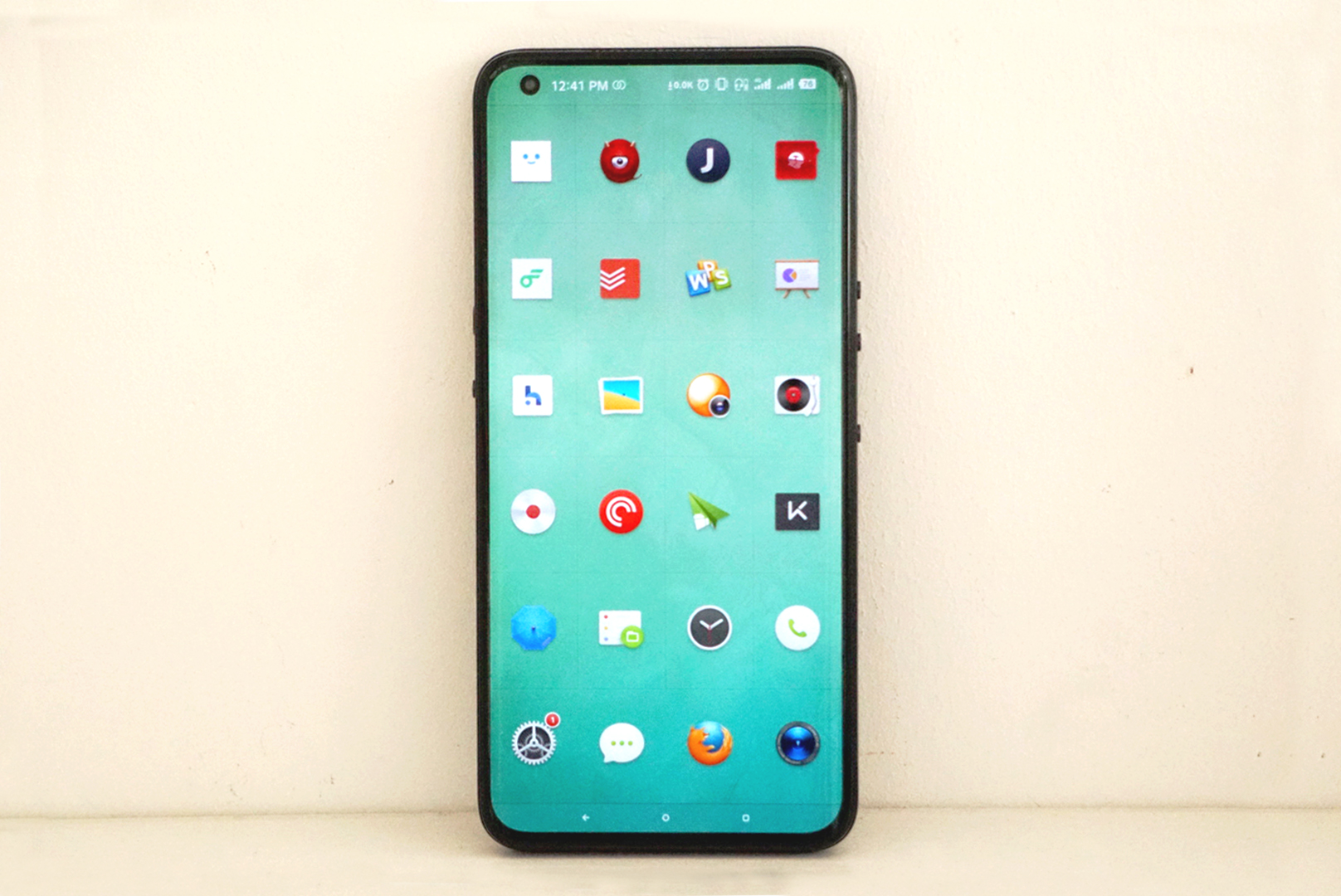
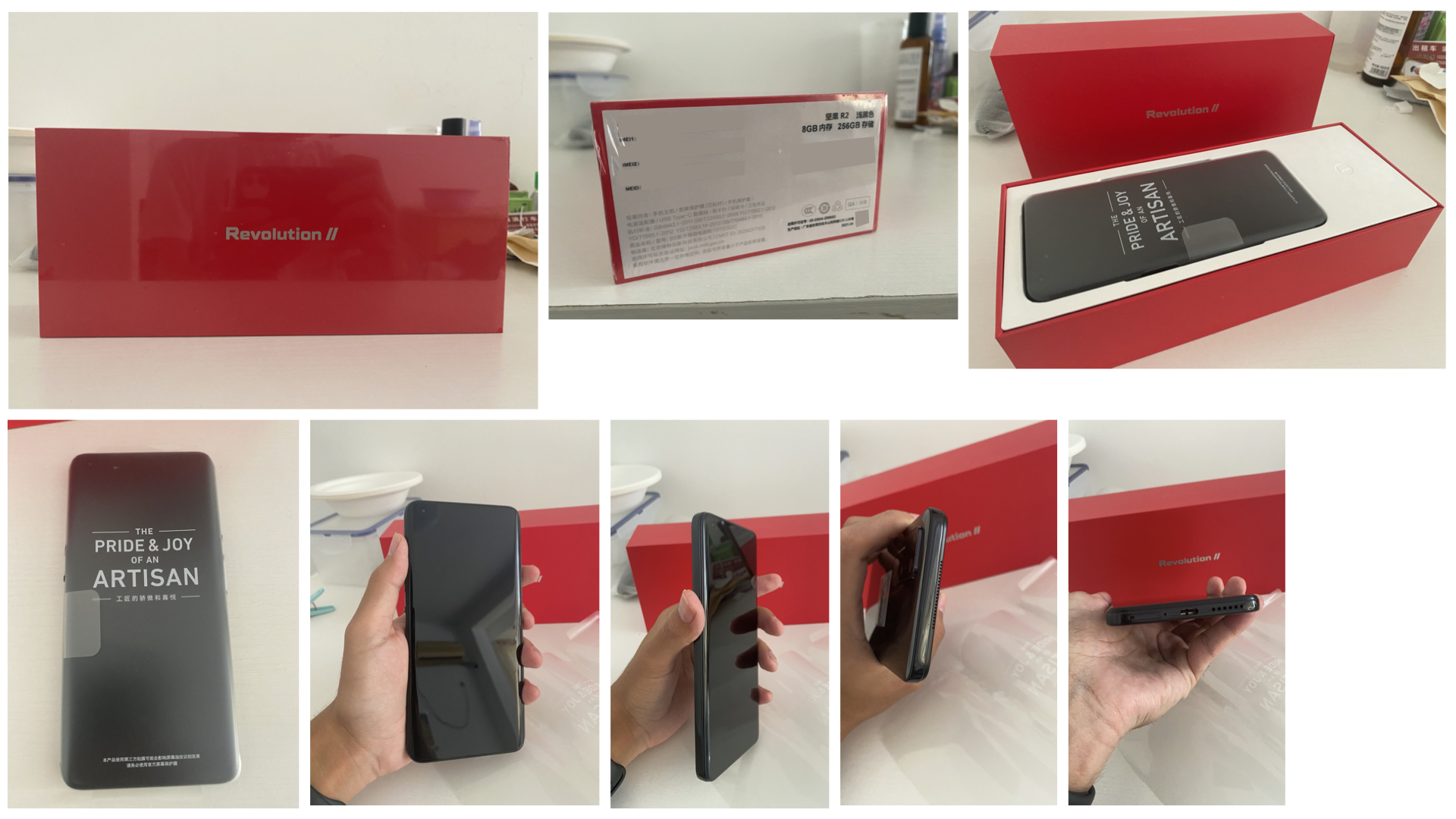
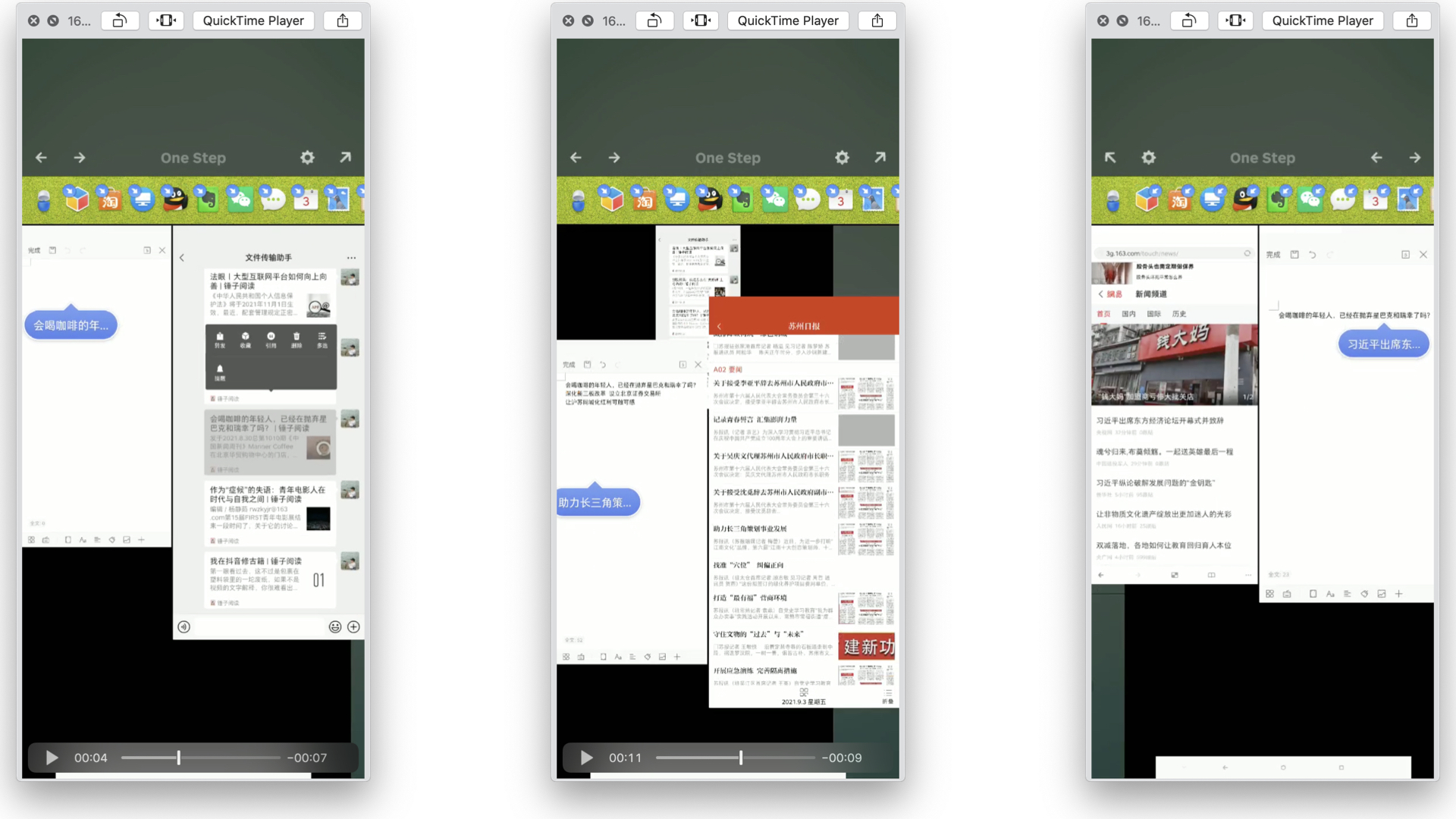
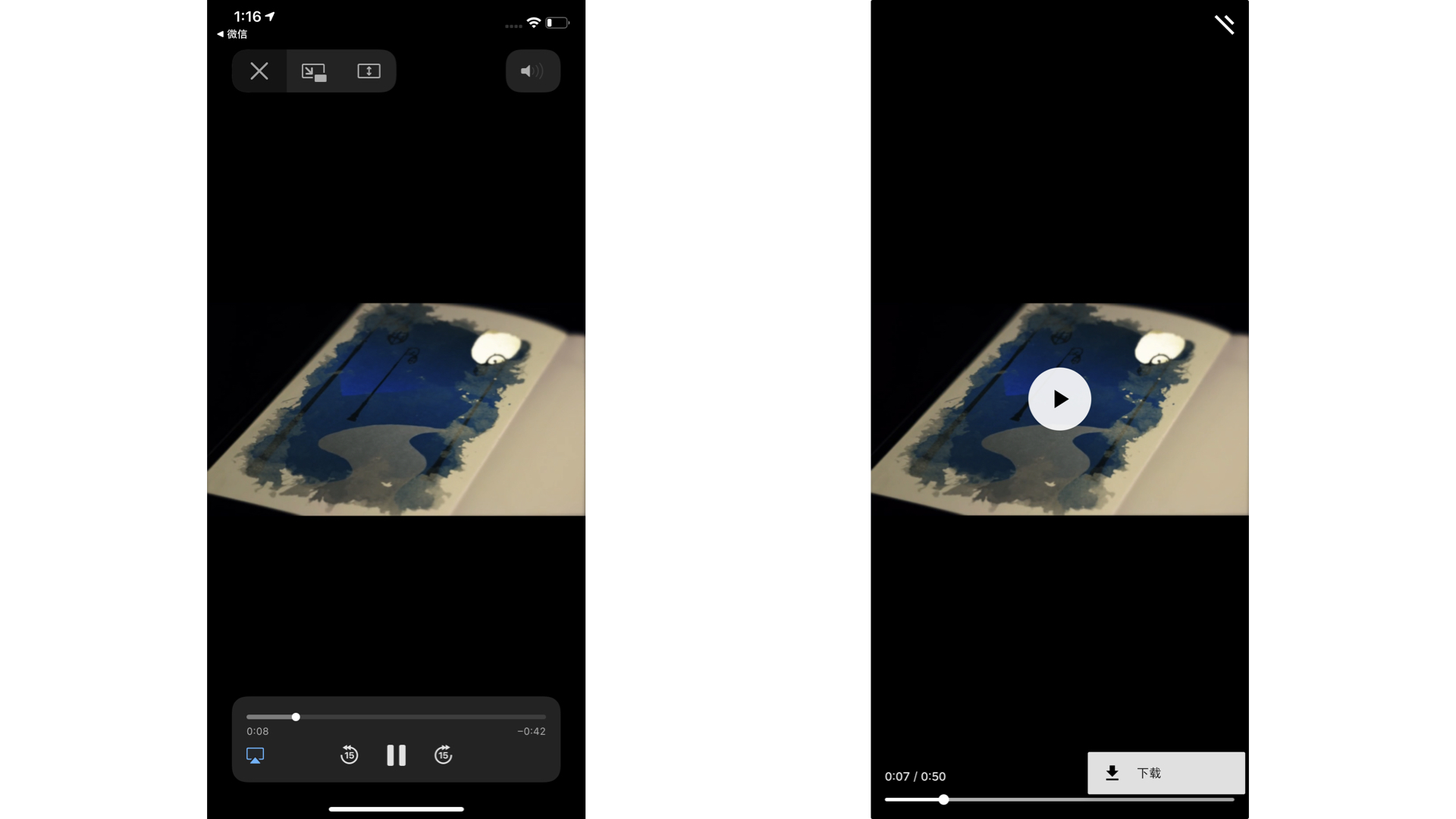
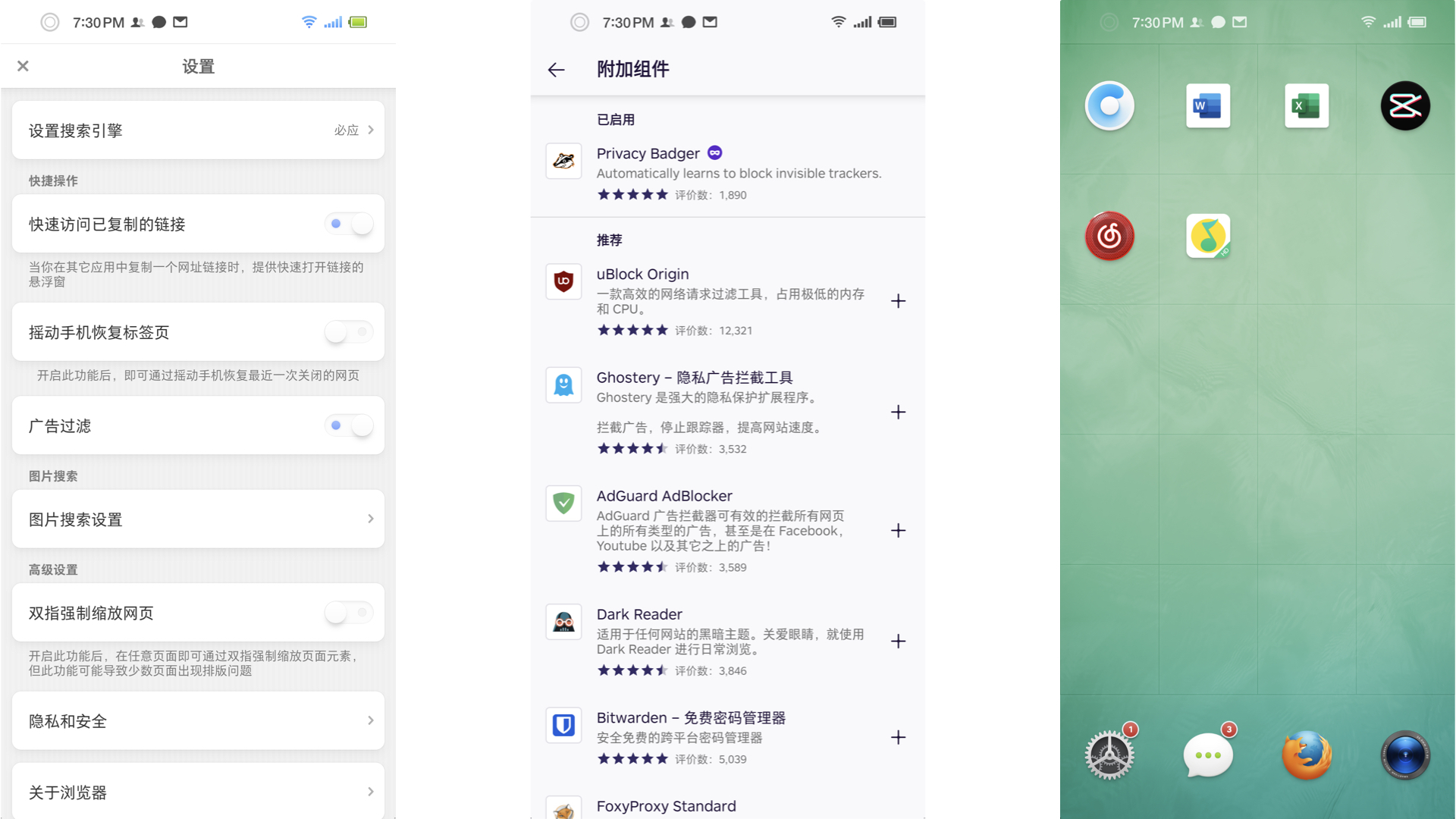
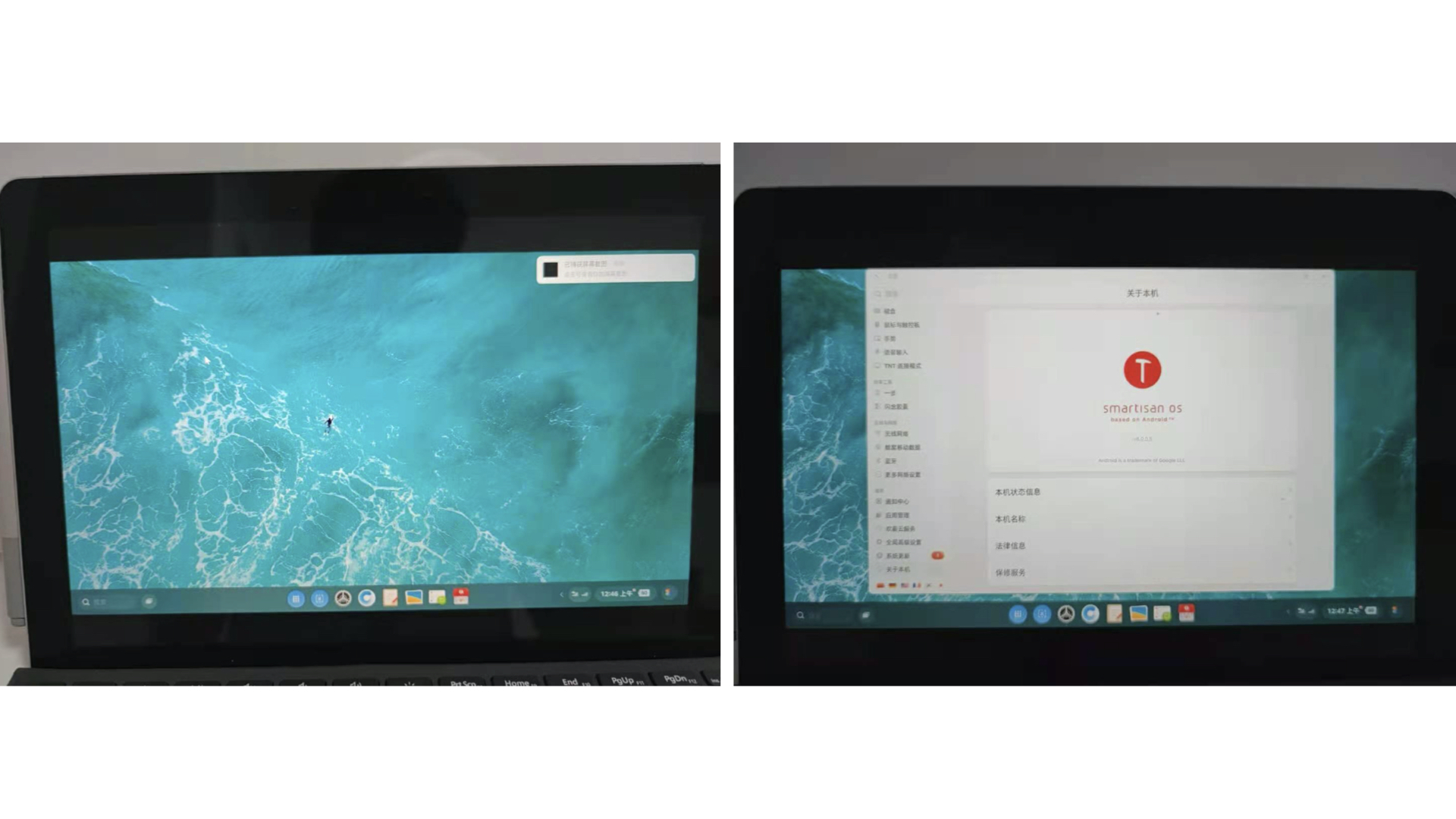
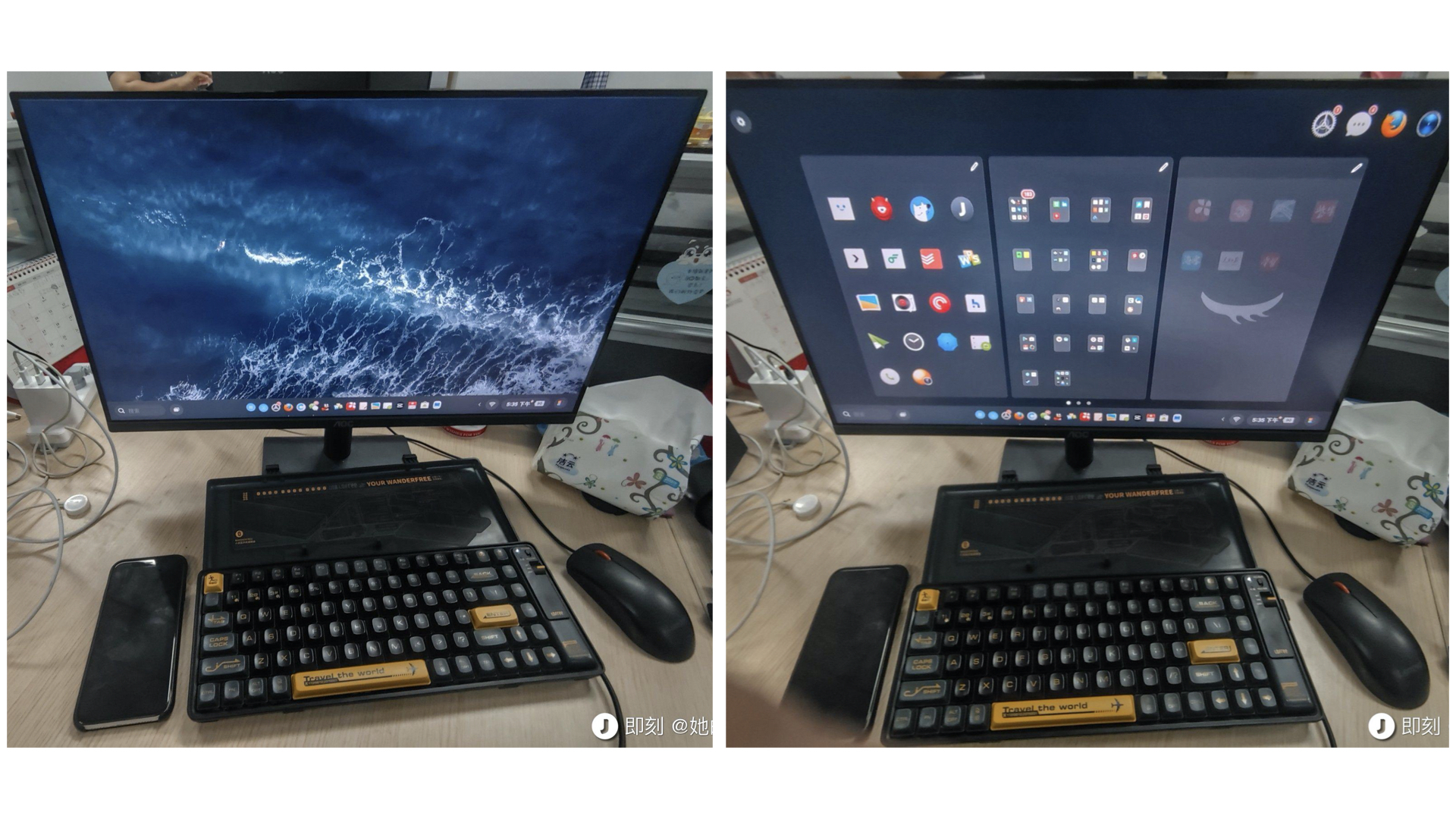
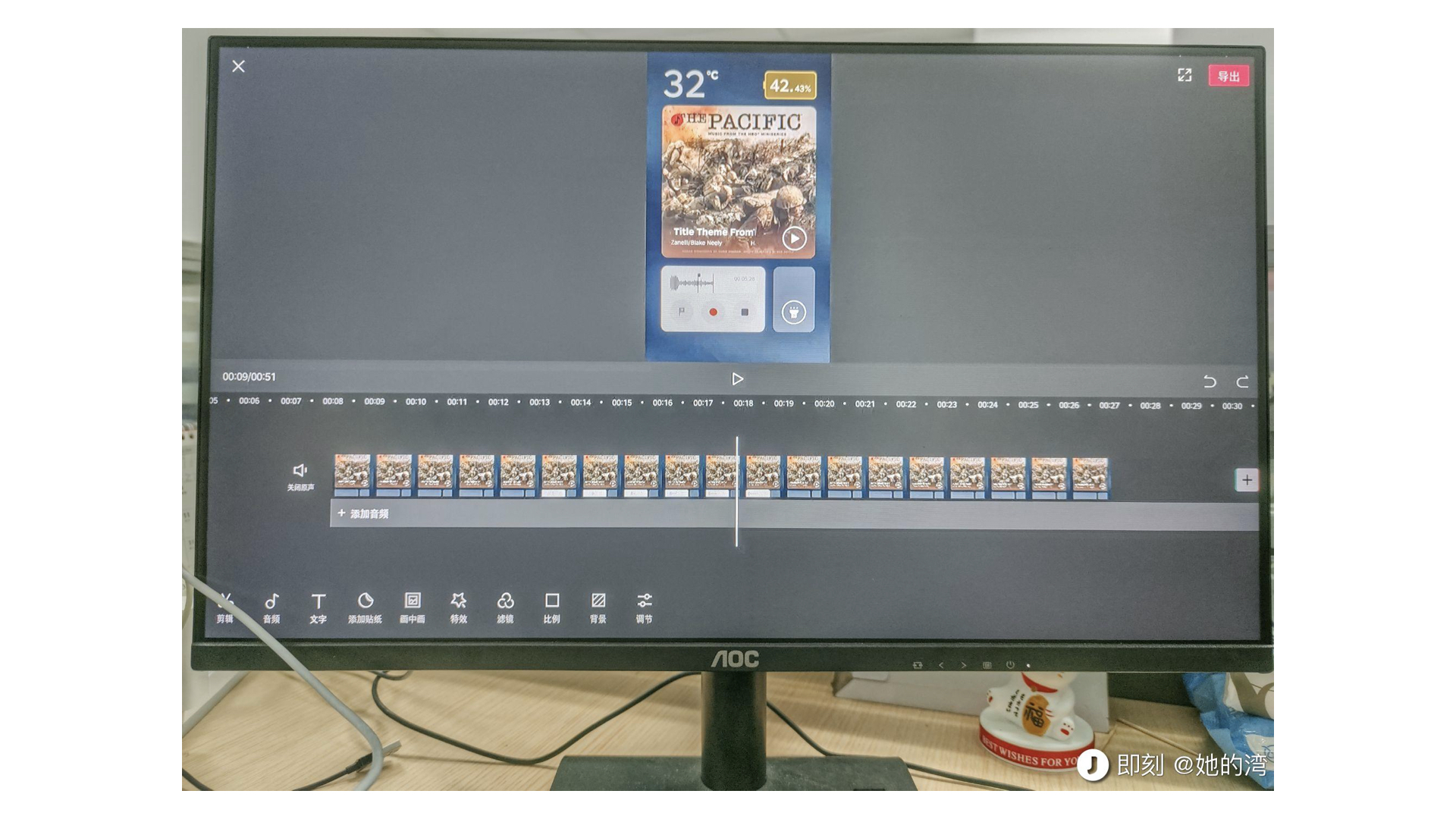
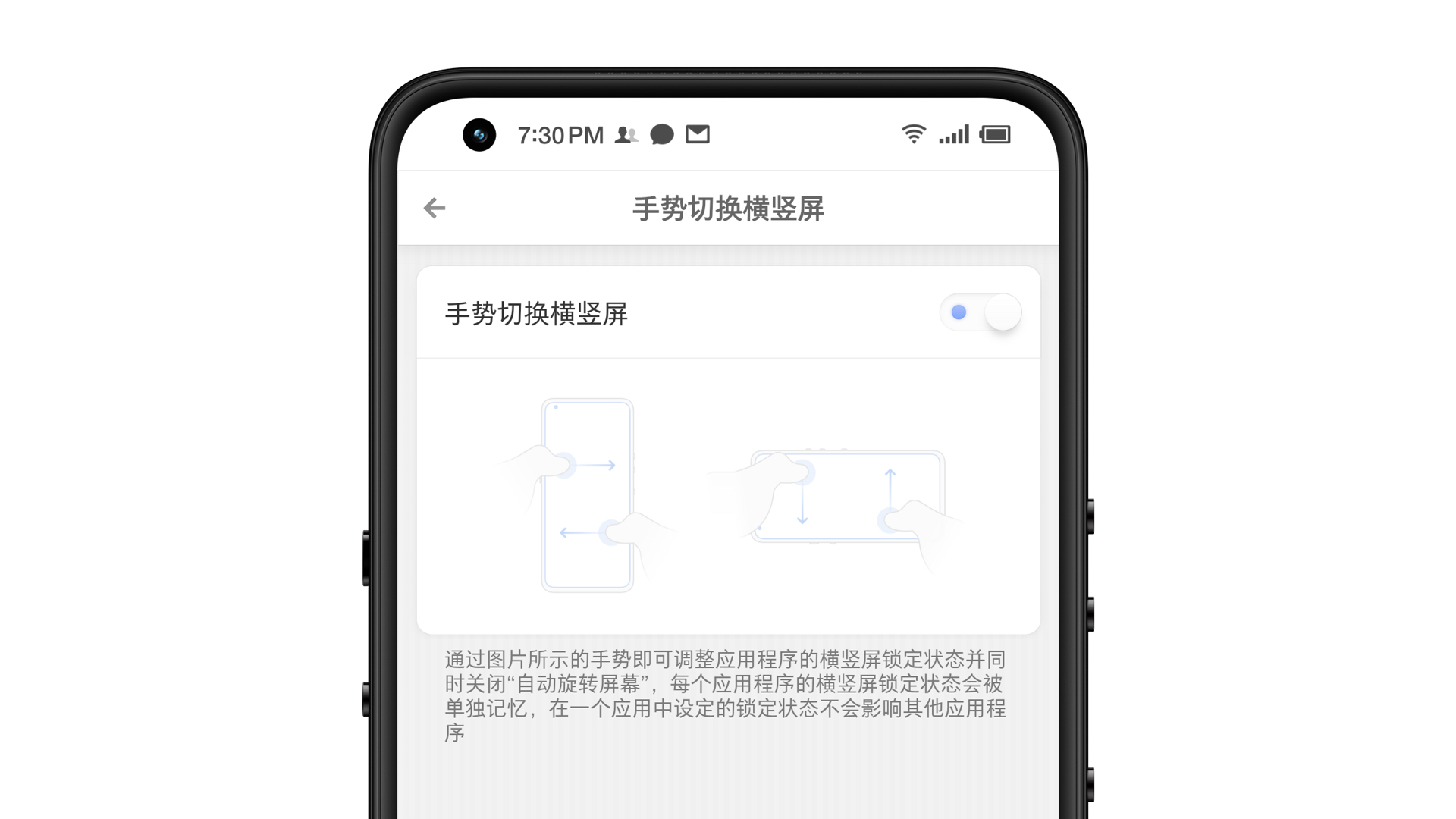
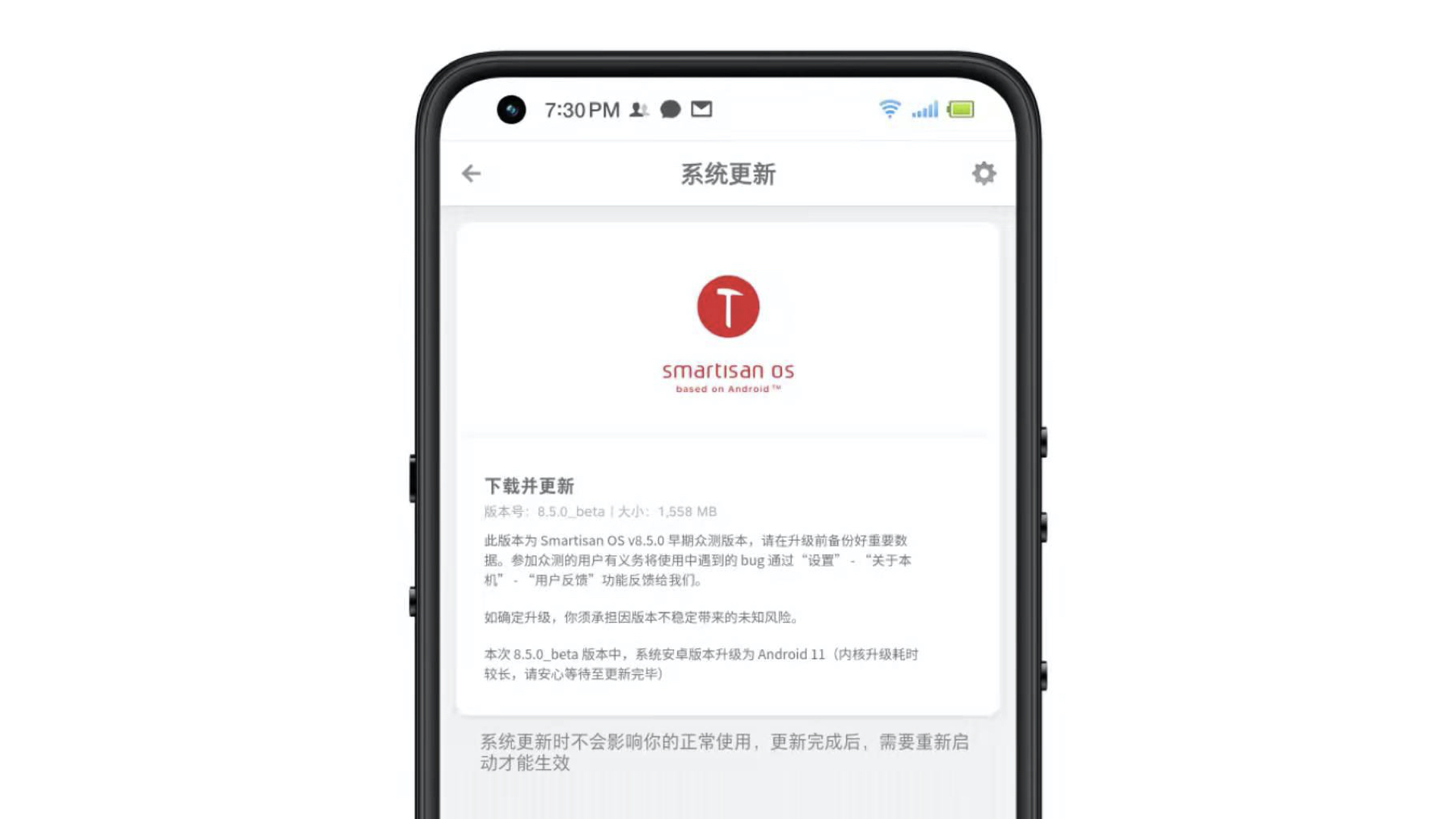
    <content type="html"><![CDATA[<blockquote><p>撰写本文，希望警戒自己不再为一个可以使用其他方式与设备实现的需求，投入更多的精力和代价，不再为心里的匮乏而使用物质来满足，且一切使用物质填充内心而无法使用其赚钱的行为都是耍流氓。</p></blockquote><span id="more"></span><h2 id="导语"><a class="markdownIt-Anchor" href="#导语"></a> 导语</h2><p>经历过白色T1工业设计的方正，目前在我旁边的抽屉里；</p><p>Pro2伴随着我在北京，初步实现了我开发地图类工具App的想法并用于实践<sup class="footnote-ref"><a href="#fn1" id="fnref1">[1]</a></sup>，最后因主板发霉后非本色而售卖；</p><p>Pro3因当时没有白色版而冲动消费，最后售卖…</p><p>为了提高工作效率（误），作为一名“曾以为”自己会成为文字工作者（或作为新媒体已经成为）、传媒公司摄录剪辑视频的视频媒体人，加上对“效率三大件“的占有欲，我再一次购买坚果设备。</p><p>这也是我第一次在外租房，将消费花在手机上<sup class="footnote-ref"><a href="#fn2" id="fnref2">[2]</a></sup>。</p><p>这部坚果R2，帮给了我多少忙？实际使用起来体验感觉如何？</p><p>它所匹配的TNT go，对我而言是否是真正的刚需？</p><p>这是一篇将手机作为效率工具的角度的硬件评测。</p><p>如果老罗没有回来继续做手机，这也许是我最后一次购买坚果手机。</p><p><img src="https://i.loli.net/2021/09/04/6qB4ohMX8RkEgS7.jpg" alt="1501630730841_.pic_hd.jpg" /></p><h3 id="需求决定行为"><a class="markdownIt-Anchor" href="#需求决定行为"></a> 需求决定行为</h3><p>这一次与之前的“心心念念”一样。在数码交流群，我多次发送价格的图片，也咨询了一些众测师，是否有必要购入这部手机。</p><p>最终的原因，可能因为工作。但它帮了我多少呢，我用它产生了多少价值？</p><p>观望后，终于在7月底，我下了决心。</p><h2 id="开箱"><a class="markdownIt-Anchor" href="#开箱"></a> 开箱</h2><p>拿到R2，根据舆论的”要求“：首先检查屏幕，确认无误可激活<sup class="footnote-ref"><a href="#fn3" id="fnref3">[3]</a></sup>。因为已经出现关于品控问题的讨论，我觉得这部4月份的机器尚可，便开始激活。</p><p>提示：下方是开箱视频/链接，您如果不在Wi-Fi环境下可直接查看照片。</p><p><a href="https://www.bilibili.com/video/BV1ih411B7iK">https://www.bilibili.com/video/BV1ih411B7iK</a></p><p>这是我非常简单的开箱视频。</p><p><img src="https://i.loli.net/2021/09/04/f5gLiWd4oD9FzyA.jpg" alt="未命名.001.jpeg" /></p><p>坚果的曲面，可以叫做微曲面。</p><p>这种曲面没有华为 P40 那么曲那么潮，是完全的左右两侧的曲面，同时也带有曲面的特色。</p><p>根据我的使用实操来说，微曲面和三大金刚键使用起来很趁手，也感觉金刚键是为了弥补无法滑动的左上角。</p><p>这种屏幕给我的第一观感是“我跟上了潮流”，手机的料很足，不少友友都吐槽手机很重，两百多克；</p><p>第二感觉则是大：相比我的iPhone11来说。这种大，结合着一步，没有浪费屏幕的尺寸（一步的顶端除外）。</p><p>但这种大在我做周报表格的时候发觉：“或许只是一步很好用，遇到了TNT”，其实手机还是捉襟见肘。</p><p>正可谓：“专业的设备做专业的事”，但是好的是对于复制粘贴与跨应用传递数据来说，一步确实提高了效率。</p><h2 id="工作体验"><a class="markdownIt-Anchor" href="#工作体验"></a> 工作体验</h2><p>目前使用坚果手机作为出行机器的近一个月，我已经适应了使用WPS和一步与应用的配合。</p><p>主要是效率三大件（一步、闪念胶囊和大爆炸），为我完成工作提供了便捷。</p><h3 id="one-step"><a class="markdownIt-Anchor" href="#one-step"></a> One step！</h3><h4 id="使用wps撰写周报"><a class="markdownIt-Anchor" href="#使用wps撰写周报"></a> 使用WPS撰写周报</h4><p>这也是我对于这份工作来说的回顾之一，一步功能着实在我的工作生活中帮助了我很多。</p><p>我目前的周报是公益项目，由于对格式的要求较高，我使用手机进行内容的快捷复制，<strong>更多的格式调整则必须在电脑上完成</strong>。我有相应且充足的计算机，所以不可能购买 TNT go。</p><p>出于演示与保护工作资料，我新建了文档进行示范。</p><p>使用 WPS Lite</p><p>使用 WPS Lite，以下复制到表格的操作均可由一步完成：</p><ol><li>由微信公众号列表复制至表格中</li><li>由引力播 App 列表读报复制至表格中</li><li>由系统浏览器的网站新闻标题直接复制至表格中，但还需去除文章的链接（这一步影响表格的格式，需调整）</li></ol><center>下方动图分别为微信号、引力播、网页浏览器使用一步复制内容的效果<center><p><img src="https://i.loli.net/2021/09/04/cg5CyiANVoed8q6.jpg" alt="未命名.002.jpeg" /></p><p>鉴于一步目前的缺陷以及6.7寸的屏幕无法企及表格的全部内容（例如需要频繁的增删单元格），故使用过程中需重复打开WPS Lite、相应网站需点开复制标题（不支持一步），这样的时间几乎是补足了一步节省下来的时间。</p><h4 id="收集新闻链接"><a class="markdownIt-Anchor" href="#收集新闻链接"></a> 收集新闻链接</h4><p>目前看这部手机给我工作上较大的效率提升，要数收集新闻链接。</p><p>通常需要将微信群里的公司有关新闻链接进行汇总，使用一步功能，可快速地将连接的标题拖拽到文档相应的光标处。</p><p>即使如此，在手机上操作仍然存在一些格式问题，目前使用的相应功能仅是“加粗”、“格式刷”，要想新增或合并单元格、修改单元格底色等操作，还是得在我的计算机上操作。</p><h4 id="下载公众号视频"><a class="markdownIt-Anchor" href="#下载公众号视频"></a> 下载公众号视频</h4><p>iOS自带的视频播放器并不具备下载功能，所以使用 Android 做公众号视频下载。</p><p><img src="https://i.loli.net/2021/09/04/m8khHcri4lzPJM5.jpg" alt="未命名3.001.jpeg" /></p><center>iOS播放器和Android QQ浏览器的图片对比<center><h3 id="开启时间胶囊~"><a class="markdownIt-Anchor" href="#开启时间胶囊~"></a> 开启时间胶囊～</h3><h4 id="会议记录"><a class="markdownIt-Anchor" href="#会议记录"></a> 会议记录</h4><p>R2 外出，我携带此手机参与一项会议，开启时间胶囊功能。</p><p>根据图片附件实测，一次发送微信多张图片，电脑接收，效率更高。</p><p>由于并不需要录音等其他功能，目前仅用图片附件的形式保存。</p><p>因内容涉及会议内容，截图就不发出了。</p><hr /><p>目前，我也在发掘以上功能在我的生活里不同场景下的更多用法。</p><h2 id="tnt使用"><a class="markdownIt-Anchor" href="#tnt使用"></a> TNT使用</h2><p>坚果 R2，可能也是 TNT 的绝唱。在工作中，我当然会使用 TNT 的功能为我的工作做过提升，即使是更好的应用浏览体验。</p><p>我将常用的应用放在 dock 栏，在上一家公司时，尝试将微信接收文件的文件夹放在桌面<sup class="footnote-ref"><a href="#fn4" id="fnref4">[4]</a></sup>，不方便重命名，且仅保留十分钟之内的会话与布局，故现无实践。</p><p>由于未更新系统，故系统浏览器的插件功能，我使用火狐浏览器代替。</p><p><img src="https://i.loli.net/2021/09/04/YdqhnvKCbDMRHew.jpg" alt="未命名.003.jpeg" /></p><p>而 TNT ，我除了会用来浏览报纸外，偶尔我也会用来安装平板版的 HD 软件，查看设计布局，体验平板应用。</p><p><img src="https://i.loli.net/2021/09/04/P98qbxtzQFpmc4H.jpg" alt="未命名.004.jpeg" /></p><p>由于公司电脑，无法进行触摸，所以我便无法使用剪映进行新闻小视频的剪辑，如果我有了 TNT go，或许这将是一个完整的工作流：</p><center>使用QQ浏览器下载视频-使用TNT go的剪映修剪，再使用一步拖拽到工作群。<center><p>目前，在公司的 TNT 体验已丧失，可能是因为主机的网卡老化，导致无法连接 Wi-Fi 了。</p><p>还好，我的 Surface Go 依旧可以使用 TNT ，以下分别是在我的电脑和办公室电脑（即刻动态）的照片：</p><p><img src="https://i.loli.net/2021/09/04/pKwfmBUPJbeqYSQ.jpg" alt="未命名.005.jpeg" /></p><p><img src="https://i.loli.net/2021/09/04/wBQujXr9xA1fPVY.jpg" alt="未命名.006.jpeg" /></p><h3 id="关于应用"><a class="markdownIt-Anchor" href="#关于应用"></a> 关于应用</h3><h4 id="剪映"><a class="markdownIt-Anchor" href="#剪映"></a> 剪映</h4><p>当发布会上说剪映适配了TNT后，自己第一反应当然是找来安装。使用键盘上的windows+上键，即可进入全屏模式，若是触屏，直接操作即可。</p><p><img src="https://i.loli.net/2021/09/04/EDe5h9nftwJ8cVZ.jpg" alt="未命名.009.jpeg" /></p><p>如上图动态所示，我使用了之前屏幕录屏视频作为素材，由于办公室计算机无法触摸，使用鼠标有所延迟。</p><h2 id="android-11众测"><a class="markdownIt-Anchor" href="#android-11众测"></a> Android 11众测</h2><p>最近，坚果手机官方开始推送Android11的众测版本，据不少用户反应仅修改了底层，并无新功能。不仅如此，还砍掉了手指切换横竖屏功能。</p><p>什么是手指切换横竖屏功能？以下是官方的解释：</p><p><img src="https://i.loli.net/2021/09/04/5DavITOKNgUlFm4.jpg" alt="未命名.011.jpeg" /></p><p>如果是备用机，我似乎会毫不犹豫的升级Android 11，但作为双持，且主力之一的R2，还是先观望一段时间，再进行更新。</p><p><img src="https://i.loli.net/2021/09/04/PqmvE7lLnDpw5rf.jpg" alt="未命名.012.jpeg" /></p><h2 id="r3"><a class="markdownIt-Anchor" href="#r3"></a> R3</h2><p>关于R3，最近群里又传出了锤子要回来的传闻。</p><p>诚然，新科技确实好，对于我这样一个产品党来说，依旧会去顺电进行深度体验，同时对于在外漂泊的人来说，购买还得靠相应的购买力。而效率工具，对于工作的人来说，利用好仅它的小功能，利用好所自带的价值，则更有意义。</p><p>为懂得这个道理，我因此而“浪费”了不少软妹币。远超过拥有其的意义，远超过填补内心的一种行为。</p><h2 id="双持与我的生活"><a class="markdownIt-Anchor" href="#双持与我的生活"></a> 双持与我的生活</h2><p>我将Phone作为出行日常的收付款、追求稳定且必要应用、摄影机以及饿了么获得吃货豆15秒的专用机器。因为工作原因，现在已经很少进行应用的体验了，而不那么追求稳定的应用、工作需求，我使用R2。</p><p>即便如此，不可避免的是手机没电等日常情况。在即刻上我写道：</p><blockquote><p>作为iOS和Android双持党，<br />想力争稳定，将支付相关装在iPhone上，结果由于国内生态环境，微信无法扫描永安行的二维码，下载了App之后还必须下载支付宝，幻想破灭……<br />出来骑行吃个饭就辣么难……</p></blockquote><h3 id="日常携带"><a class="markdownIt-Anchor" href="#日常携带"></a> 日常携带</h3><p>他们分别在防晒服左右两个口袋，分别是两个手机：一个通勤刷卡，一个看工作群。有了Wi-Fi后，他们都活起来了。</p><p>写到这，我无疑最应当做的事就是将我之前的Pro3一直留到现在而不是出掉它，但当时如果不出，则闲置在家里落灰。</p><p>算是一个恋物癖吧，看到R1的截图则很希望拥有，R2莫过于此。</p><h2 id="我对android手机的心有余悸"><a class="markdownIt-Anchor" href="#我对android手机的心有余悸"></a> 我对Android手机的心有余悸</h2><p>日后，希望我的辛苦钱，可以花在真正的“刀口”上，可以助力我完善Android基础与iOS和前端基础，完成我的App开发。</p><p>工具仅是工具，购买工具，也是为了更好进行文章的输出与工作中效率上的提升，起初是因为手里的 T1 在下载微信小视频时显得捉襟见肘，也因为iOS无法下载这样的视频<sup class="footnote-ref"><a href="#fn5" id="fnref5">[5]</a></sup>。</p><p>诚然，说得再多，想花钱，这一切都不是理由，也不需要理由。</p><p>每当看到工作群的角标变成十几，我便习惯性的打开一步，打开WPS Lite与微信、工作群、多条转发聊天记录，长按标题拖拽至文档相应的光标处。</p><p>当然，我再也没有使用 TNT 去浏览引力播，查找与周报有关的新闻。</p><h2 id="后记"><a class="markdownIt-Anchor" href="#后记"></a> 后记</h2><p>在撰写本文时，已经超过了30天无忧退的时机。</p><p>其实所有的过错，都在于人，工具只能是起到辅助的作用，它的出现，并没有对错。</p><p>现在看，它也许并没有陪着我的必要，可能我的这份工作，也会因为人的原因难以持续下去；但在下一次工作或是我的自由职业生涯，也需要一部Android手机，便于做一些操作。</p><p>原标题：坚果R2：可能是我最后一部锤子手机</p><p>本篇文章同步发表于：<a href="https://mp.weixin.qq.com/s/IkBjbWgbKjp_JLH20qGO-A">微信公众号</a> ｜<a href="https://www.toutiao.com/item/7003982298123092487/">头条号</a>｜ <a href="https://sspai.com/post/68608">少数派</a> ｜ <a href="https://www.pmcaff.com/article/3054644120193152?newwindow=1">PMCAFF</a> ｜<a href="https://zhuanlan.zhihu.com/p/406784493">知乎</a>｜<a href="#%E5%B0%8F%E7%A8%8B%E5%BA%8F://%E7%B3%96%E7%BA%B8/QJCi4b8lDq2C6Pg">糖纸众测</a></p><hr /><hr class="footnotes-sep" /><section class="footnotes"><ol class="footnotes-list"><li id="fn1" class="footnote-item"><p>目前留下来的，是一张使用截图，和工程源文件。 <a href="#fnref1" class="footnote-backref">↩︎</a></p></li><li id="fn2" class="footnote-item"><p>价格将近三个月的房租，最近，则是房管提醒我交租的日子。 <a href="#fnref2" class="footnote-backref">↩︎</a></p></li><li id="fn3" class="footnote-item"><p>除了边缘有稍稍发绿发红外，其余感觉并无大碍。 <a href="#fnref3" class="footnote-backref">↩︎</a></p></li><li id="fn4" class="footnote-item"><p>相信也有用户这么尝试过。 <a href="#fnref4" class="footnote-backref">↩︎</a></p></li><li id="fn5" class="footnote-item"><p>如果iOS可以下载，我绝对不会购买坚果R2。可能是我没找到合适的方式，例如我在Mac上找到了一个油猴脚本来网页版公众号的视频下载。 <a href="#fnref5" class="footnote-backref">↩︎</a></p></li></ol></section>]]></content>
    
    
    <summary type="html">&lt;blockquote&gt;
&lt;p&gt;撰写本文，希望警戒自己不再为一个可以使用其他方式与设备实现的需求，投入更多的精力和代价，不再为心里的匮乏而使用物质来满足，且一切使用物质填充内心而无法使用其赚钱的行为都是耍流氓。&lt;/p&gt;
&lt;/blockquote&gt;</summary>


    <category term="产品" scheme="https://felixxiong.github.io/categories/%E4%BA%A7%E5%93%81/"/>
    
    <category term="折腾与探索" scheme="https://felixxiong.github.io/categories/%E4%BA%A7%E5%93%81/%E6%8A%98%E8%85%BE%E4%B8%8E%E6%8E%A2%E7%B4%A2/"/>
    
    <category term="锤子/坚果系列" scheme="https://felixxiong.github.io/categories/%E4%BA%A7%E5%93%81/%E6%8A%98%E8%85%BE%E4%B8%8E%E6%8E%A2%E7%B4%A2/%E9%94%A4%E5%AD%90-%E5%9D%9A%E6%9E%9C%E7%B3%BB%E5%88%97/"/>
    
    
    <category term="工作流" scheme="https://felixxiong.github.io/tags/%E5%B7%A5%E4%BD%9C%E6%B5%81/"/>
    
    <category term="工作" scheme="https://felixxiong.github.io/tags/%E5%B7%A5%E4%BD%9C/"/>
    
    <category term="手机" scheme="https://felixxiong.github.io/tags/%E6%89%8B%E6%9C%BA/"/>
    
  </entry>
  
  <entry>
    <title>iPad mini2降级iOS10.3.3</title>
    <link href="https://felixxiong.github.io/2021/07/09/iPad-mini2%E9%99%8D%E7%BA%A7iOS10-3-3/"/>
    <id>https://felixxiong.github.io/2021/07/09/iPad-mini2%E9%99%8D%E7%BA%A7iOS10-3-3/</id>
    <published>2021-07-08T23:36:00.000Z</published>
    <updated>2021-07-12T09:16:42.102Z</updated>
    
    <content type="html"><![CDATA[<p>我的iPad mini2由于更新到12.4后卡顿，犹豫前后终于进行降级操作。</p><p>按照威锋网的一个帖子进行操作，本帖为我的踩坑贴汇总。</p><span id="more"></span><h2 id="安装环境报错"><a class="markdownIt-Anchor" href="#安装环境报错"></a> 安装环境报错</h2><p>使用<code>pip3 install -r requirements.txt</code>进行安装</p><h3 id="bsdiff4-setuppy-error"><a class="markdownIt-Anchor" href="#bsdiff4-setuppy-error"></a> bsdiff4 (<a href="http://setup.py">setup.py</a>) … error</h3><pre class="highlight"><code class="bash">Requirement already satisfied: six==1.13.0 <span class="hljs-keyword">in</span> /Library/Python/3.8/site-packages (from -r requirements.txt (line 10)) (1.13.0)Building wheels <span class="hljs-keyword">for</span> collected packages: bsdiff4, pyusbBuilding wheel <span class="hljs-keyword">for</span> bsdiff4 (setup.py) ... errorERROR: Command errored out with <span class="hljs-built_in">exit</span> status 1:<span class="hljs-built_in">command</span>: /Library/Developer/CommandLineTools/usr/bin/python3 -u -c <span class="hljs-string">'import io, os, sys, setuptools, tokenize; sys.argv[0] = '</span><span class="hljs-string">"'"</span><span class="hljs-string">'/private/var/folders/53/1v8ykf513138zrvp2th76l640000gn/T/pip-install-bhzlo3bb/bsdiff4_cc62a057fa494a5b92e99f21441ab6d2/setup.py'</span><span class="hljs-string">"'"</span><span class="hljs-string">'; __file__='</span><span class="hljs-string">"'"</span><span class="hljs-string">'/private/var/folders/53/1v8ykf513138zrvp2th76l640000gn/T/pip-install-bhzlo3bb/bsdiff4_cc62a057fa494a5b92e99f21441ab6d2/setup.py'</span><span class="hljs-string">"'"</span><span class="hljs-string">';f = getattr(tokenize, '</span><span class="hljs-string">"'"</span><span class="hljs-string">'open'</span><span class="hljs-string">"'"</span><span class="hljs-string">', open)(__file__) if os.path.exists(__file__) else io.StringIO('</span><span class="hljs-string">"'"</span><span class="hljs-string">'from setuptools import setup; setup()'</span><span class="hljs-string">"'"</span><span class="hljs-string">');code = f.read().replace('</span><span class="hljs-string">"'"</span><span class="hljs-string">'\r\n'</span><span class="hljs-string">"'"</span><span class="hljs-string">', '</span><span class="hljs-string">"'"</span><span class="hljs-string">'\n'</span><span class="hljs-string">"'"</span><span class="hljs-string">');f.close();exec(compile(code, __file__, '</span><span class="hljs-string">"'"</span><span class="hljs-string">'exec'</span><span class="hljs-string">"'"</span><span class="hljs-string">'))'</span> bdist_wheel -d /private/var/folders/53/1v8ykf513138zrvp2th76l640000gn/T/pip-wheel-pm9ph9rp​    cwd: /private/var/folders/53/1v8ykf513138zrvp2th76l640000gn/T/pip-install-bhzlo3bb/bsdiff4_cc62a057fa494a5b92e99f21441ab6d2/ Complete output (114 lines): running bdist_wheel running build running build_py creating build creating build/lib.macosx-10.14.6-x86_64-3.8 creating build/lib.macosx-10.14.6-x86_64-3.8/bsdiff4 copying bsdiff4/test_all.py -&gt; build/lib.macosx-10.14.6-x86_64-3.8/bsdiff4 copying bsdiff4/__init__.py -&gt; build/lib.macosx-10.14.6-x86_64-3.8/bsdiff4 copying bsdiff4/format.py -&gt; build/lib.macosx-10.14.6-x86_64-3.8/bsdiff4 copying bsdiff4/cli.py -&gt; build/lib.macosx-10.14.6-x86_64-3.8/bsdiff4 running build_ext building <span class="hljs-string">'bsdiff4.core'</span> extension creating build/temp.macosx-10.14.6-x86_64-3.8 creating build/temp.macosx-10.14.6-x86_64-3.8/bsdiff4 clang -Wno-unused-result -Wsign-compare -Wunreachable-code -fno-common -dynamic -DNDEBUG -g -fwrapv -O3 -Wall -iwithsysroot/System/Library/Frameworks/System.framework/PrivateHeaders -iwithsysroot/Applications/Xcode.app/Contents/Developer/Library/Frameworks/Python3.framework/Versions/3.8/Headers -arch arm64 -arch x86_64 -I/Library/Developer/CommandLineTools/Library/Frameworks/Python3.framework/Versions/3.8/include/python3.8 -c bsdiff4/core.c -o build/temp.macosx-10.14.6-x86_64-3.8/bsdiff4/core.o In file included from bsdiff4/core.c:9: In file included from /Library/Developer/CommandLineTools/Library/Frameworks/Python3.framework/Versions/3.8/include/python3.8/Python.h:11: In file included from /Library/Developer/CommandLineTools/usr/lib/clang/12.0.0/include/limits.h:21: In file included from /Library/Developer/CommandLineTools/SDKs/MacOSX10.15.sdk/usr/include/limits.h:63: /Library/Developer/CommandLineTools/SDKs/MacOSX10.15.sdk/usr/include/sys/cdefs.h:807:2: error: Unsupported architecture \<span class="hljs-comment">#error Unsupported architecture</span>  ^ In file included from bsdiff4/core.c:9: In file included from /Library/Developer/CommandLineTools/Library/Frameworks/Python3.framework/Versions/3.8/include/python3.8/Python.h:11: In file included from /Library/Developer/CommandLineTools/usr/lib/clang/12.0.0/include/limits.h:21: In file included from /Library/Developer/CommandLineTools/SDKs/MacOSX10.15.sdk/usr/include/limits.h:64: /Library/Developer/CommandLineTools/SDKs/MacOSX10.15.sdk/usr/include/machine/limits.h:8:2: error: architecture not supported \<span class="hljs-comment">#error architecture not supported</span>  ^ In file included from bsdiff4/core.c:9: In file included from /Library/Developer/CommandLineTools/Library/Frameworks/Python3.framework/Versions/3.8/include/python3.8/Python.h:25: In file included from /Library/Developer/CommandLineTools/SDKs/MacOSX10.15.sdk/usr/include/stdio.h:64: In file included from /Library/Developer/CommandLineTools/SDKs/MacOSX10.15.sdk/usr/include/_stdio.h:71: In file included from /Library/Developer/CommandLineTools/SDKs/MacOSX10.15.sdk/usr/include/_types.h:27: In file included from /Library/Developer/CommandLineTools/SDKs/MacOSX10.15.sdk/usr/include/sys/_types.h:33: /Library/Developer/CommandLineTools/SDKs/MacOSX10.15.sdk/usr/include/machine/_types.h:34:2: error: architecture not supported \<span class="hljs-comment">#error architecture not supported</span>  ^ In file included from bsdiff4/core.c:9: In file included from /Library/Developer/CommandLineTools/Library/Frameworks/Python3.framework/Versions/3.8/include/python3.8/Python.h:25: In file included from /Library/Developer/CommandLineTools/SDKs/MacOSX10.15.sdk/usr/include/stdio.h:64: In file included from /Library/Developer/CommandLineTools/SDKs/MacOSX10.15.sdk/usr/include/_stdio.h:71: In file included from /Library/Developer/CommandLineTools/SDKs/MacOSX10.15.sdk/usr/include/_types.h:27: /Library/Developer/CommandLineTools/SDKs/MacOSX10.15.sdk/usr/include/sys/_types.h:55:9: error: unknown <span class="hljs-built_in">type</span> name <span class="hljs-string">'__int64_t'</span> typedef __int64_t    __darwin_blkcnt_t;   /* total blocks */​     ^ /Library/Developer/CommandLineTools/SDKs/MacOSX10.15.sdk/usr/include/sys/_types.h:56:9: error: unknown <span class="hljs-built_in">type</span> name <span class="hljs-string">'__int32_t'</span>; did you mean <span class="hljs-string">'__int128_t'</span>? typedef __int32_t    __darwin_blksize_t;   /* preferred block size */​     ^ note: <span class="hljs-string">'__int128_t'</span> declared here /Library/Developer/CommandLineTools/SDKs/MacOSX10.15.sdk/usr/include/sys/_types.h:57:9: error: unknown <span class="hljs-built_in">type</span> name <span class="hljs-string">'__int32_t'</span>; did you mean <span class="hljs-string">'__int128_t'</span>? typedef __int32_t    __darwin_dev_t;     /* dev_t */​     ^ note: <span class="hljs-string">'__int128_t'</span> declared here /Library/Developer/CommandLineTools/SDKs/MacOSX10.15.sdk/usr/include/sys/_types.h:60:9: error: unknown <span class="hljs-built_in">type</span> name <span class="hljs-string">'__uint32_t'</span>; did you mean <span class="hljs-string">'__uint128_t'</span>? typedef __uint32_t   __darwin_gid_t;     /* [???] process and group IDs */​     ^ note: <span class="hljs-string">'__uint128_t'</span> declared here /Library/Developer/CommandLineTools/SDKs/MacOSX10.15.sdk/usr/include/sys/_types.h:61:9: error: unknown <span class="hljs-built_in">type</span> name <span class="hljs-string">'__uint32_t'</span>; did you mean <span class="hljs-string">'__uint128_t'</span>? typedef __uint32_t   __darwin_id_t;     /* [XSI] pid_t, uid_t, or gid_t*/​     ^ note: <span class="hljs-string">'__uint128_t'</span> declared here /Library/Developer/CommandLineTools/SDKs/MacOSX10.15.sdk/usr/include/sys/_types.h:62:9: error: unknown <span class="hljs-built_in">type</span> name <span class="hljs-string">'__uint64_t'</span> typedef __uint64_t   __darwin_ino64_t;    /* [???] Used <span class="hljs-keyword">for</span> 64 bit inodes */​     ^ /Library/Developer/CommandLineTools/SDKs/MacOSX10.15.sdk/usr/include/sys/_types.h:68:9: error: unknown <span class="hljs-built_in">type</span> name <span class="hljs-string">'__darwin_natural_t'</span> typedef __darwin_natural_t __darwin_mach_port_name_t; /* Used by mach */​     ^ /Library/Developer/CommandLineTools/SDKs/MacOSX10.15.sdk/usr/include/sys/_types.h:70:9: error: unknown <span class="hljs-built_in">type</span> name <span class="hljs-string">'__uint16_t'</span>; did you mean <span class="hljs-string">'__uint128_t'</span>? typedef __uint16_t   __darwin_mode_t;    /* [???] Some file attributes */​     ^ note: <span class="hljs-string">'__uint128_t'</span> declared here /Library/Developer/CommandLineTools/SDKs/MacOSX10.15.sdk/usr/include/sys/_types.h:71:9: error: unknown <span class="hljs-built_in">type</span> name <span class="hljs-string">'__int64_t'</span> typedef __int64_t    __darwin_off_t;     /* [???] Used <span class="hljs-keyword">for</span> file sizes */​     ^ /Library/Developer/CommandLineTools/SDKs/MacOSX10.15.sdk/usr/include/sys/_types.h:72:9: error: unknown <span class="hljs-built_in">type</span> name <span class="hljs-string">'__int32_t'</span>; did you mean <span class="hljs-string">'__int128_t'</span>? typedef __int32_t    __darwin_pid_t;     /* [???] process and group IDs */​     ^ note: <span class="hljs-string">'__int128_t'</span> declared here /Library/Developer/CommandLineTools/SDKs/MacOSX10.15.sdk/usr/include/sys/_types.h:73:9: error: unknown <span class="hljs-built_in">type</span> name <span class="hljs-string">'__uint32_t'</span>; did you mean <span class="hljs-string">'__uint128_t'</span>? typedef __uint32_t   __darwin_sigset_t;   /* [???] signal <span class="hljs-built_in">set</span> */​     ^ note: <span class="hljs-string">'__uint128_t'</span> declared here /Library/Developer/CommandLineTools/SDKs/MacOSX10.15.sdk/usr/include/sys/_types.h:74:9: error: unknown <span class="hljs-built_in">type</span> name <span class="hljs-string">'__int32_t'</span>; did you mean <span class="hljs-string">'__int128_t'</span>? typedef __int32_t    __darwin_suseconds_t;  /* [???] microseconds */​     ^ note: <span class="hljs-string">'__int128_t'</span> declared here /Library/Developer/CommandLineTools/SDKs/MacOSX10.15.sdk/usr/include/sys/_types.h:75:9: error: unknown <span class="hljs-built_in">type</span> name <span class="hljs-string">'__uint32_t'</span>; did you mean <span class="hljs-string">'__uint128_t'</span>? typedef __uint32_t   __darwin_uid_t;     /* [???] user IDs */​     ^ note: <span class="hljs-string">'__uint128_t'</span> declared here /Library/Developer/CommandLineTools/SDKs/MacOSX10.15.sdk/usr/include/sys/_types.h:76:9: error: unknown <span class="hljs-built_in">type</span> name <span class="hljs-string">'__uint32_t'</span>; did you mean <span class="hljs-string">'__uint128_t'</span>? typedef __uint32_t   __darwin_useconds_t;  /* [???] microseconds */​     ^ note: <span class="hljs-string">'__uint128_t'</span> declared here In file included from bsdiff4/core.c:9: In file included from /Library/Developer/CommandLineTools/Library/Frameworks/Python3.framework/Versions/3.8/include/python3.8/Python.h:25: In file included from /Library/Developer/CommandLineTools/SDKs/MacOSX10.15.sdk/usr/include/stdio.h:64: In file included from /Library/Developer/CommandLineTools/SDKs/MacOSX10.15.sdk/usr/include/_stdio.h:71: /Library/Developer/CommandLineTools/SDKs/MacOSX10.15.sdk/usr/include/_types.h:43:9: error: unknown <span class="hljs-built_in">type</span> name <span class="hljs-string">'__uint32_t'</span>; did you mean <span class="hljs-string">'__uint128_t'</span>? typedef __uint32_t   __darwin_wctype_t;​     ^ note: <span class="hljs-string">'__uint128_t'</span> declared here In file included from bsdiff4/core.c:9: In file included from /Library/Developer/CommandLineTools/Library/Frameworks/Python3.framework/Versions/3.8/include/python3.8/Python.h:25: In file included from /Library/Developer/CommandLineTools/SDKs/MacOSX10.15.sdk/usr/include/stdio.h:64: In file included from /Library/Developer/CommandLineTools/SDKs/MacOSX10.15.sdk/usr/include/_stdio.h:75: In file included from /Library/Developer/CommandLineTools/SDKs/MacOSX10.15.sdk/usr/include/sys/_types/_va_list.h:31: /Library/Developer/CommandLineTools/SDKs/MacOSX10.15.sdk/usr/include/machine/types.h:37:2: error: architecture not supported \<span class="hljs-comment">#error architecture not supported</span>  ^ fatal error: too many errors emitted, stopping now [-ferror-limit=] 20 errors generated. error: <span class="hljs-built_in">command</span> <span class="hljs-string">'clang'</span> failed with <span class="hljs-built_in">exit</span> status 1   ...   Check the logs <span class="hljs-keyword">for</span> full <span class="hljs-built_in">command</span> output.</code></pre><h3 id="修复"><a class="markdownIt-Anchor" href="#修复"></a> 修复</h3><h4 id="sudo-h"><a class="markdownIt-Anchor" href="#sudo-h"></a> sudo -H</h4><p>首个踩坑：</p><pre class="highlight"><code class="bash">WARNING: The directory <span class="hljs-string">'/Users/xxx/Library/Caches/pip'</span> or its parent directory is not owned by the current user and caching wheels has been disabled. check the permissions and owner of that directory. If executing pip with sudo, you may want sudo<span class="hljs-string">'s -H flag.</span></code></pre><h3 id="继续修复"><a class="markdownIt-Anchor" href="#继续修复"></a> 继续修复</h3><p>参考：<a href="https://stackoverflow.com/questions/53204916/what-is-the-meaning-of-failed-building-wheel-for-x-in-pip-install">What is the meaning of “Failed building wheel for X” in pip install?</a></p><p>使用<code>pip3 -v</code>,可见有pip3使用：pip install wheel，出现下列问题：</p><h4 id="zshcommand-cannot-found-pip"><a class="markdownIt-Anchor" href="#zshcommand-cannot-found-pip"></a> zsh:command cannot found pip</h4><p>参考：<a href="https://stackoverflow.com/questions/42870537/zsh-command-cannot-found-pip">zsh command cannot found pip</a></p><p>要点：<strong><strong>创建pip3环境变量</strong></strong></p><p>查找pip3的路径：<code>pip3 -V</code></p><p>创建alias：<code>alias pip=/usr/bin/pip3</code>放在zshrc内，之后<code>source ~/.zshrc</code>。</p><h4 id="user权限问题"><a class="markdownIt-Anchor" href="#user权限问题"></a> –user权限问题</h4><p>在更新pip时，版本从19-21，报出权限问题：<sup class="footnote-ref"><a href="#fn1" id="fnref1">[1]</a></sup></p><pre class="highlight"><code class="bash">Consider using the `--user` option or check the permissions.</code></pre><p>参考：<a href="https://stackoverflow.com/questions/52949531/could-not-install-packages-due-to-an-environmenterror-errno-13">Could not install packages due to an EnvironmentError: Errno 13</a></p><p>使用<code>pip3 install package_name --user</code>更新pip，成功。</p><h4 id="找到了一个issue"><a class="markdownIt-Anchor" href="#找到了一个issue"></a> 找到了一个issue</h4><p>参考GitHub issue：<a href="https://github.com/MatthewPierson/Vieux/issues/218">Running setup.py install for bsdiff4 … error</a></p><p>–user应该放在后面，添加zchrc，当然之后也要source：</p><pre class="highlight"><code class="bash"><span class="hljs-built_in">export</span> ARCHFLAGS=<span class="hljs-string">"-arch x86_64"</span>python3 -m pip install --user -r requirements.txt</code></pre><p>使用以下命令安装成功：</p><pre class="highlight"><code class="bash">python3 -m pip install --user -r requirements.txt</code></pre><p>结果：</p><pre class="highlight"><code class="bash">Requirement already satisfied: six==1.13.0 <span class="hljs-keyword">in</span> /Library/Python/3.8/site-packages (from -r requirements.txt (line 10)) (1.13.0)Building wheels <span class="hljs-keyword">for</span> collected packages: bsdiff4 Building wheel <span class="hljs-keyword">for</span> bsdiff4 (setup.py) ... <span class="hljs-keyword">done</span> Created wheel <span class="hljs-keyword">for</span> bsdiff4: filename=bsdiff4-1.1.9-cp38-cp38-macosx_10_14_6_x86_64.whl size=12710 sha256=fe15fdacfe95ad6a085f38ac34c501937a582d632191b4053ede8afc76f0c938 Stored <span class="hljs-keyword">in</span> directory: /Users/penghaoxiong/Library/Caches/pip/wheels/94/a6/ac/6d5b7fdb7c73297adee2e9f7181664b33234cecfd1eb34280cSuccessfully built bsdiff4Installing collected packages: bsdiff4 WARNING: The scripts bsdiff4 and bspatch4 are installed <span class="hljs-keyword">in</span> <span class="hljs-string">'/Users/penghaoxiong/Library/Python/3.8/bin'</span> <span class="hljs-built_in">which</span> is not on PATH. Consider adding this directory to PATH or, <span class="hljs-keyword">if</span> you prefer to suppress this warning, use --no-warn-script-location.Successfully installed bsdiff4-1.1.9</code></pre><h2 id="开始降级"><a class="markdownIt-Anchor" href="#开始降级"></a> 开始降级</h2><h4 id="catalina"><a class="markdownIt-Anchor" href="#catalina"></a> Catalina</h4><p>在终端中输入<code>CatalinaFix.sh</code>，使用打开方式无效。</p><h4 id="usbcorenobackenderror-no-backend-available"><a class="markdownIt-Anchor" href="#usbcorenobackenderror-no-backend-available"></a> usb.core.NoBackendError: No backend available</h4><p>参考：<a href="https://blog.csdn.net/nexuszjq/article/details/117407380">iPad mini2 Vieux降级ios10.3.3 问题解决合集</a></p><p>需要安装usbilb:<code>brew install libusb</code></p><p>当前（2021年7月）下载，可能会提示：</p><pre class="highlight"><code class="bash">Starting iBSS/iBEC patchingLooks like you are downgrading an iPad Mini 2 to 10.3.3!Patched iBSS/iBECAbout to re-build IPSWEntering PWNREC mode...Getting SHSH...Restoring...Note that errors about <span class="hljs-string">'BbSkeyId'</span>, <span class="hljs-string">'FDR Client'</span>, <span class="hljs-string">'BasebandFirmware Node'</span> and <span class="hljs-string">'ERROR: zip_name_locate: Firmware/all_flash/manifest'</span> are not important.Just ignore them and only report errors that actually stop the restore.Restoring without a baseband as your iPad4,4 doesn<span class="hljs-string">'t have cellular capabilities...WARNING: Unable to find BbChipID nodeWARNING: Unable to find BbChipID nodeFiles cleaned.Finished! Enjoy your downgraded device :)penghaoxiong@PenghaoXiongs-MacBook-Pro Vieux-master %</span></code></pre><p>便降级成功了。</p><hr /><p><a href="https://ipsw.me/iPad4,4">Choose an IPSW for the iPad Mini 2 (WiFi)</a></p><p><a href="https://github.com/MatthewPierson">MatthewPierson</a> / <a href="https://github.com/MatthewPierson/Vieux">Vieux</a></p><hr class="footnotes-sep" /><section class="footnotes"><ol class="footnotes-list"><li id="fn1" class="footnote-item"><p>此处由于安装完brew的python3之后总结，故报错信息不完整，但意思还是到了。 <a href="#fnref1" class="footnote-backref">↩︎</a></p></li></ol></section>]]></content>
    
    
    <summary type="html">&lt;p&gt;我的iPad mini2由于更新到12.4后卡顿，犹豫前后终于进行降级操作。&lt;/p&gt;
&lt;p&gt;按照威锋网的一个帖子进行操作，本帖为我的踩坑贴汇总。&lt;/p&gt;</summary>


    <category term="产品" scheme="https://felixxiong.github.io/categories/%E4%BA%A7%E5%93%81/"/>
    
    <category term="折腾与探索" scheme="https://felixxiong.github.io/categories/%E4%BA%A7%E5%93%81/%E6%8A%98%E8%85%BE%E4%B8%8E%E6%8E%A2%E7%B4%A2/"/>
    
    <category term="iPad系列" scheme="https://felixxiong.github.io/categories/%E4%BA%A7%E5%93%81/%E6%8A%98%E8%85%BE%E4%B8%8E%E6%8E%A2%E7%B4%A2/iPad%E7%B3%BB%E5%88%97/"/>
    
    
    <category term="降级" scheme="https://felixxiong.github.io/tags/%E9%99%8D%E7%BA%A7/"/>
    
  </entry>
  
  <entry>
    <title>说说近况</title>
    <link href="https://felixxiong.github.io/2021/06/19/%E8%AF%B4%E8%AF%B4%E8%BF%91%E5%86%B5/"/>
    <id>https://felixxiong.github.io/2021/06/19/%E8%AF%B4%E8%AF%B4%E8%BF%91%E5%86%B5/</id>
    <published>2021-06-18T22:41:47.000Z</published>
    <updated>2021-06-19T16:39:10.144Z</updated>
    
    <content type="html"><![CDATA[<p>由于现实因素，此博客日后仅输出思考与技术相关文章。</p><p>已经撤下部分关于博主真实心境（到现在我说话还是这么含蓄，该改改了）相关的“丧”主题的历史心理活动文章。</p><span id="more"></span><h2 id="现实"><a class="markdownIt-Anchor" href="#现实"></a> 现实</h2><h3 id="诚实的相对面"><a class="markdownIt-Anchor" href="#诚实的相对面"></a> 诚实的相对面</h3><p>由于在现实社会中，所谓“诚实”，需要对身边的人诚实，但是在社会上，有些时候确实不能诚实——</p><p>有时候人与人之间要对刚认识的同性或者是异性保持好感，要保护自己的利益，要这要那过于复杂。否则，便是失去回忆或是离开。</p><p>这样的社会环境下，很难做到做一个简简单单的人，被迫失去初心，变得多面化。</p><h3 id="博客输出技能证明"><a class="markdownIt-Anchor" href="#博客输出技能证明"></a> 博客输出=技能证明</h3><p>通常，我会和其他的程序员、产品经理 一样，将自己的个人思考放在简历中 ，作为我输出的证明。但因生活和我的个人经历情况并没有多么的顺利、值得宣扬，且随性、自由、焦虑、“丧“对于求职的HR、还是领导而言，在这样的大环境下这些并不是什么“值得被看重”的特质<sup class="footnote-ref"><a href="#fn1" id="fnref1">[1]</a></sup>，更多的还是需要服从。</p><p>所以，正如本文概述所说，博客日后仅输出思考与技术相关文章。</p><h2 id="博客并不是牺身之所"><a class="markdownIt-Anchor" href="#博客并不是牺身之所"></a> 博客并不是牺身之所</h2><p>在很早的时候，我会将我的真实生活动态在博客当中撰写，为了获得那么一丁点反馈，就发出自己的声音，在互联网的汪洋里。</p><p>同时在现实生活中，当认识一个人的时候，我就会展示自己的博客，自己输出过的内容。</p><p>当然，这也就意味着输出过的一切都展现在他人的面前。</p><p>same里有一句我经常引用在我博客里的话：</p><blockquote><p>别人稍微一理你，你就敞开心扉，这就是孤独。</p></blockquote><p>很多人，完全就是看一个热闹，而并不是真正的想了解你——毕竟他们有自己的朋友圈，自己的圈子。</p><p>有的人，或许就是想笑话。</p><p>无法预测读者的心态，但我相信目前为止给我留言的读者都是很友好的那一类人，在此感谢你们。</p><h3 id="前同学的电话"><a class="markdownIt-Anchor" href="#前同学的电话"></a> 前同学的电话</h3><p>就像最近接到军训时认识的前同学，打电话来问有没有时间帮个忙挣一点外快一样。</p><p>最后他说：</p><blockquote><p>我们也就是一面之缘，不好意思打扰到你，你也有自己的生活，自己的人际，自己的圈子。</p></blockquote><p>按照我以前来说，我不理解，同学之间就该友好的互相帮助<sup class="footnote-ref"><a href="#fn2" id="fnref2">[2]</a></sup>。</p><p>现在，我有点理解。</p><p>因为，这就是人与人之间的界限，这就是另一个在我博客里出现的“同性”对我所说的“分寸感”。</p><h2 id="值得与不值得"><a class="markdownIt-Anchor" href="#值得与不值得"></a> 值得与不值得</h2><p>熬夜聊天，也是我希望和人可以有结果。</p><p>现实的经历，或许是我还不够好，或许是对方特别势利，导致一些丧失，使我对”熬夜却伤自己身体，但为对方考虑“这样的行为感到自责。</p><p>网络社会的一些话是极度不负责任的：</p><blockquote><p>叫你早睡的人，不如一个陪你熬夜的人。</p></blockquote><p>我陪她熬夜了，结果呢？</p><p>最后要不自己身体熬坏，要不聊天窗口早就是一个红色的感叹号，要不就是被割韭菜。</p><p>没有结果，不值得。</p><p>早点睡比什么都强。</p><h2 id="最后"><a class="markdownIt-Anchor" href="#最后"></a> 最后</h2><p>网络并不是法外之地，那些自己真正想说的，还是写给自己看吧。</p><hr /><hr class="footnotes-sep" /><section class="footnotes"><ol class="footnotes-list"><li id="fn1" class="footnote-item"><p>西方社会可能要好一些。 <a href="#fnref1" class="footnote-backref">↩︎</a></p></li><li id="fn2" class="footnote-item"><p>但我想联系之前的同学聚一聚，有的拉黑有的直接删除，还有的质问我：“你想证明什么”。她们还是那么的幼稚，长不大，或者说我的思想过于超前了，他们还达不到。 <a href="#fnref2" class="footnote-backref">↩︎</a></p></li></ol></section>]]></content>
    
    
    <summary type="html">&lt;p&gt;由于现实因素，此博客日后仅输出思考与技术相关文章。&lt;/p&gt;
&lt;p&gt;已经撤下部分关于博主真实心境（到现在我说话还是这么含蓄，该改改了）相关的“丧”主题的历史心理活动文章。&lt;/p&gt;</summary>


    <category term="生活" scheme="https://felixxiong.github.io/categories/%E7%94%9F%E6%B4%BB/"/>
    
    <category term="一段时间的心里话" scheme="https://felixxiong.github.io/categories/%E7%94%9F%E6%B4%BB/%E4%B8%80%E6%AE%B5%E6%97%B6%E9%97%B4%E7%9A%84%E5%BF%83%E9%87%8C%E8%AF%9D/"/>
    
    
    <category term="生活" scheme="https://felixxiong.github.io/tags/%E7%94%9F%E6%B4%BB/"/>
    
    <category term="一个人" scheme="https://felixxiong.github.io/tags/%E4%B8%80%E4%B8%AA%E4%BA%BA/"/>
    
  </entry>
  
  <entry>
    <title>Pixel 1代PE系统降级至Android 10</title>
    <link href="https://felixxiong.github.io/2021/06/08/Pixel-1%E4%BB%A3PE%E7%B3%BB%E7%BB%9F%E9%99%8D%E7%BA%A7%E8%87%B3Android-10/"/>
    <id>https://felixxiong.github.io/2021/06/08/Pixel-1%E4%BB%A3PE%E7%B3%BB%E7%BB%9F%E9%99%8D%E7%BA%A7%E8%87%B3Android-10/</id>
    <published>2021-06-08T07:50:00.000Z</published>
    <updated>2021-06-19T16:38:40.104Z</updated>
    
    <content type="html"><![CDATA[<p>为了做Android开发（这个话题已经说了很久了，谁知我又因为一名异性网友而回到了iOS），在闲鱼购买了Nexus 5X与Pixel 1。</p><p>Nexus 5X有虚焊（bootloop）的问题，Pixel有无法连接上网络的问题。</p><p>Nexus 5X挂上了闲鱼后较为顺利的卖出后，我寄期望于后者，开始回退Android 10。</p><span id="more"></span><h2 id="pe不香么"><a class="markdownIt-Anchor" href="#pe不香么"></a> PE不香么？</h2><p>有人脸识别，主菜单还有近期/预测应用等功能。</p><p>为了连接上Wi-Fi使用基础的手机功能，这也是我不得已而牺牲更多的体验。</p><h2 id="回退过程"><a class="markdownIt-Anchor" href="#回退过程"></a> 回退过程</h2><p>整个过程很简单，需要下载相应的官方包：<a href="https://developers.google.cn/android/images">Factory Images for Nexus and Pixel Devices</a></p><p>之后将手机连接电脑，开启USB调试。</p><p>官方提供了网页上的<a href="https://flash.android.com/">Android Flash Tool</a>，很遗憾在<a href="https://source.android.google.cn/setup/contribute/flash#device-requirements">Device requirements</a>页面看到，不支持Pixel 1。</p><p>于是得通过adb命令进行降级。</p><h3 id="安装adb调试桥"><a class="markdownIt-Anchor" href="#安装adb调试桥"></a> 安装adb调试桥</h3><ol><li><p>两个系统相同的platform-tools文件夹，这个文件夹则是Android SDK必须的文件。</p><p>之前使用Surface Go时，可以使用PowerShell，使用管理员权限打开，在文件夹内进行操作。（如果是PS,则需要添加<code>./adb</code>）</p><p>在macOS上，则使用终端，cd定位到安全的platform-tools所在路径。</p></li><li><p>安装调试桥</p><p>如果安装了Android Studio，偏好设置-搜索sdk即可查看路径，添加到终端的环境变量中。</p><p>如果没有安装Android Studio，则需要在<a href="">这个页面</a>下载上述的platform-tools文件。</p></li><li><p>添加环境变量</p><p>此处仅声明在Mac上的方法：</p><ol><li>如果你的终端是bash，则需要一个<code>.bash_profile</code>文件。</li><li>如果你的终端是zch，需要<code>.zshrc</code>文件，这两个都是隐藏的。</li></ol></li><li><p>安装后检测adb</p><pre class="highlight"><code class="bash">adb version</code></pre><p>使用<code>adb device</code>查看是否开启设备调试，如果出现一些字符（设备编号等），则成功。</p></li></ol><h2 id="回退踩坑"><a class="markdownIt-Anchor" href="#回退踩坑"></a> 回退踩坑</h2><p>定位文件与执行flash.sh时，不应当使用双击打开运行，应当使用  路径+flash.sh运行。</p><p>我的博客不太清楚确定使用哪一家的图床，之前使用的是sm.ms的服务，由于数据安全性与倾诉欲的丧失，后续的文章可能不会有更多的图片。</p><h2 id="回退完毕"><a class="markdownIt-Anchor" href="#回退完毕"></a> 回退完毕</h2><p>由于购买的已经解锁了BL（bootloader），但自己刷好之后还没有使用下列命令锁上：</p><pre class="highlight"><code class="bash">fastboot flashing lock</code></pre><hr /><p><a href="https://juejin.cn/post/6844903645289398280">ADB 操作命令详解及用法大全</a></p><p><a href="https://qastack.cn/programming/34532063/finding-android-sdk-on-mac-and-adding-to-path">在Mac上找到Android SDK并添加到PATH</a></p>]]></content>
    
    
    <summary type="html">&lt;p&gt;为了做Android开发（这个话题已经说了很久了，谁知我又因为一名异性网友而回到了iOS），在闲鱼购买了Nexus 5X与Pixel 1。&lt;/p&gt;
&lt;p&gt;Nexus 5X有虚焊（bootloop）的问题，Pixel有无法连接上网络的问题。&lt;/p&gt;
&lt;p&gt;Nexus 5X挂上了闲鱼后较为顺利的卖出后，我寄期望于后者，开始回退Android 10。&lt;/p&gt;</summary>


    <category term="产品" scheme="https://felixxiong.github.io/categories/%E4%BA%A7%E5%93%81/"/>
    
    <category term="折腾与探索" scheme="https://felixxiong.github.io/categories/%E4%BA%A7%E5%93%81/%E6%8A%98%E8%85%BE%E4%B8%8E%E6%8E%A2%E7%B4%A2/"/>
    
    <category term="Google Pixel" scheme="https://felixxiong.github.io/categories/%E4%BA%A7%E5%93%81/%E6%8A%98%E8%85%BE%E4%B8%8E%E6%8E%A2%E7%B4%A2/Google-Pixel/"/>
    
    
    <category term="Android" scheme="https://felixxiong.github.io/tags/Android/"/>
    
    <category term="Pixel" scheme="https://felixxiong.github.io/tags/Pixel/"/>
    
  </entry>
  
  <entry>
    <title>使用全局变量判断用户是否登录</title>
    <link href="https://felixxiong.github.io/2021/05/08/%E4%BD%BF%E7%94%A8%E5%85%A8%E5%B1%80%E5%8F%98%E9%87%8F%E5%88%A4%E6%96%AD%E7%94%A8%E6%88%B7%E6%98%AF%E5%90%A6%E7%99%BB%E5%BD%95/"/>
    <id>https://felixxiong.github.io/2021/05/08/%E4%BD%BF%E7%94%A8%E5%85%A8%E5%B1%80%E5%8F%98%E9%87%8F%E5%88%A4%E6%96%AD%E7%94%A8%E6%88%B7%E6%98%AF%E5%90%A6%E7%99%BB%E5%BD%95/</id>
    <published>2021-05-07T16:09:51.000Z</published>
    <updated>2021-05-07T16:34:08.842Z</updated>
    
    <content type="html"><![CDATA[<h2 id="判断用户是否登录"><a class="markdownIt-Anchor" href="#判断用户是否登录"></a> 判断用户是否登录</h2><p>在项目中有这样的需求，类似于小鸡辞典小程序的显示用户昵称。</p><p>目前使用全局变量来实现，最终会使用其他方式实现。</p><p>在这里记录下自己的尝试方案，但目前暂未解决，后续要填补这个坑。</p><span id="more"></span><p>app.js：</p><pre class="highlight"><code class="js">App(&#123;  <span class="hljs-attr">onLaunch</span>: <span class="hljs-function"><span class="hljs-keyword">function</span> (<span class="hljs-params"></span>) </span>&#123; &#125;    <span class="hljs-attr">globalData</span>:&#123; <span class="hljs-attr">userInfos</span>:<span class="hljs-literal">null</span> &#125; <span class="hljs-comment">/*定义全局变量userInfos，为了不与用户信息重叠，加了s*/</span>  &#125;)</code></pre><p>在获取用户信息的登录页面（假设login.js）：</p><pre class="highlight"><code class="js"><span class="hljs-keyword">var</span> app = getApp(); <span class="hljs-comment">//获取全局app</span>Page(&#123;  <span class="hljs-attr">data</span>: &#123;    <span class="hljs-attr">userInfos</span>:<span class="hljs-string">''</span>,  <span class="hljs-comment">//定义的全局变量</span>    <span class="hljs-attr">userInfo</span>:<span class="hljs-string">''</span>, <span class="hljs-comment">//使用新接口获得用户信息的两个方法，此处不展开</span>    <span class="hljs-attr">hasUserInfo</span>:<span class="hljs-literal">false</span>,  &#125;,    getUserProfile()&#123;     wx.getUserProfile(&#123;      <span class="hljs-attr">desc</span>:<span class="hljs-string">'请登录'</span>,      <span class="hljs-attr">success</span>:<span class="hljs-function">(<span class="hljs-params">res</span>) =&gt;</span> &#123;        <span class="hljs-built_in">console</span>.log(<span class="hljs-string">'获取用户信息成功'</span>,res)        <span class="hljs-keyword">let</span> userinfos = res.userInfo <span class="hljs-comment">//登录需要的用户信息</span>        <span class="hljs-keyword">var</span> globalUserInfos = app.globalData.userInfos <span class="hljs-comment">//全局变量的用户信息</span>        wx.setStorageSync(<span class="hljs-string">'userinfos'</span>, userinfos)        <span class="hljs-keyword">this</span>.setData(&#123;          <span class="hljs-attr">userInfos</span>:globalUserInfos,  <span class="hljs-comment">//使用globalUserInfos，目的为了用户信息赋值给全局变量</span>          <span class="hljs-attr">userInfo</span>:userinfos, <span class="hljs-comment">//登录需要的用户信息</span>          <span class="hljs-attr">hasUserInfo</span>:<span class="hljs-literal">true</span>        &#125;)      &#125;,      <span class="hljs-attr">fail</span>:<span class="hljs-function">(<span class="hljs-params">res</span>) =&gt;</span> &#123;        <span class="hljs-built_in">console</span>.log(<span class="hljs-string">'获取用户信息失败'</span>,res)      &#125;    &#125;)  &#125;,</code></pre><p>在需要判断用户是否登录的页面（假设commit.js）：</p><pre class="highlight"><code class="js"><span class="hljs-keyword">var</span> app = getApp(); <span class="hljs-comment">//获取全局app</span>Page(&#123;  <span class="hljs-attr">data</span>: &#123;    <span class="hljs-attr">userInfos</span>:<span class="hljs-string">''</span>, <span class="hljs-comment">//全局变量的用户信息:问题代码处</span>    <span class="hljs-attr">username</span>:<span class="hljs-string">''</span>, <span class="hljs-comment">//用户名</span>  &#125;,    ......    onLoad: <span class="hljs-function"><span class="hljs-keyword">function</span> (<span class="hljs-params">options</span>) </span>&#123; <span class="hljs-comment">//在onload方法中赋值给全局变量userInfos</span>    <span class="hljs-keyword">this</span>.setData(&#123;      <span class="hljs-attr">userInfos</span>:app.globalData.userInfos    &#125;)  &#125;,  getUserName()&#123;    <span class="hljs-keyword">this</span>.setData(&#123;      <span class="hljs-attr">username</span>:userInfos.nickName <span class="hljs-comment">//赋值给用户昵称</span>    &#125;)  &#125;,  commit()&#123;  <span class="hljs-keyword">if</span>( userInfos = <span class="hljs-literal">null</span>)&#123; <span class="hljs-comment">//如果GlobaluserInfo为空，提示需要登录</span>    wx.showModal(&#123;      <span class="hljs-attr">title</span>: <span class="hljs-string">'请登录'</span>,      <span class="hljs-attr">content</span>: <span class="hljs-string">'请登陆后再发表'</span>,    &#125;<span class="hljs-keyword">else</span>&#123;      <span class="hljs-keyword">const</span> db = wx.cloud.database()    db.collection(<span class="hljs-string">'Sayings'</span>).add(&#123;       <span class="hljs-attr">data</span>:&#123;       ...       username:GlobaluserInfo <span class="hljs-comment">//把全局变量赋值给username</span>      &#125;, &#125;  &#125;)  &#125;  &#125;</code></pre><p>目前报错：userInfos is not defined</p>]]></content>
    
    
    <summary type="html">&lt;h2 id=&quot;判断用户是否登录&quot;&gt;&lt;a class=&quot;markdownIt-Anchor&quot; href=&quot;#判断用户是否登录&quot;&gt;&lt;/a&gt; 判断用户是否登录&lt;/h2&gt;
&lt;p&gt;在项目中有这样的需求，类似于小鸡辞典小程序的显示用户昵称。&lt;/p&gt;
&lt;p&gt;目前使用全局变量来实现，最终会使用其他方式实现。&lt;/p&gt;
&lt;p&gt;在这里记录下自己的尝试方案，但目前暂未解决，后续要填补这个坑。&lt;/p&gt;</summary>


    <category term="编程开发" scheme="https://felixxiong.github.io/categories/%E7%BC%96%E7%A8%8B%E5%BC%80%E5%8F%91/"/>
    
    <category term="前端" scheme="https://felixxiong.github.io/categories/%E7%BC%96%E7%A8%8B%E5%BC%80%E5%8F%91/%E5%89%8D%E7%AB%AF/"/>
    
    <category term="微信小程序" scheme="https://felixxiong.github.io/categories/%E7%BC%96%E7%A8%8B%E5%BC%80%E5%8F%91/%E5%89%8D%E7%AB%AF/%E5%BE%AE%E4%BF%A1%E5%B0%8F%E7%A8%8B%E5%BA%8F/"/>
    
    
    <category term="变量" scheme="https://felixxiong.github.io/tags/%E5%8F%98%E9%87%8F/"/>
    
  </entry>
  
  <entry>
    <title>当数据全部消失，部署hexo全过程与踩坑记录</title>
    <link href="https://felixxiong.github.io/2021/04/08/%E5%BD%93%E6%95%B0%E6%8D%AE%E5%85%A8%E9%83%A8%E6%B6%88%E5%A4%B1%EF%BC%8C%E9%83%A8%E7%BD%B2hexo%E5%85%A8%E8%BF%87%E7%A8%8B%E4%B8%8E%E8%B8%A9%E5%9D%91%E8%AE%B0%E5%BD%95/"/>
    <id>https://felixxiong.github.io/2021/04/08/%E5%BD%93%E6%95%B0%E6%8D%AE%E5%85%A8%E9%83%A8%E6%B6%88%E5%A4%B1%EF%BC%8C%E9%83%A8%E7%BD%B2hexo%E5%85%A8%E8%BF%87%E7%A8%8B%E4%B8%8E%E8%B8%A9%E5%9D%91%E8%AE%B0%E5%BD%95/</id>
    <published>2021-04-08T14:06:00.000Z</published>
    <updated>2021-04-09T01:23:07.984Z</updated>
    
    <content type="html"><![CDATA[<p>2021年，我电脑更换了主板，数据全部消失。</p><p>于是我开始了重新部署Hexo的征程。</p><span id="more"></span><p>因为时间原因，后续会补上我之前关于电脑修复的文章，首先发表于<a href="https://sspai.com/post/65529">少数派</a>。</p><p>安装首先根据我之前的<a href="">迁移</a>目录下的文章，之后根据<a href="https://www.zhihu.com/question/21193762/answer/103097754">skycrown的知乎回答</a>一步一步走。</p><h1 id="踩坑"><a class="markdownIt-Anchor" href="#踩坑"></a> 踩坑</h1><p>关于我的其他Hexo的问题与优化记录，可配合查看：<a href="https://felixxiong.github.io/2020/09/25/LeanCloud%E5%9B%BD%E5%86%85%E7%89%88%E8%BF%81%E7%A7%BB%E8%87%B3%E5%9B%BD%E9%99%85%E7%89%88/">LeanCloud国内版迁移至国际版</a></p><h2 id="版本过低"><a class="markdownIt-Anchor" href="#版本过低"></a> 版本过低</h2><h3 id="本地预览出现错误"><a class="markdownIt-Anchor" href="#本地预览出现错误"></a> 本地预览出现错误</h3><pre class="highlight"><code class="bash">Version 9 of Highlight.js has reached EOL and is no longer supported.Please upgrade or ask whatever dependency you are using to upgrade.https://github.com/highlightjs/highlight.js/issues/2877FATAL Something<span class="hljs-string">'s wrong. Maybe you can find the solution here: https://hexo.io/docs/troubleshooting.htmlNunjucks Error:  [Line 70, Column 6] expected name as lookup value, got .    =====               Context Dump               =====    === (line number probably different from source) ===  65 | &lt;pre class="highlight"&gt;&lt;code class=""&gt;  66 | &#123;&#123;  67 |    paginator(&#123;  68 |    prev_text: '&lt;i class=&quot;fa fa-angle-left&quot; aria-label=&quot;'+__('accessibility.prev_page')+'&quot;&gt;&lt;/i&gt;',  69 |    next_text: '&lt;i class=&quot;fa fa-angle-right&quot; aria-label=&quot;'+__('accessibility.next_page')+'&quot;&gt;&lt;/i&gt;',  70 |    ...  71 |  &#125;)  72 | </code></pre>  73 | <h3 id="网站总访问量修正"><a class="markdownIt-Anchor" href="#网站总访问量修正"></a> 网站总访问量修正</h3>  74 | <p>更新了不蒜子的域名，官方解释在<a href="http://ibruce.info/2015/04/04/busuanzi/">这里</a>。</p>  75 | <p>修改<code>busuanzi-counter.swig</code>：</p>    =====             Context Dump Ends            =====```以及以下错误：```bash    at formatNunjucksError (/Users/yourname/FelixXiongHexo/node_modules/hexo/lib/extend/tag.js:102:13)    at /Users/yourname/FelixXiongHexo/node_modules/hexo/lib/extend/tag.js:124:34    at tryCatcher (/Users/yourname/FelixXiongHexo/node_modules/bluebird/js/release/util.js:16:23)    at Promise._settlePromiseFromHandler (/Users/yourname/FelixXiongHexo/node_modules/bluebird/js/release/promise.js:547:31)    at Promise._settlePromise (/Users/yourname/FelixXiongHexo/node_modules/bluebird/js/release/promise.js:604:18)    at Promise._settlePromise0 (/Users/yourname/FelixXiongHexo/node_modules/bluebird/js/release/promise.js:649:10)    at Promise._settlePromises (/Users/yourname/FelixXiongHexo/node_modules/bluebird/js/release/promise.js:725:18)    at _drainQueueStep (/Users/yourname/FelixXiongHexo/node_modules/bluebird/js/release/async.js:93:12)    at _drainQueue (/Users/yourname/FelixXiongHexo/node_modules/bluebird/js/release/async.js:86:9)    at Async._drainQueues (/Users/yourname/FelixXiongHexo/node_modules/bluebird/js/release/async.js:102:5)    at Immediate.Async.drainQueues [as _onImmediate] (/Users/yourname/FelixXiongHexo/node_modules/bluebird/js/release/async.js:15:14)    at processImmediate (internal/timers.js:439:21)```npm报错```bashnpm WARN deprecated core-js@2.6.12: core-js@<3 is no longer maintained and not recommended for usage due to the number of issues. Please, upgrade your dependencies to the actual version of core-js@3.```升级core.js```bashsudo npm install --save core-js@^3```**检查npm更新**```bashnpm-check```升级旧版本（根据知乎的迁移回答，我安装的hexo居然是3.9版本）```bashnpm install --save hexo@5.4.0npm install --save hexo-deployer-git@3.0.0npm install --save hexo-renderer-ejs@1.0.0npm install --save hexo-renderer-stylus@2.0.1npm install --save hexo-server@2.0.0npm install --save hexo-generator-tag@1.0.0npm install --save hexo-generator-sitemap@2.1.0npm install --save hexo-wordcount@6.0.1```### 升级后 本地预览出现：```json{% extends '_layout.swig' %} {% import '_macro/post.swig' as post_template %} {% import '_macro/sidebar.swig' as sidebar_template %} {% block title %}{{ config.title }}{% if theme.index_with_subtitle and config.subtitle %} - {{config.subtitle }}{% endif %}{% endblock %} {% block page_class %} {% if is_home() %}page-home{% endif -%} {% endblock %} {% block content %}{% for post in page.posts %} {% if post.visible !== 'hide' %} {{ post_template.render(post, true) }} {% endif %} {% endfor %}{% include '_partials/pagination.swig' %} {% endblock %} {% block sidebar %} {{ sidebar_template.render(false) }} {% endblock %} </span></code></pre><p>安装：</p><pre class="highlight"><code class="bash">npm i hexo-renderer-swig</code></pre><blockquote><p>hexo c清理缓存，hexo g &amp; s 即可</p></blockquote><h2 id="页脚问题"><a class="markdownIt-Anchor" href="#页脚问题"></a> 页脚问题</h2><p>页脚出现“下一页按钮变成代码”的问题后，修改以下代码后仍直接出现代码：</p><pre class="highlight"><code class="yml"><span class="hljs-attr">prev_text:</span> <span class="hljs-string">'&lt;i class="fa fa-angle-left" aria-label="'</span><span class="hljs-string">+__('accessibility.prev_page')+'"&gt;&lt;/i&gt;',</span><span class="hljs-attr">next_text:</span> <span class="hljs-string">'&lt;i class="fa fa-angle-right" aria-label="'</span><span class="hljs-string">+__('accessibility.next_page')+'"&gt;&lt;/i&gt;',</span><span class="hljs-attr">mid_size:</span> <span class="hljs-number">1</span><span class="hljs-string">,</span> <span class="hljs-attr">escape:</span> <span class="hljs-literal">false</span> <span class="hljs-comment">#增加此行</span></code></pre><hr /><p><a href="https://ifumei.cc/2019/10/26/hexo%E5%92%8Cthemes-Next%E7%89%88%E6%9C%AC%E5%8D%87%E7%BA%A7/">hexo和themes Next版本升级</a></p><p><a href="https://stackoverflow.com/questions/55606841/how-to-update-core-js-to-core-js3-dependency">How to update core-js to core-js@3 dependency?</a></p>]]></content>
    
    
    <summary type="html">&lt;p&gt;2021年，我电脑更换了主板，数据全部消失。&lt;/p&gt;
&lt;p&gt;于是我开始了重新部署Hexo的征程。&lt;/p&gt;</summary>


    <category term="博客探索" scheme="https://felixxiong.github.io/categories/%E5%8D%9A%E5%AE%A2%E6%8E%A2%E7%B4%A2/"/>
    
    <category term="Hexo" scheme="https://felixxiong.github.io/categories/%E5%8D%9A%E5%AE%A2%E6%8E%A2%E7%B4%A2/Hexo/"/>
    
    <category term="迁移" scheme="https://felixxiong.github.io/categories/%E5%8D%9A%E5%AE%A2%E6%8E%A2%E7%B4%A2/Hexo/%E8%BF%81%E7%A7%BB/"/>
    
    
    <category term="Mac" scheme="https://felixxiong.github.io/tags/Mac/"/>
    
    <category term="教程" scheme="https://felixxiong.github.io/tags/%E6%95%99%E7%A8%8B/"/>
    
    <category term="hexo" scheme="https://felixxiong.github.io/tags/hexo/"/>
    
    <category term="Github" scheme="https://felixxiong.github.io/tags/Github/"/>
    
  </entry>
  
  <entry>
    <title>声音入门与Au系后期应用小记</title>
    <link href="https://felixxiong.github.io/2021/02/10/%E5%A3%B0%E9%9F%B3%E5%85%A5%E9%97%A8%E4%B8%8EAu%E7%B3%BB%E5%90%8E%E6%9C%9F%E5%BA%94%E7%94%A8%E5%B0%8F%E8%AE%B0/"/>
    <id>https://felixxiong.github.io/2021/02/10/%E5%A3%B0%E9%9F%B3%E5%85%A5%E9%97%A8%E4%B8%8EAu%E7%B3%BB%E5%90%8E%E6%9C%9F%E5%BA%94%E7%94%A8%E5%B0%8F%E8%AE%B0/</id>
    <published>2021-02-09T16:00:00.000Z</published>
    <updated>2021-03-25T15:47:54.311Z</updated>
    
    <content type="html"><![CDATA[<p>最近在和朋友制作一档播客，这是我在学习声音、音频剪辑软件Audacity、Audition的一些功能小记。</p><p>在音频后期中会遇到各种问题：前期应当调节什么？在细剪阶段又该调节哪些？相信在日后制作播客的过程中都会慢慢加深印象。</p><p>如果你有经常用到的功能，欢迎在下方评论留言。</p><span id="more"></span><h2 id="声音基础"><a class="markdownIt-Anchor" href="#声音基础"></a> 声音基础</h2><h2 id="概念"><a class="markdownIt-Anchor" href="#概念"></a> 概念</h2><p>db：分贝</p><p>0db：最大容许音量，通常在音轨最上&amp;最下，愈到中间愈小。</p><p>注意：一般音量不建议做满，保留“-1db”为安全的做法，这里让我想起了书籍装帧中的3mm的保留”出血线“。</p><h2 id="audacity"><a class="markdownIt-Anchor" href="#audacity"></a> Audacity</h2><p>一款免费多平台的音频后期应用，目前来看很多人使用它做降噪处理。</p><p>此处为部分常用功能的学习笔记。</p><h3 id="降噪"><a class="markdownIt-Anchor" href="#降噪"></a> 降噪</h3><p>Noise Reduction功能：选中噪声-效果-降噪</p><blockquote><p>Noise reduction (dB)：这个应该是指把噪声降低多少分贝。取值范围为0-48，默认值为12，应该是指把音量降低到1/4。</p><p>Sensitivity：取值范围0-24，默认6。</p><p>Frequency smoothing (bands)：取值0-12，默认3。这个值越大，频率带越多，也越容易降低信号质量。3个 bands 应该差不多代表着高中低频。</p></blockquote><h3 id="声音大小相关功能"><a class="markdownIt-Anchor" href="#声音大小相关功能"></a> 声音大小相关功能</h3><h4 id="增幅"><a class="markdownIt-Anchor" href="#增幅"></a> 增幅</h4><p>使用场景：录音声音太小/波形平坦</p><p>特效（Effect）→增幅（Amplify）</p><blockquote><p>没有问题的情况下，Audacity 会放大选取区的音波；接着将「新的峰值振幅「New Peak Amplitude」设置为「0.0」，不要选到「Allow Clippin」，会影响到结果</p></blockquote><h4 id="压缩器压限"><a class="markdownIt-Anchor" href="#压缩器压限"></a> 压缩器/压限</h4><p>使用场景：解决录音因为前后左右是否远离麦克风导致的声音有大有小问题</p><p>动态调节声音波形的振幅</p><p>效果（Effect）→压缩器（Compressor）</p><blockquote><p>将临界值设定在 -10dB 和 -16dB 之间，即可解决声音忽大忽小问题。</p></blockquote><h5 id="名词解释"><a class="markdownIt-Anchor" href="#名词解释"></a> 名词解释</h5><ul><li>压缩的阈值（Threshold）：它设定当电平值达到多少的时候，限制器开始工作。比如说，你输入-20dbfs，那么-20dbfs 以下的就不被压缩，-20dbfs 以上的会被压缩。</li><li>压缩比例（Ratio）：压缩比例只针对阈值以上的电平进行处理，而对阈值以下的电平不工作。接以上例子，阈值是-20dbfs，压缩比例是2:1，那么就是说-20dbfs 以上的电平以2:1的比例被压缩。</li><li>平滑系数（Knee）：当你没有对它进行设定的时候，限制器做的是线性变化；当你作出设定的时候，折线将会变成曲线，那么限制期的门限会往下移动变成压缩器的门限，这样避免压缩出来的声音生硬。</li><li>Acctak Time和Release  Time：分别是压缩开始和结束的缓冲时间。比如你设定的是15ms（毫秒），那么在达到-20dbfs 的时候，会过15ms  才开始压缩。两者小，则声音的压缩快，很快进入和离开工作状态。前小后大，则声音的回复慢，声音过度更加柔和一些。</li><li>增益（Gain）：就是放大或减少音量，同样在增大或减少音量时也受 Ratio 影响，比如对阈值以下的值是按1:1放大缩小，但是对阈值以上的按 Ratio 放大或缩小。</li></ul><p>当压缩不够的时候，主播的声音就会让你觉得很生硬，同时也会很刺耳；压缩过量的时候，声音就会变得软塌塌，甚至还会让声音有点闷。不够和过量都是由压缩比例（Ratio）决定。</p><h3 id="等化"><a class="markdownIt-Anchor" href="#等化"></a> 等化</h3><p>使用场景：需要更清楚的录音：</p><blockquote><p>一般来说，当低频被提升，同时高频被减少时，录音的内容听起来会更清楚，使你的声音听起来更深刻。</p></blockquote><p>特效（Effect）→ 等化（Equalization）</p><blockquote><p>小技巧：将低频（低于200Hz）调到 10dB 和 20dB 之间，高频（超过4,000Hz）调到 -3dB 和 -6dB 之间，便能呈现出最棒的声音</p></blockquote><h2 id="audition常用操作"><a class="markdownIt-Anchor" href="#audition常用操作"></a> Audition常用操作</h2><p>调节语速：时间与变调-伸缩与变调（处理）</p><p>在波形界面快速裁切分段：Ctrl/Command + X</p><hr /><p>通用概念：</p><ol><li><a href="https://www.jianshu.com/p/cca157381b22">降噪 Noise Reduction</a></li><li><a href="https://zhuanlan.zhihu.com/p/25345326?refer=onespiece">从零开始做播客：第四章 ‧ 播客制作过程注意事项</a></li></ol><p>Audicity：</p><ol><li><a href="https://www.audioapp.cn/thread-179642-1-1.html">录音：如何使用 Audacity 调整完美音质</a></li><li><a href="http://marvin.yabi.me/diy/Ada_Amp.htm?i=1">Audacity 的音量調整（以單軌錄音為著眼點）</a></li><li><a href="http://marvin.yabi.me/diy/Ada_Cfg.htm">Audacity 調教攻略（以有聲書錄音為著眼點）</a></li></ol><p>Audition：</p><ol><li><a href="https://www.cnblogs.com/obge/p/11498269.html">Adobe Audition cc 修改音频 — 淡出、淡入，合并、裁剪</a></li></ol><p>论坛：<a href="https://www.audioapp.cn/">音频应用</a></p>]]></content>
    
    
    <summary type="html">&lt;p&gt;最近在和朋友制作一档播客，这是我在学习声音、音频剪辑软件Audacity、Audition的一些功能小记。&lt;/p&gt;
&lt;p&gt;在音频后期中会遇到各种问题：前期应当调节什么？在细剪阶段又该调节哪些？相信在日后制作播客的过程中都会慢慢加深印象。&lt;/p&gt;
&lt;p&gt;如果你有经常用到的功能，欢迎在下方评论留言。&lt;/p&gt;</summary>


    <category term="音频后期" scheme="https://felixxiong.github.io/categories/%E9%9F%B3%E9%A2%91%E5%90%8E%E6%9C%9F/"/>
    
    <category term="AU" scheme="https://felixxiong.github.io/categories/%E9%9F%B3%E9%A2%91%E5%90%8E%E6%9C%9F/AU/"/>
    
    
    <category term="播客" scheme="https://felixxiong.github.io/tags/%E6%92%AD%E5%AE%A2/"/>
    
    <category term="PocketCast" scheme="https://felixxiong.github.io/tags/PocketCast/"/>
    
  </entry>
  
  <entry>
    <title>关于微信跨平台迁移聊天记录的问题</title>
    <link href="https://felixxiong.github.io/2021/01/22/%E5%85%B3%E4%BA%8E%E5%BE%AE%E4%BF%A1%E8%B7%A8%E5%B9%B3%E5%8F%B0%E8%BF%81%E7%A7%BB%E8%81%8A%E5%A4%A9%E8%AE%B0%E5%BD%95%E7%9A%84%E9%97%AE%E9%A2%98/"/>
    <id>https://felixxiong.github.io/2021/01/22/%E5%85%B3%E4%BA%8E%E5%BE%AE%E4%BF%A1%E8%B7%A8%E5%B9%B3%E5%8F%B0%E8%BF%81%E7%A7%BB%E8%81%8A%E5%A4%A9%E8%AE%B0%E5%BD%95%E7%9A%84%E9%97%AE%E9%A2%98/</id>
    <published>2021-01-21T16:00:00.000Z</published>
    <updated>2021-03-24T15:50:31.727Z</updated>
    
    <content type="html"><![CDATA[<p>在中国被神化了的微信，总有很多槽点，迁移微信聊天记录也是其中之一。</p><p>不好好研究聊天记录的跨平台，不提及软件的后门与软件数据隐私问题，总是越发的QQ化，逐渐增加各种花哨功能：</p><p>添加当前状态、改变浮窗UI，增加表情动效，这也迎来了无意义的表情刷屏潮。</p><p>他早就不那么克制了。</p><span id="more"></span><h2 id="背景"><a class="markdownIt-Anchor" href="#背景"></a> 背景</h2><p>因iPhone 11最新系统版本14.3下拉使用Spotlight搜索总不出现Siri建议，导致无法快捷使用部分软件<sup class="footnote-ref"><a href="#fn1" id="fnref1">[1]</a></sup>，遂迁移主力机至坚果R1。</p><p>因坚果R1电池原因出现无法充电现象（其实是数据线的原因），再次迁移回iPhone 11。</p><p>本文则对迁移过程中的问题进行记录。</p><p>对于需要做”聊天记录迁移“相关的产品朋友，本文也可以作为原型图的设计与参考。</p><p>产品的逻辑依旧难以理解。</p><h2 id="迁移"><a class="markdownIt-Anchor" href="#迁移"></a> 迁移</h2><h3 id="ios-android"><a class="markdownIt-Anchor" href="#ios-android"></a> iOS-Android</h3><p>比较顺利，前提：需要被迁移的手机（Android）上开启热点，iOS链接进行传输，Wi-Fi则会提示网络连接超时。</p><h3 id="android-ios"><a class="markdownIt-Anchor" href="#android-ios"></a> Android-iOS</h3><p>出现问题，原因：网络环境复杂、未开启相应iOS权限：本地网络。</p><p>网络环境复杂的原因：Wi-Fi信号未覆盖到，我的测试环境为家庭阁楼。</p><ol><li>使用Wi-Fi传输且”网络环境复杂“：左图为使用普通Wi-Fi提示，右图为开启个人热点提示。</li></ol><p><img src="https://i.loli.net/2021/01/22/XvdNPIYDGMiJWac.jpg" alt="个人博客配图.001.jpeg" /></p><ol><li><p>使用热点传输</p><ol><li><p>热点是在Android开启，提示：需通过Wi-Fi迁移聊天记录，请开启并连接Wi-Fi。<strong>这与“建立个人热点”的操作相悖。</strong></p><p>Wi-Fi开启后，Android热点即消失，无解。</p></li><li><p>Android关闭热点后（此操作待确认）提示：二维码获取失败，请检查网络。</p></li></ol></li></ol><p><img src="https://i.loli.net/2021/01/22/42itpfSIHby8JoW.jpg" alt="个人博客配图.002.jpeg" /></p><h3 id="最终解决方案"><a class="markdownIt-Anchor" href="#最终解决方案"></a> 最终解决方案</h3><p>从Android迁移到电脑内，再从电脑恢复到手机，这无疑是增加了用户的使用成本与时间成本，<strong>这一点上来说用户体验并不算好</strong>。</p><p>相关原型图：</p><p><img src="https://i.loli.net/2021/01/22/jkcaEvNzs6T1OqU.jpg" alt="个人博客配图.003.jpeg" /></p><hr /><hr class="footnotes-sep" /><section class="footnotes"><ol class="footnotes-list"><li id="fn1" class="footnote-item"><p>微信就是其中之一，我需要减少微信的使用时间，避免无意义的时间消耗。 <a href="https://felixxiong.github.io/2021/01/22/%E5%85%B3%E4%BA%8E%E5%BE%AE%E4%BF%A1%E8%BF%81%E7%A7%BB%E8%81%8A%E5%A4%A9%E8%AE%B0%E5%BD%95%E7%9A%84%E9%97%AE%E9%A2%98/#fnref1">↩︎</a> <a href="#fnref1" class="footnote-backref">↩︎</a></p></li></ol></section>]]></content>
    
    
    <summary type="html">&lt;p&gt;在中国被神化了的微信，总有很多槽点，迁移微信聊天记录也是其中之一。&lt;/p&gt;
&lt;p&gt;不好好研究聊天记录的跨平台，不提及软件的后门与软件数据隐私问题，总是越发的QQ化，逐渐增加各种花哨功能：&lt;/p&gt;
&lt;p&gt;添加当前状态、改变浮窗UI，增加表情动效，这也迎来了无意义的表情刷屏潮。&lt;/p&gt;
&lt;p&gt;他早就不那么克制了。&lt;/p&gt;</summary>


    <category term="产品" scheme="https://felixxiong.github.io/categories/%E4%BA%A7%E5%93%81/"/>
    
    <category term="体验" scheme="https://felixxiong.github.io/categories/%E4%BA%A7%E5%93%81/%E4%BD%93%E9%AA%8C/"/>
    
    
    <category term="微信" scheme="https://felixxiong.github.io/tags/%E5%BE%AE%E4%BF%A1/"/>
    
  </entry>
  
  <entry>
    <title>初探个人Wiki</title>
    <link href="https://felixxiong.github.io/2021/01/19/%E5%88%9D%E6%8E%A2%E4%B8%AA%E4%BA%BAWiki/"/>
    <id>https://felixxiong.github.io/2021/01/19/%E5%88%9D%E6%8E%A2%E4%B8%AA%E4%BA%BAWiki/</id>
    <published>2021-01-18T16:00:00.000Z</published>
    <updated>2021-03-24T15:48:52.795Z</updated>
    
    <content type="html"><![CDATA[<p>回家之后打算为我的博客增加加密功能，于是蹦出了一个npm的报错。</p><p>于是，我又学习到了新知识，打算去找一个地进行记录。</p><span id="more"></span><h2 id="为何使用-wiki"><a class="markdownIt-Anchor" href="#为何使用-wiki"></a> 为何使用 Wiki</h2><p>最近在整理Java的笔记，使用语雀。</p><p>我经常和面试的人说：</p><blockquote><p>我使用语雀进行知识的管理与沉淀。</p></blockquote><p>话虽这么说，其实现在看这并不是一个特别专业的知识管理的方法。</p><p>作为普通人，一般的Evernote等笔记类应用已经足够，在<a href="https://felixxiong.github.io/2021/01/19/%E5%88%9D%E6%8E%A2%E4%B8%AA%E4%BA%BAWiki/#%E4%B8%AA%E4%BA%BA%E7%9F%A5%E8%AF%86%E7%AE%A1%E7%90%86%E7%9A%84%E5%8F%98%E8%BF%81%E5%8F%B2">下文</a>中会提到。</p><p>但作为一名开发，且各种团队与协作都附带有“团队Wiki”的一项功能<sup class="footnote-ref"><a href="#fn1" id="fnref1">[1]</a></sup>，可见“wiki”作为知识管理工具的重要性与专业性。</p><p>以及一些面试的职位需求，会搭建Wiki也是一个必要的加分项，这也是我做Wiki的动力之一。</p><h3 id="之前的输入输出方法"><a class="markdownIt-Anchor" href="#之前的输入输出方法"></a> 之前的输入输出方法</h3><p>关于我学生时代的阅读与输出，沿用到现在的微Evernote-Instapaper-pocket，之后是Google Keep记录一些书摘<sup class="footnote-ref"><a href="#fn2" id="fnref2">[2]</a></sup>。</p><h2 id="个人知识管理的变迁史"><a class="markdownIt-Anchor" href="#个人知识管理的变迁史"></a> <a href="https://felixxiong.github.io/2021/01/19/%E5%88%9D%E6%8E%A2%E4%B8%AA%E4%BA%BAWiki/#%E4%B8%AA%E4%BA%BA%E7%9F%A5%E8%AF%86%E7%AE%A1%E7%90%86%E7%9A%84%E5%8F%98%E8%BF%81%E5%8F%B2">个人知识管理的变迁史</a></h2><p>之后一段时间，我使用joplin几个月，似乎只是因为保护我的数据不被第三方侵入。由于双栏的markdown编辑器，如果TOC很长，则不是很便于查看与增添。</p><p>如果使用国内笔记应用：语雀、有道云笔记、为知笔记甚至是微软的OneNote,都不可避免的因为会审核其中的内容,或者被其他用户分享不合法的内容而导致平台整改，自己的全部输出都会消失<sup class="footnote-ref"><a href="#fn3" id="fnref3">[3]</a></sup>,而并不考虑使用这种方法。</p><p>随后，这段时间我的知识管理与技术踩坑几乎都是在我的个人博客里，导致这样也和我的生活经历相结合，其实并不是一个很好的现象。</p><p>后来在家的两个月，尝试将Joplin迁移到Notion中，同样是也是因为担心账号被Ban而放弃。</p><h2 id="对wiki的需求"><a class="markdownIt-Anchor" href="#对wiki的需求"></a> 对Wiki的需求</h2><p>关于知识管理，我参考了参考链接V2的链接，也整理了自己的需求List：</p><ol><li>支持全部Markdown</li><li>支持分类、且分类支持子集（作为产品的分类僻）</li><li>无需使用服务器（可以节省下软妹币，这也是我为什么不继续使用WP作为个人博客的原因<sup class="footnote-ref"><a href="#fn4" id="fnref4">[4]</a></sup>）</li><li>有极客范，可以进行语言的学习与搭建，但学习成本不高（这点好像和第3点冲突了）</li><li>界面上的整洁与优雅</li><li>如果可以支持搜索则更好</li><li>不与我已经使用的服务相冲突（目前已经有一个Hexo）</li></ol><h3 id="挑选与筛选"><a class="markdownIt-Anchor" href="#挑选与筛选"></a> 挑选与筛选</h3><p>目前最合适的，似乎仅仅是在我的另一个电脑里再次搭建一个Hexo。</p><p><a href="https://www.dokuwiki.org/dokuwiki">DokuWiki</a>的话，PHP语言，  插件丰富，但需要购买网站空间，弃。</p><p><a href="https://github.com/hexojs/hexo">Hexo</a>+theme-<a href="https://github.com/zthxxx/hexo-theme-Wikitten">Wikitten</a>：需要再次搭建一个Hexo,之后可以<a href="https://blog.zthxxx.me/post/build-hexo-blog-by-travis-ci/#github-pages">使用Travis自动构建Hexo到GitHub</a>,但暂不考虑。</p><p><a href="https://orgmode.org/index.html">OrgMode</a>：一种Emacs的编辑模式，语言需要学习一段时间，但在当下看并不是一个很好的方式，以及他的<a href="https://wiki.geekplux.com/#org0e1ae5e">显示目录</a><sup class="footnote-ref"><a href="#fn5" id="fnref5">[5]</a></sup>特别像Joplin。</p><h2 id="参考链接"><a class="markdownIt-Anchor" href="#参考链接"></a> 参考链接</h2><p>V2EX：<a href="https://www.v2ex.com/t/347176?p=1">用 Hexo 做个人 Wiki 知识管理系统</a></p><p>知乎：</p><p><a href="https://www.zhihu.com/question/20317929/answer/37268688">适合小团队的知识库软件有哪些？</a></p><p><a href="https://www.zhihu.com/question/366856912/answer/985976776">什么wiki系统界面好看，中文的，功能强大，且是php的？</a></p><hr /><hr class="footnotes-sep" /><section class="footnotes"><ol class="footnotes-list"><li id="fn1" class="footnote-item"><p>例如在线文档平台语雀、敏捷开发软件Ping Code。 <a href="https://felixxiong.github.io/2021/01/19/%E5%88%9D%E6%8E%A2%E4%B8%AA%E4%BA%BAWiki/#fnref1">↩︎</a> <a href="#fnref1" class="footnote-backref">↩︎</a></p></li><li id="fn2" class="footnote-item"><p>详见我大学时代的微信公众号文章：<a href="https://mp.weixin.qq.com/s?__biz=MzI3MTYyNjcyMA==&amp;mid=2247484023&amp;idx=1&amp;sn=7761a1353c4ddfd5f80a2a31721fbd3c&amp;chksm=eb3fbaf8dc4833eef1fde3dcd2faa652d63f5cba0f45c029bcea7755bd91e08041c8a58cd482&amp;scene=21#wechat_redirect">那些被遗忘的阅读角落——我之前的阅读梳理</a> <a href="https://felixxiong.github.io/2021/01/19/%E5%88%9D%E6%8E%A2%E4%B8%AA%E4%BA%BAWiki/#fnref2">↩︎</a> <a href="#fnref2" class="footnote-backref">↩︎</a></p></li><li id="fn3" class="footnote-item"><p>虽然在我的2020年终总结中写过需要认清这样的现实，但这一就是一个不可避免的“沉没成本”的问题 <a href="https://felixxiong.github.io/2021/01/19/%E5%88%9D%E6%8E%A2%E4%B8%AA%E4%BA%BAWiki/#fnref3">↩︎</a> <a href="#fnref3" class="footnote-backref">↩︎</a></p></li><li id="fn4" class="footnote-item"><p>我也知道从这点上对自己的“投资”是必要的，但还是需要花钱花在刀口上。 <a href="https://felixxiong.github.io/2021/01/19/%E5%88%9D%E6%8E%A2%E4%B8%AA%E4%BA%BAWiki/#fnref4">↩︎</a> <a href="#fnref4" class="footnote-backref">↩︎</a></p></li><li id="fn5" class="footnote-item"><p>这里使用了一个网友@GeekPlux的Wiki做展示。 <a href="https://felixxiong.github.io/2021/01/19/%E5%88%9D%E6%8E%A2%E4%B8%AA%E4%BA%BAWiki/#fnref5">↩︎</a> <a href="#fnref5" class="footnote-backref">↩︎</a></p></li></ol></section>]]></content>
    
    
    <summary type="html">&lt;p&gt;回家之后打算为我的博客增加加密功能，于是蹦出了一个npm的报错。&lt;/p&gt;
&lt;p&gt;于是，我又学习到了新知识，打算去找一个地进行记录。&lt;/p&gt;</summary>


    <category term="个人沉淀" scheme="https://felixxiong.github.io/categories/%E4%B8%AA%E4%BA%BA%E6%B2%89%E6%B7%80/"/>
    
    <category term="知识管理" scheme="https://felixxiong.github.io/categories/%E4%B8%AA%E4%BA%BA%E6%B2%89%E6%B7%80/%E7%9F%A5%E8%AF%86%E7%AE%A1%E7%90%86/"/>
    
    
    <category term="Wiki" scheme="https://felixxiong.github.io/tags/Wiki/"/>
    
  </entry>
  
  <entry>
    <title>Android keystore踩坑记录</title>
    <link href="https://felixxiong.github.io/2021/01/16/Android%20keystore%E8%B8%A9%E5%9D%91%E8%AE%B0%E5%BD%95/"/>
    <id>https://felixxiong.github.io/2021/01/16/Android%20keystore%E8%B8%A9%E5%9D%91%E8%AE%B0%E5%BD%95/</id>
    <published>2021-01-15T16:00:00.000Z</published>
    <updated>2021-03-24T15:46:16.028Z</updated>
    
    <content type="html"><![CDATA[<p>最近又在折腾我之前的Android项目了，再次重写，使用不同的控件，由浅入深，尝试转向开发岗<sup class="footnote-ref"><a href="#fn1" id="fnref1">[1]</a></sup>。</p><p>关于在百度地图上踩的keystore的坑以及解决方案，都在这里一并记录。希望可以节省你的时间。</p><p>关于我练手项目的尝试经历，可以查看相关标签中关于地图与音乐的文章：<a href="https://felixxiong.github.io/categories/%E7%BC%96%E7%A8%8B%E5%BC%80%E5%8F%91/Android%E5%BC%80%E5%8F%91/">Android开发</a></p><span id="more"></span><p>场景：2020年7月，我创建过一个Keystore,今日通过如下命令<sup class="footnote-ref"><a href="#fn2" id="fnref2">[2]</a></sup>创建keystore，发生错误。</p><p>以下的解决方案，<strong>其中部分整合</strong>了参考链接中的内容与相应软件的命令，我在此对原作者表示感谢。</p><h2 id="报错"><a class="markdownIt-Anchor" href="#报错"></a> 报错</h2><h3 id="密钥库不存在"><a class="markdownIt-Anchor" href="#密钥库不存在"></a> 密钥库不存在</h3><p>Android的终端输入：<code>keytool -list -v -keystore debug.keystore</code></p><p>提示：密钥库不存在，但在Mac路径<code>〜/.android/debug.keystore</code>中，有debug.keystore文件。</p><h4 id="解决方案"><a class="markdownIt-Anchor" href="#解决方案"></a> 解决方案</h4><p>在终端使用如下命令重建keystore：</p><pre class="highlight"><code class="">keytool -genkey -v -keystore debug.keystore -alias androiddebugkey -keyalg RSA -validity 10000</code></pre><p>重建文件，则百度地图后台需要<strong>再次</strong>提交。</p><h3 id="keystore-password-was-incorrect"><a class="markdownIt-Anchor" href="#keystore-password-was-incorrect"></a> keystore password was incorrect</h3><blockquote><p>Execution failed for task ‘:app:packageDebug’.</p><blockquote><p>A failure occurred while executing com.android.build.gradle.tasks.PackageAndroidArtifact$IncrementalSplitterRunnable<br />com.android.ide.common.signing.KeytoolException: Failed to read key  AndroidDebugKey from store  “/Users/felixxiong/.android/debug.keyst··ore”: keystore password was  incorrect</p></blockquote></blockquote><blockquote><p>Cause: failed to decrypt safe contents entry:  javax.crypto.BadPaddingException: Given final block not properly padded. Such issues can arise if a bad key is used during decryption.</p></blockquote><p>原因：keystore密码错误</p><p>场景：在Mac路径<code>〜/.android/debug.keystore</code>中，有debug.keystore文件，在Android运行时签名报错。</p><h4 id="解决方案-2"><a class="markdownIt-Anchor" href="#解决方案-2"></a> 解决方案</h4><p>使用以下三个命令可修改keystore参数(其中<code>my.keystore</code>为复制后的新keystore)：</p><p>修改密码：<code>keytool -storepasswd -keystore android.keystore</code></p><p>修改别名alias：<code>keytool -changealias -keystore android.keystore -alias my_name -destalias androiddebugkey</code></p><p>修改alias密码：<code>keytool -keypasswd -keystore my.keystore -alias androiddebugkey</code></p><h4 id="keystore的种类"><a class="markdownIt-Anchor" href="#keystore的种类"></a> keystore的种类</h4><p>目前发现，keystore有PKCS12与SHA256withRSA两种。</p><h5 id="如果-storetype-为-pkcs12"><a class="markdownIt-Anchor" href="#如果-storetype-为-pkcs12"></a> 如果 -storetype 为 PKCS12</h5><p>尝试修改密码，继续报错：</p><blockquote><p>keytool 错误: java.lang.UnsupportedOperationException: 如果 -storetype 为 PKCS12, 则不支持 -keypasswd 命令</p></blockquote><p><strong>如果 -storetype 为 SHA256withRSA</strong></p><p>此处我通过Android Studio - Build - Generate Singed -Bundle / APK创建的keystore。</p><blockquote><p>Warning:JKS 密钥库使用专用格式。建议使用 “keytool -importkeystore -srckeystore  debug.keystore -destkeystore debug.keystore -deststoretype pkcs12”  迁移到行业标准格式 PKCS12。</p></blockquote><p>便于复制的命令：</p><blockquote><p>keytool -importkeystore -srckeystore debug.keystore -destkeystore debug.keystore -deststoretype pkcs12</p></blockquote><p>此处经测试，当keystore的type为SHA256withRSA时，可以使用上述三个命令。</p><h5 id="找回key相关"><a class="markdownIt-Anchor" href="#找回key相关"></a> 找回key相关</h5><h6 id="日志找回"><a class="markdownIt-Anchor" href="#日志找回"></a> 日志找回</h6><p>如果你使用AS生成过，则可通过log方式查看。</p><p>Windows：C:\Users\UserName（当前系统的用户名），AndroidStudioX.X &gt; system &gt; log-idea.log-<strong>injected.signing.store</strong></p><p>Mac：Terminal- ~/Library/Logs -&gt; AndroidStudioBeta -&gt;idea.log.1 (or any old log number)-<strong>injected.signing.store</strong></p><h6 id="使用软件破解密码"><a class="markdownIt-Anchor" href="#使用软件破解密码"></a> 使用软件破解密码</h6><ol><li><p>下载<a href="https://felixxiong.github.io/2021/01/16/Android-keystore%E8%B8%A9%E5%9D%91%E8%AE%B0%E5%BD%95/#more">Android-keystore-password-recover</a>,获得jar包，放置在桌面。</p></li><li><p>创建你所熟悉的密码词表，以txt格式结尾，放置在桌面。</p></li><li><p>使用字典破解或智能破解方式：</p><pre class="highlight"><code class=""></code></pre></li><li><pre class="highlight"><code class=""># 字典破解java -jar Android_Keystore_Password_Recover_1.07.jar -m 2 -k &quot;C:\\mykeystore.keystore&quot; -d &quot;passlib.txt&quot;#智能破解java -jar Android_Keystore_Password_Recover_1.07.jar -m 3 -k &quot;C:\\mykeystore.keystore&quot; -d &quot;passlib.txt&quot;# Android_Keystore_Password_Recover_1.07.jar 为软件名称# &quot;C:\\mykeystore.keystore&quot;为keystore路径# &quot;passlib.txt&quot;为你所熟悉的密码词表的txt文档的名称</code></pre></li></ol><h5 id="报错-2"><a class="markdownIt-Anchor" href="#报错-2"></a> 报错</h5><blockquote><p>Exception in thread “main” java.io.FileNotFoundException:  Users/felixxiong/Desktop/mykeystore.keystore (No such file or directory)</p></blockquote><p>可能是Mac的文件编写路径错误。</p><p>文件在桌面的终端路径写法为：<code>Users/youraccountname/Desktop/xxx.keystore</code></p><blockquote><p>java.io.IOException: not a JavaKeyStore</p></blockquote><p>后续更新。</p><p>如果你有解决方案，欢迎在评论里留言~</p><hr /><p>参考链接：</p><p><a href="https://blog.csdn.net/fzkf9225/article/details/105197627">关于Android Studio打包出现错误</a></p><p>[<a href="https://blog.blundellapps.co.uk/tut-change-alias-passwords-of-your-android-keystore/#comment-2408">TUT] Change alias passwords of your Android Keystore</a></p><p><a href="https://www.jianshu.com/p/91f58b632848">Android 找回签名证书Key Alias 和 Key Password</a></p><hr /><hr class="footnotes-sep" /><section class="footnotes"><ol class="footnotes-list"><li id="fn1" class="footnote-item"><p>这个话我想了很多次了，但这一次我非技术（Android）不做。 <a href="https://felixxiong.github.io/2021/01/16/Android-keystore%E8%B8%A9%E5%9D%91%E8%AE%B0%E5%BD%95/#fnref1">↩︎</a> <a href="#fnref1" class="footnote-backref">↩︎</a></p></li><li id="fn2" class="footnote-item"><p>可通过终端或Android Studio终端输入命令 <a href="https://felixxiong.github.io/2021/01/16/Android-keystore%E8%B8%A9%E5%9D%91%E8%AE%B0%E5%BD%95/#fnref2">↩︎</a> <a href="#fnref2" class="footnote-backref">↩︎</a></p></li></ol></section>]]></content>
    
    
    <summary type="html">&lt;p&gt;最近又在折腾我之前的Android项目了，再次重写，使用不同的控件，由浅入深，尝试转向开发岗&lt;sup class=&quot;footnote-ref&quot;&gt;&lt;a href=&quot;#fn1&quot; id=&quot;fnref1&quot;&gt;[1]&lt;/a&gt;&lt;/sup&gt;。&lt;/p&gt;
&lt;p&gt;关于在百度地图上踩的keystore的坑以及解决方案，都在这里一并记录。希望可以节省你的时间。&lt;/p&gt;
&lt;p&gt;关于我练手项目的尝试经历，可以查看相关标签中关于地图与音乐的文章：&lt;a href=&quot;https://felixxiong.github.io/categories/%E7%BC%96%E7%A8%8B%E5%BC%80%E5%8F%91/Android%E5%BC%80%E5%8F%91/&quot;&gt;Android开发&lt;/a&gt;&lt;/p&gt;</summary>


    <category term="编程开发" scheme="https://felixxiong.github.io/categories/%E7%BC%96%E7%A8%8B%E5%BC%80%E5%8F%91/"/>
    
    <category term="Android开发" scheme="https://felixxiong.github.io/categories/%E7%BC%96%E7%A8%8B%E5%BC%80%E5%8F%91/Android%E5%BC%80%E5%8F%91/"/>
    
    <category term="踩坑记录" scheme="https://felixxiong.github.io/categories/%E7%BC%96%E7%A8%8B%E5%BC%80%E5%8F%91/Android%E5%BC%80%E5%8F%91/%E8%B8%A9%E5%9D%91%E8%AE%B0%E5%BD%95/"/>
    
    
    <category term="密钥" scheme="https://felixxiong.github.io/tags/%E5%AF%86%E9%92%A5/"/>
    
  </entry>
  
  <entry>
    <title>RadioButton+Fragment+VP开发实践</title>
    <link href="https://felixxiong.github.io/2021/01/13/RadioButton+Fragment+VP%E5%BC%80%E5%8F%91%E5%AE%9E%E8%B7%B5/"/>
    <id>https://felixxiong.github.io/2021/01/13/RadioButton+Fragment+VP%E5%BC%80%E5%8F%91%E5%AE%9E%E8%B7%B5/</id>
    <published>2021-01-12T16:00:00.000Z</published>
    <updated>2021-03-25T15:45:23.590Z</updated>
    
    <content type="html"><![CDATA[<p>底部导航栏的实现方式之一。其他实现方式有： Tablayout+Fragment+VP，Bottom Nav+VP</p><p>我的其他控件开发实践：<a href="https://felixxiong.github.io/2018/12/02/TableLayout-Fragment-VP%E5%BC%80%E5%8F%91%E5%AE%9E%E8%B7%B5/">TableLayout+Fragment+VP开发实践</a></p><span id="more"></span><h2 id="主要步骤"><a class="markdownIt-Anchor" href="#主要步骤"></a> 主要步骤</h2><ol><li>RadioButton：写布局与设置样式、实现<code>OnCheckedChangeListener</code>接口并重写<code>onCheckedChanged</code>方法、设定初始值<code>check</code></li><li>Fragment：初始化并添加 <code>Fragment&lt;List&gt;</code>、使用<code>FragmentManager</code>、设置适配器<code>FragmentPagerAdapter</code></li><li>ViewPager：实现接口重写<code>OnPageChangeListener</code>方法、添加适配器与监听<code>addOnPageChangeListener</code></li></ol><h2 id="xml"><a class="markdownIt-Anchor" href="#xml"></a> XML</h2><p>activity_min.xml:</p><pre class="highlight"><code class="">&lt;LinearLayout    xmlns:android=&quot;http://schemas.android.com/apk/res/android&quot;    xmlns:app=&quot;http://schemas.android.com/apk/res-auto&quot;    xmlns:tools=&quot;http://schemas.android.com/tools&quot;    android:layout_width=&quot;match_parent&quot;    android:layout_height=&quot;match_parent&quot;    android:orientation=&quot;vertical&quot; &lt;！--设置布局的Radiogroup位置--&gt;    tools:context=&quot;.MainActivity&quot;&gt;    &lt;androidx.viewpager.widget.ViewPager        android:id=&quot;@+id/mainViewPager&quot;        android:layout_width=&quot;match_parent&quot;        android:layout_gravity=&quot;bottom&quot;        android:layout_height=&quot;0dp&quot;        android:layout_weight=&quot;1&quot;&gt;    &lt;/androidx.viewpager.widget.ViewPager&gt;    &lt;RadioGroup        android:id=&quot;@+id/mainRadioGroup&quot;        android:gravity=&quot;center&quot;        android:layout_width=&quot;match_parent&quot;        android:layout_height=&quot;wrap_content&quot;        android:orientation=&quot;horizontal&quot;&gt;        &lt;RadioButton            android:id=&quot;@+id/Frag1Btn&quot;            android:button=&quot;@null&quot; &lt;！--去除原生按钮--&gt;            android:text=&quot;@string/fragment1&quot;            android:layout_width=&quot;50dp&quot;            android:layout_height=&quot;50dp&quot;            android:layout_weight=&quot;1&quot;            android:gravity=&quot;center&quot;&gt;        &lt;/RadioButton&gt;        &lt;RadioButton            android:id=&quot;@+id/Frag2Btn&quot;            android:button=&quot;@null&quot;            android:text=&quot;@string/fragment2&quot;            android:layout_width=&quot;50dp&quot;            android:layout_height=&quot;50dp&quot;            android:layout_weight=&quot;1&quot;            android:gravity=&quot;center&quot;&gt;        &lt;/RadioButton&gt;        &lt;RadioButton            android:id=&quot;@+id/Frag3Btn&quot;            android:button=&quot;@null&quot;            android:text=&quot;@string/fragment3&quot;            android:layout_width=&quot;50dp&quot;            android:layout_height=&quot;50dp&quot;            android:layout_weight=&quot;1&quot;            android:gravity=&quot;center&quot;&gt;        &lt;/RadioButton&gt;        &lt;RadioButton            android:id=&quot;@+id/Frag4Btn&quot;            android:button=&quot;@null&quot;            android:text=&quot;@string/fragment4&quot;            android:layout_width=&quot;50dp&quot;            android:layout_height=&quot;50dp&quot;            android:layout_weight=&quot;1&quot;            android:gravity=&quot;center&quot;&gt;        &lt;/RadioButton&gt;    &lt;/RadioGroup&gt;&lt;/LinearLayout&gt;</code></pre><p>单个Fragment页面此处省略。</p><h2 id="mainactivity"><a class="markdownIt-Anchor" href="#mainactivity"></a> MainActivity</h2><p>声明：RadioButton、RadioGroup、Fragment、FragmentPagerAdapter（可选）、ViewPager</p><h3 id="fragment"><a class="markdownIt-Anchor" href="#fragment"></a> Fragment</h3><p>初始化与添加fragment到集合中(两种写法)：</p><pre class="highlight"><code class="">private List&lt;Fragment&gt; fragmentList;           fragmentList = new ArrayList&lt;Fragment&gt;() //初始化fragment                               //实例化mlist数组 frag1 = new Fragment1();                      fragOne = new Frag_One();  frag2 = new Fragment2();                      fragTwo = new Frag_Two(); frag3 = new Fragment3();         =            fragThree = new Frag_Three();  frag4 = new Fragment4();                      fragmentList.add(fragOne);                                               fragmentList.add(fragTwo); fragmentList = new ArrayList&lt;&gt;();             fragmentList.add(fragThree); fragmentList.add(frag1);                                fragmentList.add(frag2);                             fragmentList.add(frag3);                              fragmentList.add(frag4);</code></pre><p><code>.add</code>方法：添加到数组中</p><h4 id="fragmentmanager"><a class="markdownIt-Anchor" href="#fragmentmanager"></a> FragmentManager</h4><p>定义FragmentManager</p><h4 id="fragmentpageradapter"><a class="markdownIt-Anchor" href="#fragmentpageradapter"></a> FragmentPagerAdapter</h4><p>创建Fragment适配器，用于显示每一个页面的内容（此处可为外部类或内部类）：</p><ol><li>实例化FragmentPagerAdapter<strong>并传入ArrayList</strong>：</li></ol><pre class="highlight"><code class="">MainFragmentPagerAdapter mainFragmentPagerAdapter = new MainFragmentPagerAdapter(getSupportFragmentManager()，fragmentList);</code></pre><p>重写三个方法：</p><pre class="highlight"><code class="java"><span class="hljs-keyword">public</span> <span class="hljs-class"><span class="hljs-keyword">class</span> <span class="hljs-title">mainFragmentPagerAdapter</span> <span class="hljs-keyword">extends</span> <span class="hljs-title">FragmentPagerAdapter</span> </span>&#123;<span class="hljs-keyword">private</span> List&lt;Fragment&gt; fragmentList;<span class="hljs-function"><span class="hljs-keyword">public</span> <span class="hljs-title">MainViewPagerAdapter</span><span class="hljs-params">(FragmentManager fragmentManager, List&lt;Fragment&gt; fragmentList)</span> </span>&#123;      <span class="hljs-keyword">super</span>(fragmentManager);      <span class="hljs-keyword">this</span>.fragmentList = fragmentList;&#125;     <span class="hljs-meta">@Override</span>  <span class="hljs-function"><span class="hljs-keyword">public</span> Fragment <span class="hljs-title">getItem</span><span class="hljs-params">(<span class="hljs-keyword">int</span> position)</span> </span>&#123; <span class="hljs-comment">//返回每个位置（position）的fragment对象/当前显示的是第几个</span>    <span class="hljs-keyword">return</span> fragmentList.get(position);  &#125;     <span class="hljs-meta">@Override</span>  <span class="hljs-function"><span class="hljs-keyword">public</span> <span class="hljs-keyword">int</span> <span class="hljs-title">getCount</span><span class="hljs-params">()</span> </span>&#123; <span class="hljs-comment">//获得个数</span>    <span class="hljs-keyword">return</span> fragmentList.size(); <span class="hljs-comment">//返回fragmentlist的个数</span>  &#125;&#125;</code></pre><h3 id="radiogroup"><a class="markdownIt-Anchor" href="#radiogroup"></a> RadioGroup</h3><ol><li>实现<code>RadioGroup.OnpageChangeListener</code>接口，重写<code>OnCheckedChanged</code>方法：</li></ol><pre class="highlight"><code class="java"><span class="hljs-meta">@Override</span>    <span class="hljs-function"><span class="hljs-keyword">public</span> <span class="hljs-keyword">void</span> <span class="hljs-title">onCheckedChanged</span><span class="hljs-params">(RadioGroup radioGroup, <span class="hljs-keyword">int</span> checkedID)</span> </span>&#123;        <span class="hljs-keyword">switch</span>(checkedID) &#123;            <span class="hljs-keyword">case</span> R.id.Frag1Btn:                viewPager.setCurrentItem(<span class="hljs-number">0</span>, <span class="hljs-keyword">true</span>); <span class="hljs-comment">//此处第二个参数smoothScrool为页面切换动画的启用</span>            <span class="hljs-keyword">case</span> R.id.Frag2Btn:                viewPager.setCurrentItem(<span class="hljs-number">1</span>, <span class="hljs-keyword">true</span>);            <span class="hljs-keyword">case</span> R.id.Frag3Btn:                viewPager.setCurrentItem(<span class="hljs-number">2</span>, <span class="hljs-keyword">true</span>);            <span class="hljs-keyword">case</span> R.id.Frag4Btn:                viewPager.setCurrentItem(<span class="hljs-number">3</span>, <span class="hljs-keyword">true</span>);            <span class="hljs-keyword">default</span>:                <span class="hljs-keyword">break</span>;        &#125;    &#125;</code></pre><p>设置radiogroup监听与初始选择：</p><pre class="highlight"><code class="java">radioGroup.setOnCheckedChangeListener(<span class="hljs-keyword">this</span>); <span class="hljs-comment">//设置点击监听</span>radioGroup.check(R.id.Frag1Btn);<span class="hljs-comment">//设置初始选中按钮</span></code></pre><h3 id="viewpager"><a class="markdownIt-Anchor" href="#viewpager"></a> ViewPager</h3><p>实现<code>ViewPager.OnpageChangeListener</code>接口，重写其中<code>setOnPageChangeListener</code>：滑动选择方法</p><pre class="highlight"><code class="java"><span class="hljs-meta">@Override</span>    <span class="hljs-function"><span class="hljs-keyword">public</span> <span class="hljs-keyword">void</span> <span class="hljs-title">onPageScrolled</span><span class="hljs-params">(<span class="hljs-keyword">int</span> position, <span class="hljs-keyword">float</span> positionOffset, <span class="hljs-keyword">int</span> positionOffsetPixels)</span> </span>&#123;    &#125;        <span class="hljs-meta">@Override</span>    <span class="hljs-function"><span class="hljs-keyword">public</span> <span class="hljs-keyword">void</span> <span class="hljs-title">onPageSelected</span><span class="hljs-params">(<span class="hljs-keyword">int</span> position)</span> </span>&#123;        <span class="hljs-keyword">switch</span> (position) &#123;            <span class="hljs-keyword">case</span> <span class="hljs-number">0</span>:                radioGroup.check(R.id.Frag1Btn);                <span class="hljs-keyword">break</span>;            <span class="hljs-keyword">case</span> <span class="hljs-number">1</span>:                radioGroup.check(R.id.Frag2Btn);                <span class="hljs-keyword">break</span>;            <span class="hljs-keyword">case</span> <span class="hljs-number">2</span>:                radioGroup.check(R.id.Frag3Btn);                <span class="hljs-keyword">break</span>;            <span class="hljs-keyword">case</span> <span class="hljs-number">3</span>:                radioGroup.check(R.id.Frag4Btn);                <span class="hljs-keyword">break</span>;            <span class="hljs-keyword">default</span>:                <span class="hljs-keyword">break</span>;        &#125;        &#125;        <span class="hljs-meta">@Override</span>    <span class="hljs-function"><span class="hljs-keyword">public</span> <span class="hljs-keyword">void</span> <span class="hljs-title">onPageScrollStateChanged</span><span class="hljs-params">(<span class="hljs-keyword">int</span> state)</span> </span>&#123;        &#125;</code></pre><h4 id="viewpager-2"><a class="markdownIt-Anchor" href="#viewpager-2"></a> ViewPager</h4><p>设置ViewPager：</p><pre class="highlight"><code class="">mainViewPager.setAdapter(mainViewPagerAdapter);//添加适配器mainViewPager.addOnPageChangeListener(this); //设置viewpager页面监听mainViewPager.setCurrentItem(0); //设置第一个页面</code></pre><h2 id="参考链接"><a class="markdownIt-Anchor" href="#参考链接"></a> 参考链接</h2><p><a href="https://blog.csdn.net/shenyuanqing/article/details/46670761">Android ViewPager+RadioGroup+Fragment超高仿微信主界面</a></p><p><a href="https://blog.csdn.net/u013132744/article/details/50296159">使用ViewPager+Fragment+RadioGroup实现类似微信主界面</a></p><p><a href="https://www.jianshu.com/p/dc0683bb489f">RadioGroup+ViewPager+Fragment的组合使用</a></p><p><a href="https://www.cnblogs.com/baipengzhan/p/Android_ViewPager_RadioGroup.html">Android底部导航栏创建——ViewPager + RadioGroup</a></p><p><a href="https://blog.csdn.net/likesidehu/article/details/78440216">RadioButton点击事件不起作用的坑</a></p>]]></content>
    
    
    <summary type="html">&lt;p&gt;底部导航栏的实现方式之一。其他实现方式有： Tablayout+Fragment+VP，Bottom Nav+VP&lt;/p&gt;
&lt;p&gt;我的其他控件开发实践：&lt;a href=&quot;https://felixxiong.github.io/2018/12/02/TableLayout-Fragment-VP%E5%BC%80%E5%8F%91%E5%AE%9E%E8%B7%B5/&quot;&gt;TableLayout+Fragment+VP开发实践&lt;/a&gt;&lt;/p&gt;</summary>


    <category term="编程开发" scheme="https://felixxiong.github.io/categories/%E7%BC%96%E7%A8%8B%E5%BC%80%E5%8F%91/"/>
    
    <category term="Android开发" scheme="https://felixxiong.github.io/categories/%E7%BC%96%E7%A8%8B%E5%BC%80%E5%8F%91/Android%E5%BC%80%E5%8F%91/"/>
    
    <category term="导航栏" scheme="https://felixxiong.github.io/categories/%E7%BC%96%E7%A8%8B%E5%BC%80%E5%8F%91/Android%E5%BC%80%E5%8F%91/%E5%AF%BC%E8%88%AA%E6%A0%8F/"/>
    
    
    <category term="UI" scheme="https://felixxiong.github.io/tags/UI/"/>
    
    <category term="导航" scheme="https://felixxiong.github.io/tags/%E5%AF%BC%E8%88%AA/"/>
    
  </entry>
  
  <entry>
    <title>LeanCloud国内版迁移至国际版</title>
    <link href="https://felixxiong.github.io/2020/09/25/LeanCloud%E5%9B%BD%E5%86%85%E7%89%88%E8%BF%81%E7%A7%BB%E8%87%B3%E5%9B%BD%E9%99%85%E7%89%88/"/>
    <id>https://felixxiong.github.io/2020/09/25/LeanCloud%E5%9B%BD%E5%86%85%E7%89%88%E8%BF%81%E7%A7%BB%E8%87%B3%E5%9B%BD%E9%99%85%E7%89%88/</id>
    <published>2020-09-24T16:00:00.000Z</published>
    <updated>2021-03-24T15:35:29.051Z</updated>
    
    <content type="html"><![CDATA[<p>自从9月15日收到第一条LeanCloud的“实名认证”的短信之后，发现自己之前的错误选择。</p><p>对于自己信奉的“自由信条”，所以在自己做产品的时候，一定要让评论更“自由”。博客产品也是如此。</p><p>正好4个月后，我解决了迁移过程中博客无法评论的问题，以及无法展示阅读数量的问题，希望迁移的“来客”可以有所帮助。</p><p>2020年12月25日，上线了新版控制台。以下截图为旧版截图，大家看看就好。</p><span id="more"></span><h2 id="数据备份"><a class="markdownIt-Anchor" href="#数据备份"></a> 数据备份</h2><p>首先从华北节点的LeanCloud数据进行导出，开发版不支持转让应用，否则可能更便捷。</p><p>之后，查看邮件，会得到带有.tar.gz的压缩文件格式，解压缩之后是多个json文件。</p><h2 id="国际版开始配置"><a class="markdownIt-Anchor" href="#国际版开始配置"></a> 国际版开始配置</h2><p>国际版Leancloud入口：<a href="https://console.leancloud.app/login.html#/signin%EF%BC%8C%E9%80%89%E6%8B%A9%E5%9B%BD%E9%99%85%E7%89%88">https://console.leancloud.app/login.html#/signin，选择国际版</a></p><h3 id="创建class"><a class="markdownIt-Anchor" href="#创建class"></a> 创建Class</h3><p>如果你使用的是Valine的评论（下文也会提到），那么需要根据国内版的节点创建Class，如图所示：</p><p><strong>根据你的使用场景</strong>来创建，我创建的是Comment+Counter：<strong>评论与未读计数</strong>。</p><p><img src="https://i.loli.net/2020/09/25/UmBjcXv87W1Caxb.jpg" alt="未命名.001.jpeg" /></p><p>改版后的控制台创建Class需要权限，也可以在国内版的权限中进行设置：</p><p><img src="https://i.loli.net/2020/09/25/G3t1wm4q6eAuXW5.jpg" alt="未命名.002.jpeg" /></p><h3 id="导入"><a class="markdownIt-Anchor" href="#导入"></a> 导入</h3><p>存储-导入导出-输入创建的两个Class的名称，我这里是Comment与Counter，输入两次，选择文件即可。</p><p>若未出现绿色导入成功的提示，刷新一下页面，查看结构化数据即可。</p><p>我这里还有<code>_User</code>字段，应该是用来存储用户评论的用户（名）的，也进行导入。</p><p><img src="https://i.loli.net/2020/09/25/7Yzb1hRodgavHtc.jpg" alt="未命名.003.jpeg" /></p><h3 id="key的设置"><a class="markdownIt-Anchor" href="#key的设置"></a> Key的设置</h3><p>这里根据你创建的Class进行修改，我需要修改两处：</p><p>先是评论(Comment)：</p><pre class="highlight"><code class=""># Valine.# You can get your appid and appkey from https://leancloud.cn# more info please open https://valine.js.orgvaline:  enable: true  appid:    # your leancloud application appid  appkey:   # your leancloud application appkey  notify: true # mail notifier , https://github.com/xCss/Valine/wiki  verify: false # Verification code  placeholder: Just go go # comment box placeholder  avatar: mm # gravatar style  guest_info: nick,mail,link # custom comment header  pageSize: 10 # pagination size</code></pre><p>之后为访问量(Counter)：</p><pre class="highlight"><code class=""># Show number of visitors to each article.# You can visit https://leancloud.cn get AppID and AppKey.leancloud_visitors:  enable: true  app_id:  #&lt;app_id&gt;  app_key:  #&lt;app_key&gt;</code></pre><h3 id="验证"><a class="markdownIt-Anchor" href="#验证"></a> 验证</h3><p>最后<code>hexo g -d</code>上去，随便找一条最新的博文输入测试数据，之后在控制台进行查看即可。</p><h3 id="最后"><a class="markdownIt-Anchor" href="#最后"></a> 最后</h3><p>删除国内版LeanCloud账号，需事先删除创建的应用。</p><h2 id="优化"><a class="markdownIt-Anchor" href="#优化"></a> 优化</h2><p>设置-风险监测，可查看当前应用的情况，可结合相应权限进行更改操作。</p><h2 id="踩坑记录"><a class="markdownIt-Anchor" href="#踩坑记录"></a> 踩坑记录</h2><h3 id="部分路径"><a class="markdownIt-Anchor" href="#部分路径"></a> 部分路径</h3><p>以下为我修改相应文件的路径，以供参考。</p><p><code>/Users/felixxiong/FelixXiongHexo/themes/next/layout/_partials/pagination.swig</code>：pagination.swig</p><p><code>/Users/felixxiong/FelixXiongHexo/themes/next/layout/_third-party/comments/valine.swig</code>：valine.swig</p><p><code>/Users/felixxiong/FelixXiongHexo/themes/next/layout/_third-party/analytics/lean-analytics.swig</code>：lean-analytics.swig</p><p><code>/Users/felixxiong/FelixXiongHexo/themes/next/layout/_third-party/analytics/busuanzi-counter.swig</code>：</p><p>busuanzi-counter.swig</p><h3 id="网站页脚修正"><a class="markdownIt-Anchor" href="#网站页脚修正"></a> 网站页脚修正</h3><p>修改<code>pagination.swig</code>：</p><pre class="highlight"><code class="">&#123;&#123;   paginator(&#123;   prev_text: '&lt;i class=&quot;fa fa-angle-left&quot; aria-label=&quot;'+__('accessibility.prev_page')+'&quot;&gt;&lt;/i&gt;',   next_text: '&lt;i class=&quot;fa fa-angle-right&quot; aria-label=&quot;'+__('accessibility.next_page')+'&quot;&gt;&lt;/i&gt;',   ... &#125;)</code></pre><h3 id="网站总访问量修正"><a class="markdownIt-Anchor" href="#网站总访问量修正"></a> 网站总访问量修正</h3><p>更新了不蒜子的域名，官方解释在<a href="http://ibruce.info/2015/04/04/busuanzi/">这里</a>。</p><p>修改<code>busuanzi-counter.swig</code>：</p><pre class="highlight"><code class="">&lt;script async src=&quot;//dn-lbstatics.qbox.me/busuanzi/2.3/busuanzi.pure.mini.js&quot;&gt;&lt;/script&gt;&lt;script async src=&quot;//busuanzi.ibruce.info/busuanzi/2.3/busuanzi.pure.mini.js&quot;&gt;&lt;/script&gt;</code></pre><h3 id="valine无法评论"><a class="markdownIt-Anchor" href="#valine无法评论"></a> Valine无法评论</h3><h4 id="提示code-401-message-unauthorized"><a class="markdownIt-Anchor" href="#提示code-401-message-unauthorized"></a> 提示：<code>Code 401 message Unauthorized</code></h4><p>{“code”:401,“message”:“Unauthorized.”}</p><p>尝试：</p><ol><li>检查appid、appkey：正确无误</li><li>更改<code>valine.swig</code>：<ol><li>两条js，因为直接访问cdn地址无法打开，所以拷贝至本地，创建路径，下载链接参见链接6。</li><li>去除<code>valine.swig</code>中的第一条js，只留下<code>Valine.min.js</code></li><li><code>''</code>为真实的字符串。</li></ol></li><li>更改LeanCloud配置：<ol><li>安全域名：添加端口号（https：443，http：80）</li><li>增加不带https前缀的URL，结果为错误</li></ol></li></ol><p><strong>结果：使用1、2.2，成功显示之前导入评论。</strong></p><p>检查控制台，<a href="http://xn--leancloud-fp6nq4ch83ab48e1zvauh7f.cn">发现请求仍为leancloud.cn</a>：</p><h3 id="leancloud评论计数不显示"><a class="markdownIt-Anchor" href="#leancloud评论计数不显示"></a> LeanCloud评论计数不显示</h3><p>尝试：<strong>复制<code>lean-analytics.swig</code>的js代码，成功</strong>，参见链接3。</p><h2 id="后记"><a class="markdownIt-Anchor" href="#后记"></a> 后记</h2><p>博客也修好了，终于又有可以安心说话的地方了。：）</p><h2 id="参考链接"><a class="markdownIt-Anchor" href="#参考链接"></a> 参考链接</h2><p>1：<a href="https://felixxiong.github.io/2018/05/05/%E5%8D%9A%E5%AE%A2%E8%AF%84%E8%AE%BA%E7%B3%BB%E7%BB%9F%E9%80%89%E7%94%A8%E4%B9%8B%E8%B7%AF/">博客评论系统选用之路</a></p><p>2：使用 LeanCloud：<a href="https://bjtu-hxs.github.io/2018/06/12/leancloud-config/">Hexo博客Next主题添加统计文章阅读量功能</a></p><p>3：<a href="https://co5.me/2019/190818-valine.html">将 Valine 切换至 leancloud 国际版</a></p><p>4：<a href="https://blog.csdn.net/Aoman_Hao/article/details/87809762">Hexo博客使用valine评论系统无效果及终极解决方案</a></p><p>5：<a href="https://www.fayne.cn/2019/01/08/new-comment-valine/">hexo+valine评论系统(评论无效+头像不显示问题解决)</a></p><p>6：<a href="https://www.fujiatian.com/post/32518.html">Valine评论系统不能使用</a></p><p>​</p>]]></content>
    
    
    <summary type="html">&lt;p&gt;自从9月15日收到第一条LeanCloud的“实名认证”的短信之后，发现自己之前的错误选择。&lt;/p&gt;
&lt;p&gt;对于自己信奉的“自由信条”，所以在自己做产品的时候，一定要让评论更“自由”。博客产品也是如此。&lt;/p&gt;
&lt;p&gt;正好4个月后，我解决了迁移过程中博客无法评论的问题，以及无法展示阅读数量的问题，希望迁移的“来客”可以有所帮助。&lt;/p&gt;
&lt;p&gt;2020年12月25日，上线了新版控制台。以下截图为旧版截图，大家看看就好。&lt;/p&gt;</summary>


    <category term="博客探索" scheme="https://felixxiong.github.io/categories/%E5%8D%9A%E5%AE%A2%E6%8E%A2%E7%B4%A2/"/>
    
    <category term="Hexo" scheme="https://felixxiong.github.io/categories/%E5%8D%9A%E5%AE%A2%E6%8E%A2%E7%B4%A2/Hexo/"/>
    
    <category term="功能组件" scheme="https://felixxiong.github.io/categories/%E5%8D%9A%E5%AE%A2%E6%8E%A2%E7%B4%A2/Hexo/%E5%8A%9F%E8%83%BD%E7%BB%84%E4%BB%B6/"/>
    
    
    <category term="迁移" scheme="https://felixxiong.github.io/tags/%E8%BF%81%E7%A7%BB/"/>
    
  </entry>
  
  <entry>
    <title>Android音乐播放器实践（一）</title>
    <link href="https://felixxiong.github.io/2020/09/18/Android%E9%9F%B3%E4%B9%90%E6%92%AD%E6%94%BE%E5%99%A8%E5%AE%9E%E8%B7%B5%EF%BC%88%E4%B8%80%EF%BC%89/"/>
    <id>https://felixxiong.github.io/2020/09/18/Android%E9%9F%B3%E4%B9%90%E6%92%AD%E6%94%BE%E5%99%A8%E5%AE%9E%E8%B7%B5%EF%BC%88%E4%B8%80%EF%BC%89/</id>
    <published>2020-09-17T16:00:00.000Z</published>
    <updated>2021-03-24T13:48:15.161Z</updated>
    
    <content type="html"><![CDATA[<p>重新做一个简单的小项目，在一年后，争取进入android技术开发的行列中。</p><p>至于一直未能加入技术开发行业的原因，本博客将会进行展开，其实也是总所周知的原因。</p><p>本篇文章其实挺突然的，从笔记就突然变成了一篇分享出来的博客，记录自己的“重学成长”。</p><span id="more"></span><h2 id="引言"><a class="markdownIt-Anchor" href="#引言"></a> 引言</h2><p>从音乐播放器开始做起。Why MusicPlayer？</p><p>其中涉及列表展示，多线程，媒体等等，以及<strong>一年前</strong>自己开始写了一个较为大而全的项目，其中就有音乐播放器的功能<sup class="footnote-ref"><a href="#fn1" id="fnref1">[1]</a></sup>。</p><p>本文为第一部分，仅列出将本地音乐显示在列表里的<strong>基本步骤</strong>，以及把业务逻辑写在fragment中的一些坑。</p><p>后续在本文的知识点中，会增加相应链接，跳转到我的笔记<sup class="footnote-ref"><a href="#fn2" id="fnref2">[2]</a></sup>中。</p><h2 id="所需知识点"><a class="markdownIt-Anchor" href="#所需知识点"></a> 所需知识点</h2><p>Java：javaBean类、遍历（主要为while循环）、泛型、集合（List&lt;&gt;）</p><p>Android：</p><p>列表：ListView或<strong>RecycleView</strong>及生成：Adapter、ViewHolder</p><p>媒体：ContentProvider、ContentReserver、MediaStore</p><h2 id="开始编写"><a class="markdownIt-Anchor" href="#开始编写"></a> 开始编写</h2><h3 id="界面"><a class="markdownIt-Anchor" href="#界面"></a> 界面</h3><ol><li>使用ListView或RecycleView编写基本列表</li><li>编写音乐播放控制条（上一曲下一曲）</li><li>编写音乐条目的<code>单个item</code></li></ol><h3 id="主要业务逻辑"><a class="markdownIt-Anchor" href="#主要业务逻辑"></a> 主要业务逻辑</h3><p>注：findViewById相关步骤省略，若音乐的界面写在fragment内，前面需要<code>getView()</code><sup class="footnote-ref"><a href="#fn3" id="fnref3">[3]</a></sup>。</p><h3 id="基本步骤"><a class="markdownIt-Anchor" href="#基本步骤"></a> 基本步骤</h3><h4 id="加入权限"><a class="markdownIt-Anchor" href="#加入权限"></a> 加入权限</h4><p>AndroidManiFest.xml中加入读写权限：</p><pre class="highlight"><code class="">&lt;uses-permission android:name=&quot;android.permission.READ_EXTERNAL_STORAGE&quot; /&gt;&lt;uses-permission android:name=&quot;android.permission.WRITE_EXTERNAL_STORAGE&quot; /&gt;</code></pre><h4 id="bean"><a class="markdownIt-Anchor" href="#bean"></a> Bean</h4><p>编写MusicBean类，（根据<code>单个item</code>中包含的内容为参考），生成getter与setter方法与构造方法，作为List的泛型对象存在被传入</p><h4 id="数据源"><a class="markdownIt-Anchor" href="#数据源"></a> 数据源</h4><p>初始化数据源：MusicBean</p><pre class="highlight"><code class="">List&lt;MusicBean&gt; = new arrayList()</code></pre><h4 id="adapter相关"><a class="markdownIt-Anchor" href="#adapter相关"></a> Adapter相关</h4><p>编写适配器：</p><ol><li><p>创建Adapter对象继承自Adapter（根据使用的列表而定）、</p></li><li><p>创建ViewHolder类继承自ViewHolder（根据使用的列表而定）</p></li><li><p>并重写三个方法并设置适配器：</p><p>3.1. 在ViewHolder里使用itemView与绑定ID对控件进行查找</p><p>3.2. 定义Context与List数据源，并使用构造函数传递（为什么？）</p></li></ol><pre class="highlight"><code class="">public class LocalMusicAdapter extends RecyclerView.Adapter&lt;LocalMusicAdapter.LocalMusicViewHolder&gt; &#123;  Context context;  List&lt;LocalMusicBean&gt; musicDataBean;  public LocalMusicAdapter(Context context, List&lt;LocalMusicBean&gt; musicDataBean) &#123;    this.context = context;    this.musicDataBean = musicDataBean;  &#125;</code></pre><p>​3.3 创建Adapter对象继承自Adapter：泛型中传入ViewHolder，重写三个方法：</p><pre class="highlight"><code class="">public LocalMusicViewHolder onCreateViewHolder(@NonNull ViewGroup parent, int viewType) &#123;                             //创建ViewHolder（对象）并返回,作用：生成与初始化每一个ViewHolder        View view = LayoutInflater.from(context).inflate(R.layout.item_music,parent,false);        LocalMusicViewHolder holder = new LocalMusicViewHolder(view);        return holder;    &#125;    @Override    public void onBindViewHolder(@NonNull LocalMusicViewHolder holder, int position) &#123;                //查找并绑定数据展示        LocalMusicBean musicBean = musicDataBean.get(position); //拿到Bean        holder.songName.setText(musicBean.getSongName());        holder.artistName.setText(musicBean.getArtistName());        holder.albumName.setText(musicBean.getAlbumName());    &#125;    @Override    public int getItemCount() &#123; //有多少条目就返回多少条目        return musicDataBean.size();    &#125;</code></pre><h4 id="布局管理器"><a class="markdownIt-Anchor" href="#布局管理器"></a> 布局管理器</h4><p>创建布局管理器，设置为何种布局（横向滑动/瀑布流等），使用<code>LinearLayoutManager</code>并设置</p><h4 id="加载文件"><a class="markdownIt-Anchor" href="#加载文件"></a> 加载文件</h4><p>使用ContentResolver-获取本地音乐URL地址</p><p>使用Cursor（游标）进行查询（<code>resolver.query()</code>方法），之后进行遍历</p><h2 id="todofragment的坑"><a class="markdownIt-Anchor" href="#todofragment的坑"></a> TODO：Fragment的坑</h2><p>如果将业务逻辑以Fragment的形式写在App项目中：</p><p>需考虑应用使用何种导航形式：侧滑菜单/底部Tab/ViewPager+Fragment，以及不同的展现方法。</p><p>确定好应用结构之后：</p><p>TODO：将fragment放进<code>MainActivty.java</code>中。</p><h3 id="直接写context报错"><a class="markdownIt-Anchor" href="#直接写context报错"></a> 直接写Context报错</h3><p>fragment中无法直接调用findViewById与Context。（为什么？）</p><p>TODO：什么是context？他在App中开发的作用？</p><pre class="highlight"><code class="">localMusicAdapter = new LocalMusicAdapter(getContext(),musicDataBean);mRecycleView.setAdapter(localMusicAdapter);LinearLayoutManager linearLayoutManager = new LinearLayoutManager(getContext(),LinearLayoutManager.VERTICAL,false);mRecycleView.setLayoutManager(linearLayoutManager);</code></pre><hr /><hr class="footnotes-sep" /><section class="footnotes"><ol class="footnotes-list"><li id="fn1" class="footnote-item"><p>即使如此，到现在也是半成品，所以这也是未能入行的原因之一：没有一个完整的项目，于是精简就开始了。 <a href="https://felixxiong.github.io/2020/09/18/Android%E9%9F%B3%E4%B9%90%E6%92%AD%E6%94%BE%E5%99%A8%E5%AE%9E%E8%B7%B5%EF%BC%88%E4%B8%80%EF%BC%89/#fnref1">↩︎</a> <a href="#fnref1" class="footnote-backref">↩︎</a></p></li><li id="fn2" class="footnote-item"><p>我的笔记大都是用语雀进行记录。 <a href="https://felixxiong.github.io/2020/09/18/Android%E9%9F%B3%E4%B9%90%E6%92%AD%E6%94%BE%E5%99%A8%E5%AE%9E%E8%B7%B5%EF%BC%88%E4%B8%80%EF%BC%89/#fnref2">↩︎</a> <a href="#fnref2" class="footnote-backref">↩︎</a></p></li><li id="fn3" class="footnote-item"><p>这也是段落<strong>Fragment的坑</strong>的内容。 <a href="https://felixxiong.github.io/2020/09/18/Android%E9%9F%B3%E4%B9%90%E6%92%AD%E6%94%BE%E5%99%A8%E5%AE%9E%E8%B7%B5%EF%BC%88%E4%B8%80%EF%BC%89/#fnref3">↩︎</a> <a href="#fnref3" class="footnote-backref">↩︎</a></p></li></ol></section>]]></content>
    
    
    <summary type="html">&lt;p&gt;重新做一个简单的小项目，在一年后，争取进入android技术开发的行列中。&lt;/p&gt;
&lt;p&gt;至于一直未能加入技术开发行业的原因，本博客将会进行展开，其实也是总所周知的原因。&lt;/p&gt;
&lt;p&gt;本篇文章其实挺突然的，从笔记就突然变成了一篇分享出来的博客，记录自己的“重学成长”。&lt;/p&gt;</summary>


    <category term="编程开发" scheme="https://felixxiong.github.io/categories/%E7%BC%96%E7%A8%8B%E5%BC%80%E5%8F%91/"/>
    
    <category term="Android开发" scheme="https://felixxiong.github.io/categories/%E7%BC%96%E7%A8%8B%E5%BC%80%E5%8F%91/Android%E5%BC%80%E5%8F%91/"/>
    
    <category term="空间开发实践" scheme="https://felixxiong.github.io/categories/%E7%BC%96%E7%A8%8B%E5%BC%80%E5%8F%91/Android%E5%BC%80%E5%8F%91/%E7%A9%BA%E9%97%B4%E5%BC%80%E5%8F%91%E5%AE%9E%E8%B7%B5/"/>
    
    <category term="音乐播放器" scheme="https://felixxiong.github.io/categories/%E7%BC%96%E7%A8%8B%E5%BC%80%E5%8F%91/Android%E5%BC%80%E5%8F%91/%E7%A9%BA%E9%97%B4%E5%BC%80%E5%8F%91%E5%AE%9E%E8%B7%B5/%E9%9F%B3%E4%B9%90%E6%92%AD%E6%94%BE%E5%99%A8/"/>
    
    
    <category term="Android" scheme="https://felixxiong.github.io/tags/Android/"/>
    
  </entry>
  
  <entry>
    <title>从WordPress去往Bloggler</title>
    <link href="https://felixxiong.github.io/2020/07/19/%E4%BB%8EWordPress%E5%8E%BB%E5%BE%80Bloggler/"/>
    <id>https://felixxiong.github.io/2020/07/19/%E4%BB%8EWordPress%E5%8E%BB%E5%BE%80Bloggler/</id>
    <published>2020-07-18T16:00:00.000Z</published>
    <updated>2021-03-24T13:44:21.866Z</updated>
    
    <content type="html"><![CDATA[<p>从2020年3月底至今，我的WordPress新博客已经运行了一百二十多天了。</p><p>由于疫情优化的原因，迁移回Hexo，是必要之举，主要是可以省下交服务器的软妹币。</p><p>和之前的文章不同的是，迁移的步骤不多赘述，更多的是说说写博客的心理变化以及感受。</p><span id="more"></span><h2 id="2020年我写博客的心境"><a class="markdownIt-Anchor" href="#2020年我写博客的心境"></a> 2020年，我写博客的心境</h2><p>从我在WP里写的的文章来看，其实更多的心境仍旧在“孤寂、工作、疫情”上：</p><p>我的第一篇文章《<a href="http://felixxiong.com/toss-to-this-point-continue-to-settle/">折腾至此，继续沉淀</a>》，直到最近的《<a href="http://felixxiong.com/two-ways-to-install-homebrew/">安装HomeBrew的两种方法</a>》，其中包含<strong>小程序开发</strong>、<strong>iOS地图开发</strong>以及<strong>我使用过的硬件回顾</strong>等文章，可见我的心依旧是在技术上永不停息；</p><p>我的文章《<a href="http://felixxiong.com/on-gaochuns-bus/">在高淳的公交车上</a>》，到《<a href="http://felixxiong.com/the-darkest-moment-of-human-nature-the-interpersonal-reality-i-experienced/">人性的至暗时刻：我所经历的人际现实</a>》，依旧阐述了我在现实的大环境下勇敢的从产品角度批判社会现实；以及勇敢表达自我，阐述自己的经历（当然是有博得理解的成分），依旧在个人博客里展现自我；</p><p>我的文章《<a href="http://felixxiong.com/self-entertainment-at-work/">在工作中自娱自乐</a>》，到带有密码保护的文章《<a href="http://felixxiong.com/in-3-5-days-in-the-snow/">在雪中的3.5天里</a>》，描绘了我在工作时的所思所想（当然这并不意味着分心），以及工作现实，当然，最近没有更新。</p><p>献上一个我最后的”新“博客文章的截图。</p><p><img src="https://i.loli.net/2020/07/19/pvjR3NcIOHFe24K.png" alt="截屏2020-07-19下午8.02.35.png" /></p><h2 id="当初选择wp的原因"><a class="markdownIt-Anchor" href="#当初选择wp的原因"></a> 当初选择WP的原因</h2><p>在我的第一篇文章里说：</p><blockquote><p>2020年的三月底，我在博客的事情上经历了较多尝试：“历久弥新”的Hexo到WordPress初探（com），到阿里云仅仅是用了半个月后的弃用，现转至现在Vultr主机。</p><p>希望不会出现什么问题，否则只会迁移主机，再不行回到之前的静态或直接Joplin——或者，<a href="https://www.blogger.com/">Google Blogger</a>。</p><p>经历了些折腾，当前希望自己能在这里安定下来，稳定了。</p><p>由此可见，现在的环境里讲讲话有多难，哪怕即使想放是一个社交连接的图标，一个Twitter的卡片。</p></blockquote><p>主要是为了WP愈加丰富的插件，以及愈来愈多丰富的主题，更好的阅读体验（可以在文章里增加各种代码段、甚至是Twitter卡片以及网易云音乐专辑），以及在任意浏览器里的轻击键盘上的“f”，登陆后即可撰写文章的轻盈，选择区块、选择发布时间的几次轻点……</p><p>当初在决定是选用阿里云、Vultr还是Degital Ocean时，在反反复复地确定主题使用WordPress自带的主题《二零二零》还是《二零一九》时，花费了约三天的时间。即使现在，这些时间我并不后悔，因为自己喜欢研究这些，即使没想过现在回头了。</p><h2 id="回到hexo"><a class="markdownIt-Anchor" href="#回到hexo"></a> 回到Hexo</h2><p>这是Hexo官方的<a href="https://hexo.io/zh-cn/docs/migration.html#WordPress">迁移教程</a>，如果你也有WordPress迁移至Hexo的需求，希望可以帮到你。</p><h2 id="突变"><a class="markdownIt-Anchor" href="#突变"></a> 突变</h2><p>你永远不会知道明天和意外哪个先来<sup class="footnote-ref"><a href="#fn1" id="fnref1">[1]</a></sup>：</p><pre class="highlight"><code class="">username@UsernameMacBook-Pro ~ % npm install hexo-migrator-wordpress --save  npm WARN deprecated request@2.88.2: request has been deprecated, see https://github.com/request/request/issues/3142&gt; nice-napi@1.0.2 install /Users/username/node_modules/nice-napi&gt; node-gyp-buildnpm WARN saveError ENOENT: no such file or directory, open '/Users/username/package.json'npm notice created a lockfile as package-lock.json. You should commit this file.npm WARN enoent ENOENT: no such file or directory, open '/Users/username/package.json'npm WARN username No descriptionnpm WARN username No repository field.npm WARN username No README datanpm WARN username No license field.+ hexo-migrator-wordpress@2.0.0added 187 packages from 566 contributors and audited 187 packages in 328.424s7 packages are looking for funding  run `npm fund` for detailsfound 0 vulnerabilities</code></pre><p>顺着<code>request</code>的“指示”，查找到了这个<a href="https://github.com/request/request/issues/3142">issue</a>：</p><p><img src="https://i.loli.net/2020/07/19/7hAWLHQ5wTi2jfO.png" alt="截屏2020-07-19下午9.13.39.png" /></p><p>节省下修复npm的时间，直接尝试免费的Google Blogger。</p><h2 id="去往google-blogger之后"><a class="markdownIt-Anchor" href="#去往google-blogger之后"></a> 去往Google Blogger之后</h2><p>去往Google Blogger之后，那些私密的文章以及曾经有过密码的文章，都会保存在本地，或者开始新的尝试，探索是否有类似的功能。</p><p>那些本想大声说出来的话，如果Blogger没有这些Feature，则依旧是仅自己可见。</p><h3 id="后续写博客的频率"><a class="markdownIt-Anchor" href="#后续写博客的频率"></a> 后续写博客的频率</h3><p>撰写此篇文章时，正在看网上的Java课，极客时间。如果你也在学习Java或者学习过Java，也欢迎与我进行交流。</p><p>正是因为这样的原因，关于Java的技术型博客还尚未成形，可能是由于没有实际Java项目所致<sup class="footnote-ref"><a href="#fn2" id="fnref2">[2]</a></sup>，而部分知识的笔记，依旧存在于Joplin中。</p><p>考虑过撰写博客：关于代码，关于朋友和老同学，关于播客，当然，也关于产品。</p><hr /><p>原名：从WordPress返回至Hexo</p><hr /><hr class="footnotes-sep" /><section class="footnotes"><ol class="footnotes-list"><li id="fn1" class="footnote-item"><p>隐私原因，<code>本机名称</code>更换为<code>username</code>。 <a href="https://felixxiong.github.io/2020/07/19/%E4%BB%8EWordPress%E5%8E%BB%E5%BE%80Blogger/#fnref1">↩︎</a> <a href="#fnref1" class="footnote-backref">↩︎</a></p></li><li id="fn2" class="footnote-item"><p>尽管如此，极客时间的第一章的作业我可以做一下，并写一个博客。 <a href="https://felixxiong.github.io/2020/07/19/%E4%BB%8EWordPress%E5%8E%BB%E5%BE%80Blogger/#fnref2">↩︎</a> <a href="#fnref2" class="footnote-backref">↩︎</a></p></li></ol></section>]]></content>
    
    
    <summary type="html">&lt;p&gt;从2020年3月底至今，我的WordPress新博客已经运行了一百二十多天了。&lt;/p&gt;
&lt;p&gt;由于疫情优化的原因，迁移回Hexo，是必要之举，主要是可以省下交服务器的软妹币。&lt;/p&gt;
&lt;p&gt;和之前的文章不同的是，迁移的步骤不多赘述，更多的是说说写博客的心理变化以及感受。&lt;/p&gt;</summary>


    <category term="博客探索" scheme="https://felixxiong.github.io/categories/%E5%8D%9A%E5%AE%A2%E6%8E%A2%E7%B4%A2/"/>
    
    <category term="WordPress" scheme="https://felixxiong.github.io/categories/%E5%8D%9A%E5%AE%A2%E6%8E%A2%E7%B4%A2/WordPress/"/>
    
    <category term="迁移" scheme="https://felixxiong.github.io/categories/%E5%8D%9A%E5%AE%A2%E6%8E%A2%E7%B4%A2/WordPress/%E8%BF%81%E7%A7%BB/"/>
    
    
    <category term="Blogger" scheme="https://felixxiong.github.io/tags/Blogger/"/>
    
  </entry>
  
  <entry>
    <title>安装HomeBrew的两种方法</title>
    <link href="https://felixxiong.github.io/2020/07/05/%E5%AE%89%E8%A3%85HomeBrew%E7%9A%84%E4%B8%A4%E7%A7%8D%E6%96%B9%E6%B3%95/"/>
    <id>https://felixxiong.github.io/2020/07/05/%E5%AE%89%E8%A3%85HomeBrew%E7%9A%84%E4%B8%A4%E7%A7%8D%E6%96%B9%E6%B3%95/</id>
    <published>2020-07-04T16:00:00.000Z</published>
    <updated>2021-03-24T13:41:44.060Z</updated>
    
    <content type="html"><![CDATA[<p>安装HomeBrew步骤在我的<a href="https://felixxiong.github.io/2018/11/10/HomeBrew%E5%88%9D%E8%A7%81/">老博客</a>写过，目前国内环境中安装会出现标题所述的错误：</p><pre class="highlight"><code class="">curl: (7) Failed to connect to raw.githubusercontent.com port 443: Connection refused</code></pre><span id="more"></span><h2 id="解决方案一保存文件"><a class="markdownIt-Anchor" href="#解决方案一保存文件"></a> 解决方案一：保存文件</h2><p>常规网上的方法都是用链接里的文件保存（install.rb）之后执行ruby的方法。</p><p>若根据参考链接里的最高赞里的链接进行保存文件：</p><p><a href="https://raw.githubusercontent.com/Homebrew/install/master/install">https://raw.githubusercontent.com/Homebrew/install/master/install</a></p><p>现在此链接已经失效，网页内容为：</p><pre class="highlight"><code class="">#!/usr/bin/rubySTDERR.print &lt;&lt;EOSWarning: The Ruby Homebrew installer is now deprecated and has been rewritten inBash. Please migrate to the following command:  /bin/bash -c &quot;$(curl -fsSL https://raw.githubusercontent.com/Homebrew/install/master/install.sh)&quot;EOSKernel.exec &quot;/bin/bash&quot;, &quot;-c&quot;, '/bin/bash -c &quot;$(curl -fsSL https://raw.githubusercontent.com/Homebrew/install/master/install.sh)&quot;'</code></pre><p>所以目前保存文件的链接应为：</p><p><a href="https://raw.githubusercontent.com/Homebrew/install/master/install.sh">https://raw.githubusercontent.com/Homebrew/install/master/install.sh</a></p><h3 id="可能出错的注意点"><a class="markdownIt-Anchor" href="#可能出错的注意点"></a> 可能出错的注意点</h3><p>保存了install.rb文件后，终端中进入相应目录（cd），报错：</p><blockquote><p><strong>Traceback</strong> (most recent call last):</p><p>ruby: <strong>no Ruby script found in input (LoadError)</strong></p></blockquote><h2 id="解决方案2使用命令安装"><a class="markdownIt-Anchor" href="#解决方案2使用命令安装"></a> 解决方案2:使用命令安装</h2><p>根据我在<a href="https://stackoverflow.com/questions/62737168/install-homebrew-and-ruby-loaderror-question">StarkOverflow上的提问</a>，根据参考链接3中的回答：</p><pre class="highlight"><code class="">/bin/bash -c &quot;$(curl -fsSL https://raw.githubusercontent.com/Homebrew/install/master/install.sh)&quot;</code></pre><p>使用此命令即可输入密码并安装。</p><h2 id="参考链接"><a class="markdownIt-Anchor" href="#参考链接"></a> 参考链接</h2><p><a href="https://stackoverflow.com/questions/29910217/homebrew-installation-on-mac-os-x-failed-to-connect-to-raw-githubusercontent-com">Homebrew installation on Mac OS X Failed to connect to raw.githubusercontent.com port 443</a></p><p><a href="https://stackoverflow.com/questions/14887335/why-is-no-ruby-script-found-in-input-loaderror">Why is no Ruby script found in input (LoadError)?</a></p><p><a href="https://www.howtogeek.com/211541/homebrew-for-os-x-easily-installs-desktop-apps-and-terminal-utilities/">How to Install Packages with Homebrew for OS X</a></p>]]></content>
    
    
    <summary type="html">&lt;p&gt;安装HomeBrew步骤在我的&lt;a href=&quot;https://felixxiong.github.io/2018/11/10/HomeBrew%E5%88%9D%E8%A7%81/&quot;&gt;老博客&lt;/a&gt;写过，目前国内环境中安装会出现标题所述的错误：&lt;/p&gt;
&lt;pre class=&quot;highlight&quot;&gt;&lt;code class=&quot;&quot;&gt;curl: (7) Failed to connect to raw.githubusercontent.com port 443: Connection refused
&lt;/code&gt;&lt;/pre&gt;</summary>


    <category term="产品" scheme="https://felixxiong.github.io/categories/%E4%BA%A7%E5%93%81/"/>
    
    <category term="插件/扩展" scheme="https://felixxiong.github.io/categories/%E4%BA%A7%E5%93%81/%E6%8F%92%E4%BB%B6-%E6%89%A9%E5%B1%95/"/>
    
    <category term="HomeBrew" scheme="https://felixxiong.github.io/categories/%E4%BA%A7%E5%93%81/%E6%8F%92%E4%BB%B6-%E6%89%A9%E5%B1%95/HomeBrew/"/>
    
    
  </entry>
  
  <entry>
    <title>iOS地图开发踩坑</title>
    <link href="https://felixxiong.github.io/2020/06/21/iOS%E5%9C%B0%E5%9B%BE%E5%BC%80%E5%8F%91%E8%B8%A9%E5%9D%91/"/>
    <id>https://felixxiong.github.io/2020/06/21/iOS%E5%9C%B0%E5%9B%BE%E5%BC%80%E5%8F%91%E8%B8%A9%E5%9D%91/</id>
    <published>2020-06-20T16:00:00.000Z</published>
    <updated>2021-03-24T13:38:57.699Z</updated>
    
    <content type="html"><![CDATA[<p>最近的项目中研究iOS地图已经有些时日了，这里记录下获得用户位置权限的基本步骤与参考资料。</p><p>如文章有误或你的经验分享，欢迎指出与评论。</p><span id="more"></span><h2 id="导入"><a class="markdownIt-Anchor" href="#导入"></a> 导入</h2><p>import Mapkit 与CoreLocation</p><h2 id="权限申请"><a class="markdownIt-Anchor" href="#权限申请"></a> 权限申请</h2><p>iOS的权限设置需在info.plist进行设置：</p><p>iOS8-10：LocationWhenInUseUsageDescription：应用前台更新位置信息</p><p>iOS11+：LocationAlwaysUsageDescription，应用前后台均可获得位置更新信息</p><p>若同时希望，则可全部添加，代码检查权限，在下文中提到</p><p>注意：业务逻辑若有两个Map，第二个出现“是否保持XX选择“，而不弹出多个选项。</p><h2 id="初始化"><a class="markdownIt-Anchor" href="#初始化"></a> 初始化</h2><pre class="highlight"><code class="">let locationManager = CLLocationManager() //创建获取位置实例locationManager.delegate = self //创建一个实例locationManager.desiredAccuracy = kCLLocationAccuracyBest //设置定位精度</code></pre><p>根据实际需求撰写：</p><pre class="highlight"><code class="">locationManager.startUpdatingLocation() //开始更新用户位置信息，并调用</code></pre><h2 id="协议"><a class="markdownIt-Anchor" href="#协议"></a> 协议</h2><p>需增加Map与地图的delegate，可作为扩展：</p><pre class="highlight"><code class="">extension ViewController: CLLocationManagerDelegate &#123; &#125;</code></pre><h3 id="不同权限用户申请的不同相应"><a class="markdownIt-Anchor" href="#不同权限用户申请的不同相应"></a> 不同权限用户申请的不同相应</h3><p>添加代理方法（参考资料-踩坑-链接1）：</p><pre class="highlight"><code class=""> func locationManager(_ manager: CLLocationManager, didChangeAuthorization status: CLAuthorizationStatus) &#123; &#125;</code></pre><p>此处有几个可选的种类：</p><ol><li>.authorizedWhenInUse：用户选择使用时启用</li><li>.denied: 用户拒绝</li><li>.notDetermined: 未选择</li><li>.authorizedAlways：总是获取位置信息</li></ol><p>此处为通常使用switch语句，若用户未响应，可添加UIAlertView：</p><pre class="highlight"><code class=""> let alert = UIAlertController(title: &quot;xx&quot;,                                message:&quot;请转到设置&gt;隐私&gt;位置服务允许位置&quot;,                                preferredStyle: .alert) let action = UIAlertAction(title: &quot;我知道了&quot;, style: .default)  alert.addAction(action) present(alert,animated: true,completion: nil)</code></pre><h3 id="调用位置成功之后"><a class="markdownIt-Anchor" href="#调用位置成功之后"></a> 调用位置成功之后</h3><p>更新用户位置方法：</p><pre class="highlight"><code class=""> func locationManager(_ manager: CLLocationManager, didUpdateLocations locations: [CLLocation]) &#123;&#125;</code></pre><p>此处写法部分遇坑：使用以下方法设置区域：</p><pre class="highlight"><code class="">let location = locations.last else &#123; return &#125; //若最近位置返回0，则返回为空MKCoordinateRegion.init(center: center, latitudinalMeters: 1000, longitudinalMeters: 1000)</code></pre><p>center：设置center用户位置中心点</p><h2 id="遇坑"><a class="markdownIt-Anchor" href="#遇坑"></a> 遇坑</h2><ol><li>申请定位权限窗口不弹出：可能是未添加所需权限（我已添加仍未弹出）</li><li>调用成功后写法</li></ol><h2 id="参考资料"><a class="markdownIt-Anchor" href="#参考资料"></a> 参考资料</h2><p>获取iOS用户位置：</p><p><a href="https://developer.apple.com/documentation">Documentation</a>  - <a href="https://developer.apple.com/documentation/mapkit">MapKit</a> - <a href="https://developer.apple.com/documentation/mapkit/mkmapview">MKMapView</a></p><p>[<a href="https://dev.classmethod.jp/articles/ios-corelocation-swift3/#toc-6">iOS] 位置情報の取得 (Swift3編)</a></p><p><a href="http://jackliu17.github.io/2016/06/10/CoreLocation%E6%A1%86%E6%9E%B6%E8%AF%A6%E8%A7%A3/">CoreLocation框架详解| Cowboy Tech</a></p><p>i<a href="https://www.jianshu.com/p/5c845e281df6">OS App地图功能开发（1）</a></p><p>踩坑：</p><p><a href="https://blog.csdn.net/shihuboke/article/details/74612529">iOS 解决iOS 地图获取位置提示框不弹出</a></p>]]></content>
    
    
    <summary type="html">&lt;p&gt;最近的项目中研究iOS地图已经有些时日了，这里记录下获得用户位置权限的基本步骤与参考资料。&lt;/p&gt;
&lt;p&gt;如文章有误或你的经验分享，欢迎指出与评论。&lt;/p&gt;</summary>


    <category term="编程开发" scheme="https://felixxiong.github.io/categories/%E7%BC%96%E7%A8%8B%E5%BC%80%E5%8F%91/"/>
    
    <category term="iOS" scheme="https://felixxiong.github.io/categories/%E7%BC%96%E7%A8%8B%E5%BC%80%E5%8F%91/iOS/"/>
    
    
    <category term="地图" scheme="https://felixxiong.github.io/tags/%E5%9C%B0%E5%9B%BE/"/>
    
  </entry>
  
  <entry>
    <title>如何查看Git clone下载文件路径</title>
    <link href="https://felixxiong.github.io/2020/06/01/%E5%A6%82%E4%BD%95%E6%9F%A5%E7%9C%8BGit%20clone%E4%B8%8B%E8%BD%BD%E6%96%87%E4%BB%B6%E8%B7%AF%E5%BE%84/"/>
    <id>https://felixxiong.github.io/2020/06/01/%E5%A6%82%E4%BD%95%E6%9F%A5%E7%9C%8BGit%20clone%E4%B8%8B%E8%BD%BD%E6%96%87%E4%BB%B6%E8%B7%AF%E5%BE%84/</id>
    <published>2020-05-31T16:00:00.000Z</published>
    <updated>2021-03-24T13:41:47.468Z</updated>
    
    <content type="html"><![CDATA[<p>背景：由于手机不在身边，微信无法登陆，忍无可忍之后安装了一个插件。</p><p><a href="https://github.com/Sunnyyoung/WeChatTweak-macOS">WeChatTweak-macOS</a>，于是直接clone后，需要查找路径并安装。<br />关于这个插件的功能，后续可能会写文章进行描述，我主要用来“防撤回”、“双开”以及“长时间不用微信不用扫码登录”。</p><span id="more"></span><h2 id="git-笔记"><a class="markdownIt-Anchor" href="#git-笔记"></a> GIT 笔记</h2><pre class="highlight"><code class="">% git clone https://github.com ……</code></pre><p>直接clone，之后并成功，后续clone需要首先cd到相应文件夹后clone，此插件网站也是这么写：</p><blockquote><p>下载本插件有以下两种方式：<br />通过 <code>git clone https://github.com/Sunnyyoung/WeChatTweak-macOS.git</code> 命令下载到<strong>任意地方</strong></p><p><a href="https://github.com/Sunnyyoung/WeChatTweak-macOS/wiki">Sunnyyoung/<strong>WeChatTweak-macOS</strong>/Wiki</a></p></blockquote><pre class="highlight"><code class="">% ls</code></pre><p>查看下载的文件，以列表形式呈现。<br />当我在Terminal中输入出现的列表，其实已经看出是/Users/yourusername/里的文档列表。</p><pre class="highlight"><code class="">% cd</code></pre><p>使用cd进入相应文件下载目录</p><pre class="highlight"><code class="">% pwd</code></pre><p>使用pwd显示文件路径。</p><p>全部操作步骤</p><p>后续则可以进行文件夹剪贴的操作步骤，后续进行安装使用了。</p><h2 id="参考链接"><a class="markdownIt-Anchor" href="#参考链接"></a> 参考链接</h2><p><a href="https://blog.csdn.net/Smile_Luckly/article/details/70677823">查看 Git Clone文件下载在哪里</a></p><p><a href="https://medium.com/@picapro33/git-%E5%85%A5%E9%96%80%E5%90%8D%E8%A9%9E%E4%BB%8B%E7%B4%B9-43fe17481855">Git 入門名詞介紹</a></p>]]></content>
    
    
    <summary type="html">&lt;p&gt;背景：由于手机不在身边，微信无法登陆，忍无可忍之后安装了一个插件。&lt;/p&gt;
&lt;p&gt;&lt;a href=&quot;https://github.com/Sunnyyoung/WeChatTweak-macOS&quot;&gt;WeChatTweak-macOS&lt;/a&gt;，于是直接clone后，需要查找路径并安装。&lt;br /&gt;
关于这个插件的功能，后续可能会写文章进行描述，我主要用来“防撤回”、“双开”以及“长时间不用微信不用扫码登录”。&lt;/p&gt;</summary>


    <category term="编程开发" scheme="https://felixxiong.github.io/categories/%E7%BC%96%E7%A8%8B%E5%BC%80%E5%8F%91/"/>
    
    <category term="Git" scheme="https://felixxiong.github.io/categories/%E7%BC%96%E7%A8%8B%E5%BC%80%E5%8F%91/Git/"/>
    
    
    <category term="Git" scheme="https://felixxiong.github.io/tags/Git/"/>
    
  </entry>
  
</feed>